If you require any technical guidance or find that your product is not operating as intended, a simple solution can often be found in the
Troubleshooting section of these instructions
28
Using your DVD player
Let’s get started
Quick access buttons
MENU Press the MENU button to display the DVD root menu and select
the desired option.
TITLE Press the TITLE button to return to the DVD title menu and select
the desired option.
DISPLAYPress the DISPLAY button to display a summary of play settings on
the screen for the disc being played.
SETUP Press the SETUP button to display the set up menu.
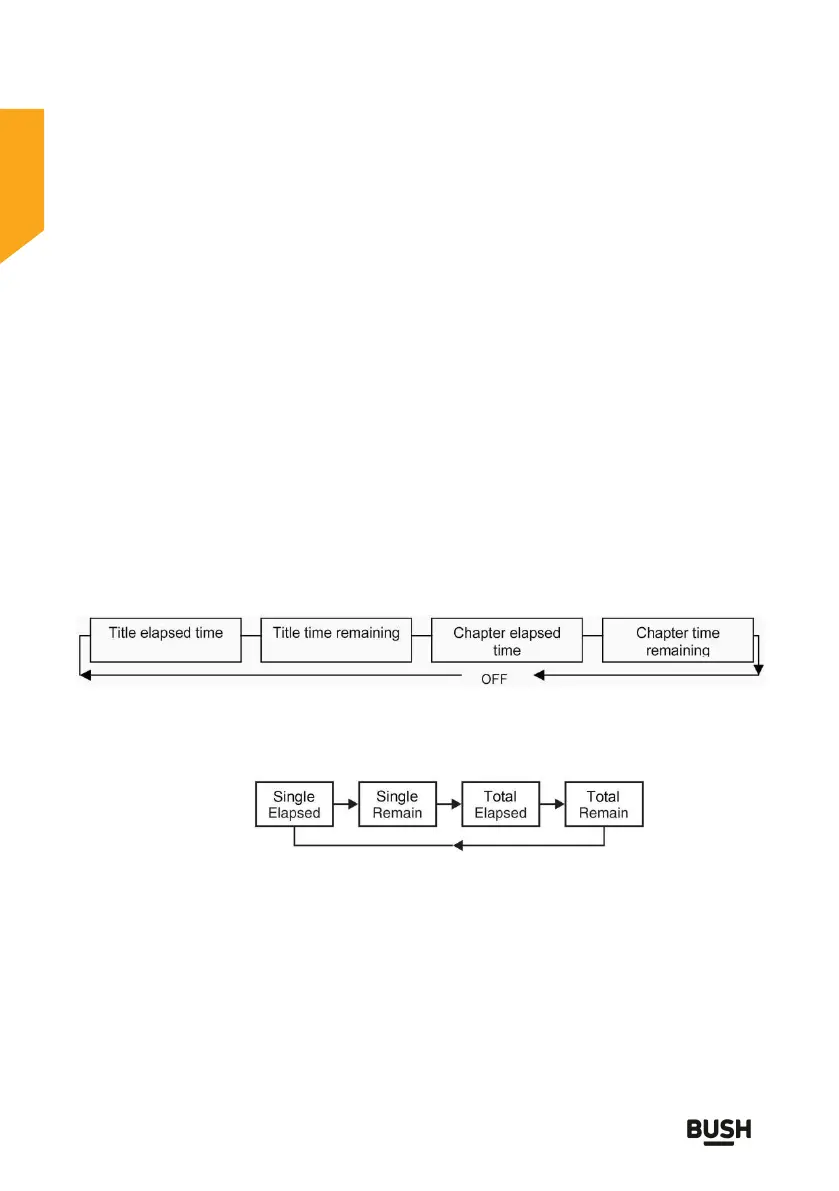
Explanation of information on display screens
1. DVD mode
Press the DISPLAY button repeatedly to scroll through the displays in
the sequence below. Press the button five times to clear the display
and return to normal viewing
2 CD mode
Press the DISPLAY button successively to select between the four
display screen features.
3 Picture mode
Press the PROGRAM button successively to select between the
options of loading the next picture. For example ‘wipe top’ will load
the next picture from the top edge downwards. ‘Diagonal wipe right
top’ will load the next picture diagonally from the top right hand corner
towards the bottom left hand corner.



 To Next Page