If you require any technical guidance or find that your product is not operating as intended, a simple solution can often be found in the
Troubleshooting section of these instructions
34
Other information
Connecting the DVD player to a TV
Connecting the DVD player to a TV
To view the content of a DVD disc in larger format, the DVD player may be
used connected to a TV.
1. Turn off the DVD player and TV and disconnect from the mains.
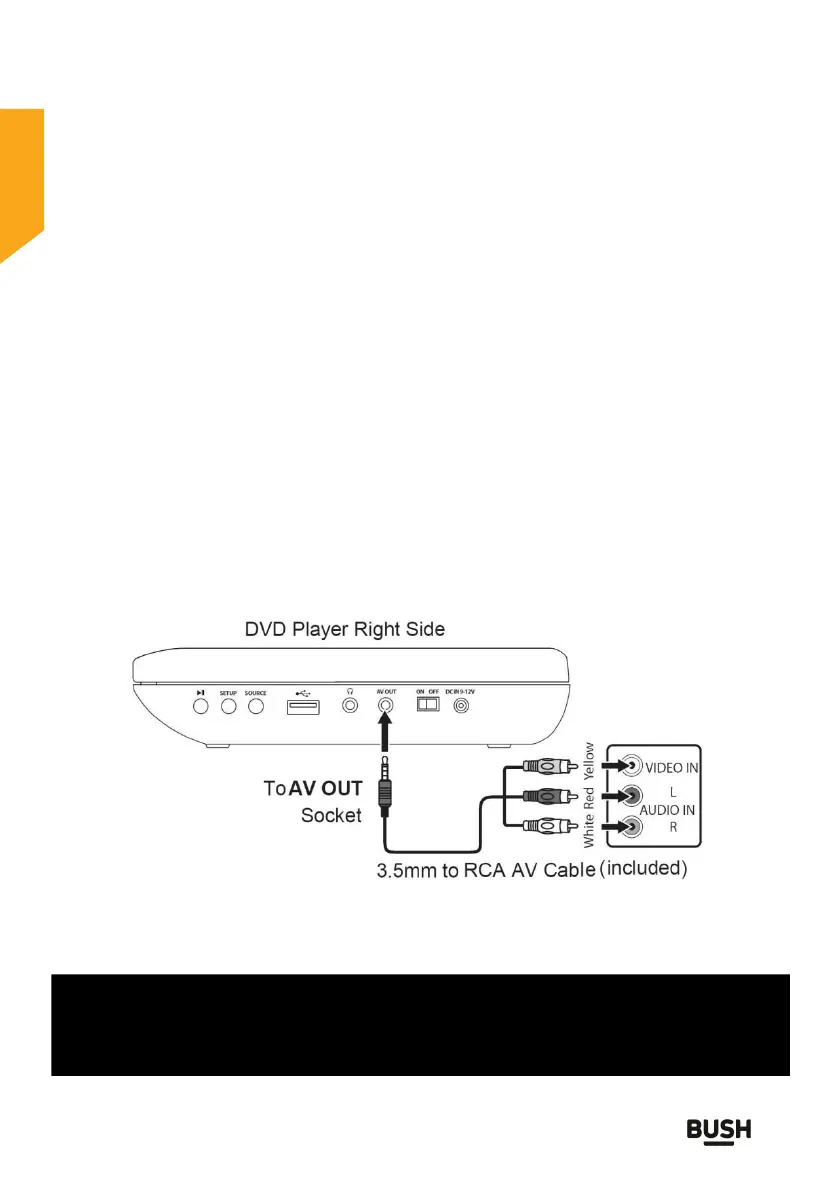
2. Using the jack to AV adaptor cable supplied, insert the black jack plug
on the cable into the AV out jack at the side of the player.
3. Connect the AV jacks from the adaptor cable to the TV as shown
below.
4. Slide the OFF / ON switch on the side of the player to the ON position
and turn on the TV.
5. Select the video mode (AV) for the TV. If there is more than one video
channel (AV1, AV2, etc) select the source that the DVD player is
connected to. See the TV instruction manual for tuning instructions if
the set does not automatically tune.
Fig. 9
CAUTION!
ALL EQUIPMENT MUST BE TURNED OFF AND DISCONNECTED FROM
THE MAINS BEFORE INSTALLATION



 To Next Page