Page 44 of 61
INSTRUCTION, USE AND
MAINTENANCE MANUAL
EN
14.0 USER MENU (OPTIONS AND CALI-
BRATION)
From the main page “Home” press the button
to move to the next screen page and the button
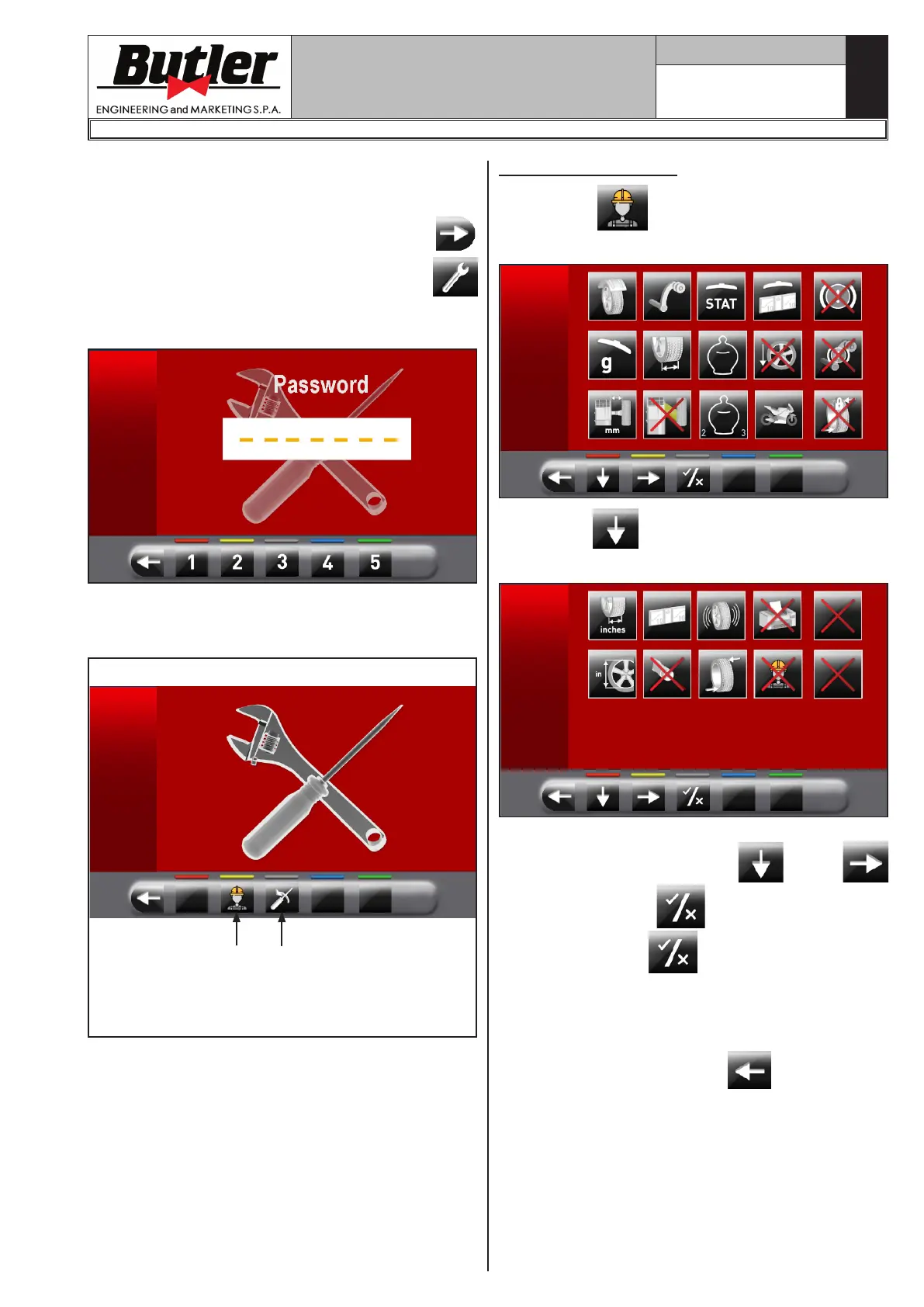
to access the user menu. On the monitor, the follow-
ing screen appears where you can enter the password.
The user login password is: 1234.
After entering the correct password you will see the
following screen:
Fig. 39
1 2
KEY
1 – Options menu push button
2 – Calibrations menu push button
14.1 Options menu
Press button to display the monitor screen to
enable/disable the options as shown below:
Press button several times to display the second
option screen page reported as follows.
To enable / disable individual functions simply high-
light the icon using the buttons
and/or
and press the button .
Pressing the button may involve, besides, the
change in the unit of measure from "mm" to "inch" and
vice versa (where applicable) or access to a sub-screen
for values settings values (see Par. 14.1.1 or 14.1.2).
After you select/deselect the desired options, exit the
menu by pressing push button
.
1296-M024-01
LIBRAK350 - LIBRAK350PRO


 To Next Page