INSTRUCTION, USE AND
MAINTENANCE MANUAL
Page 47 of 61
EN
14.1.2 Setting adhesive weight dimensions
and static threshold percentage
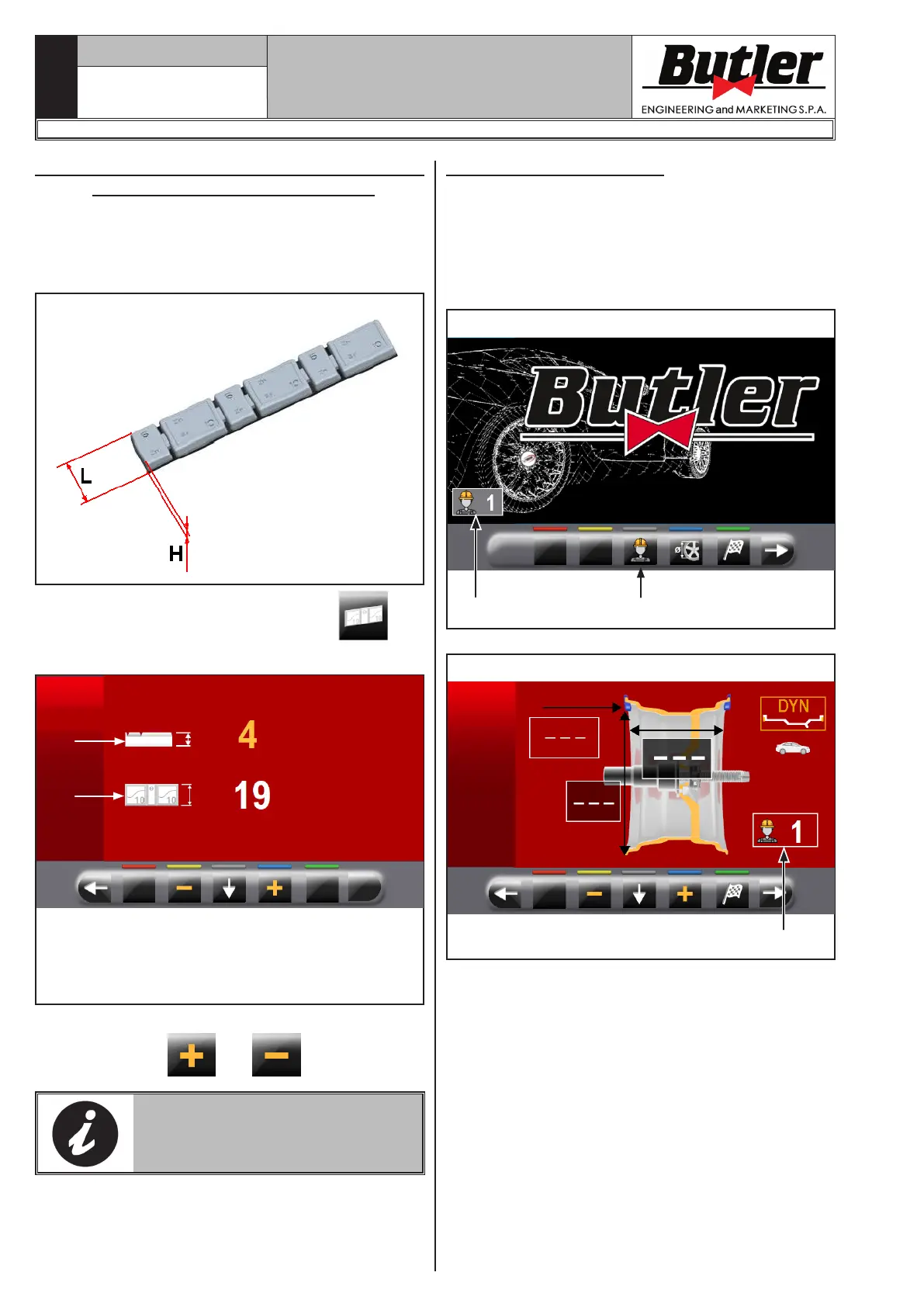
To ensure the balancing machine precisely calculates
the dimensions and total adhesive weights, set the
height (thickness) and width of the adhesive weights
at your disposal (see Fig. 40).
Fig. 40
To carry out this setting, press the icon . You
will see the following screen:
1
2
KEY
1 – Weights thickness (height) (default value (4
mm (0.16”))
2 – Weights width (default value 19 mm (0.75”))
From this screen page, change the size values of weights
using the buttons
and .
THE YELLOW-COLOURED-VALUE
IS THE ACTIVE FIELD AND THE
MODIFIABLE ONE.
14.1.3 User management
The "User Management" function is disabled on ma-
chine delivery. To enable it, proceed as described in
Para 14.1. After enabling, the icon will be displayed
on every page (Fig. 41 ref. 1).
The wheel balancers can be used simultaneously by
4 different users.
Fig. 41
2
1
Fig. 42
1
LIBRAK350 - LIBRAK350PRO
1296-M024-01


 To Next Page