B
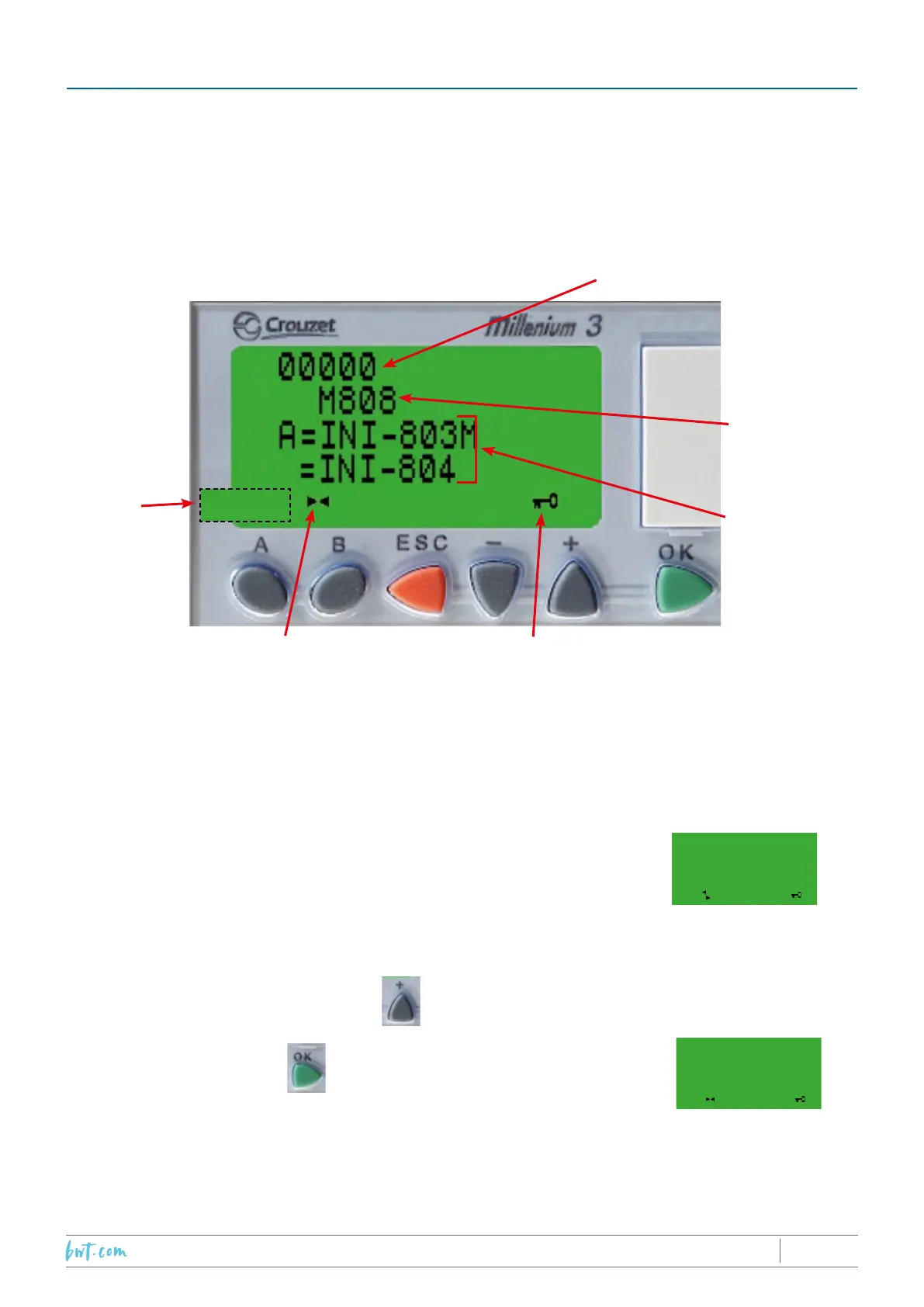
Rotating propeller : PLC
charged and ready to go
Programme locked in
the factory
Counter
indicator
Message
line
Lines recording the
cover “Closed” and
“Open” positions
Error line
10.2 PROCEDURE
10.2.1 Step 1 : Switch the PLC on
Flip the “ON/OFF” switch on the control panel. The PLC is powered on and
the welcome screen is displayed
04340
M808
10.2.2 Step 2 : Activation code
Enter the activation code by pressing the button three times,
followed by one press of the button.
This step also allows programming of ends of travel after winterizing.
00000
INI-801
10. CONFIGURING THE ENDS OF TRAVEL
The COVERDECK end of travel positions are programmed using the Programmable Logic Controller
(PLC) incorporated into the distribution/control panel. Failure to carry out the procedure described in steps
1 to 8 below will result in non-compliance with the French standard NFP 90-308.
10.1 THE PLC DISPLAY
2019/01 - Indice de révision : N - Code : 34201PROTECTION & SÉCURITÉ
45/60



 To Next Page