13
1002595 ISSUE 5 M172 VARIHEAT
Coloured buttons and parameters wi a white background can be modified,
except where locked by e User Security settings. Grey buttons and
parameters wi a grey background cannot be modified.
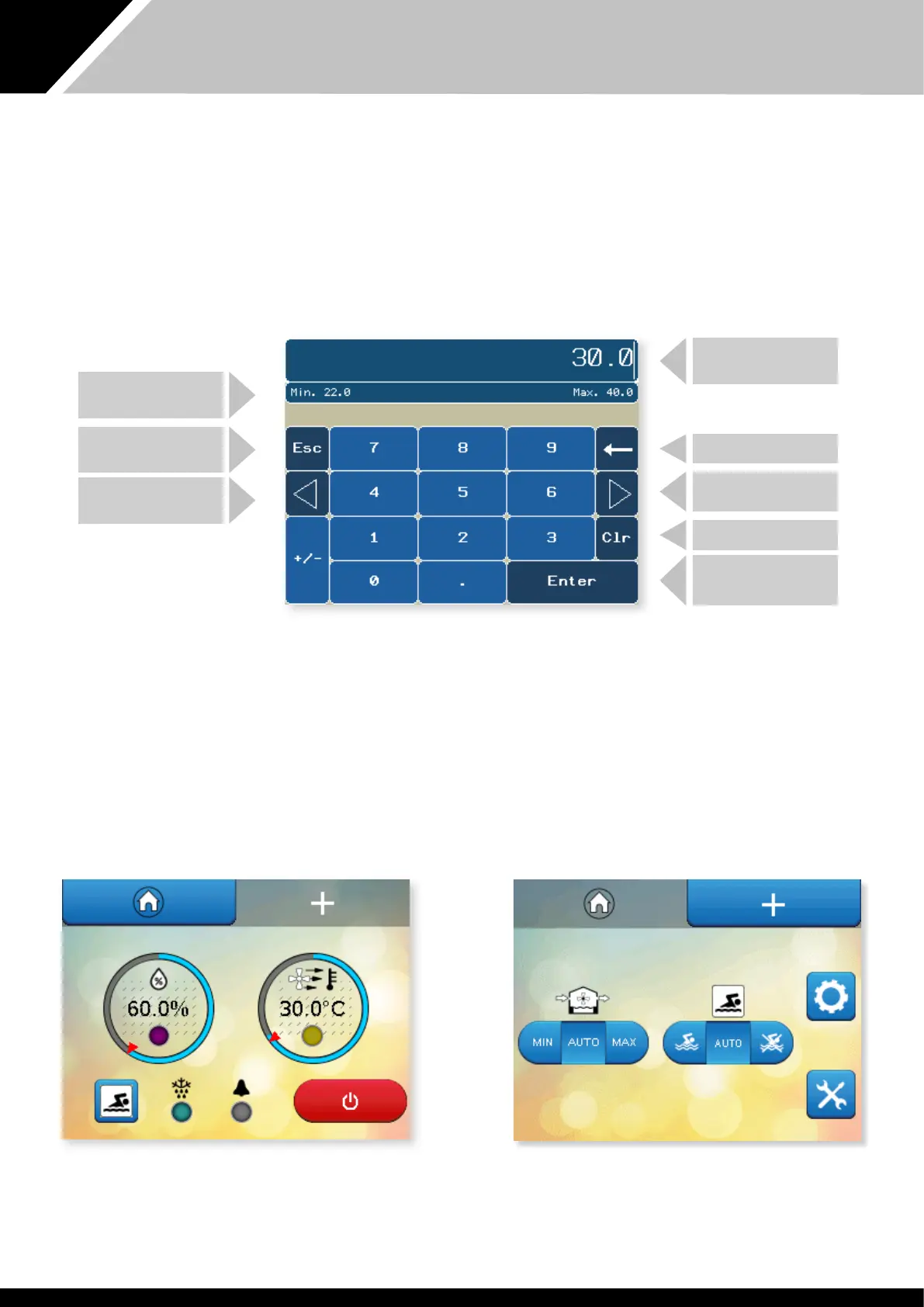
To change parameters wi a white background, press e parameter.
A keypad appears for number entry – an alphabet appears for text entry.
The keypad for entering numeric parameters is shown below. The parameter to
be modified is shown at e top. The allowable range at e parameter can
be changed between is shown undernea.
1.4 DATA ENTRY
SECURITY MODE
If Security Mode is enabled (see page 20) some functions may not be
accessible from e home screens. Functions at are not accessible are shown
wi hashed lines. In e examples shown below all functions have restricted
access apart from e fresh air settings and Occupied/Unoccupied override.
TYPE IN THE REQUIRED
SETTING
BACKSPACE KEY
MOVES THE CURSOR
TO THE RIGHT
CLEARS SETTING
SAVES THE SETTING
AND RETURNS TO THE
SETTINGS SCREEN
ALLOWABLE RANGE
LEAVES THE SCREEN
WITHOUT SAVING
MOVES THE CURSOR
TO THE LEFT


 To Next Page