EN
Page 14 / 72 E-MPSM Rev1 - Operating Instructions
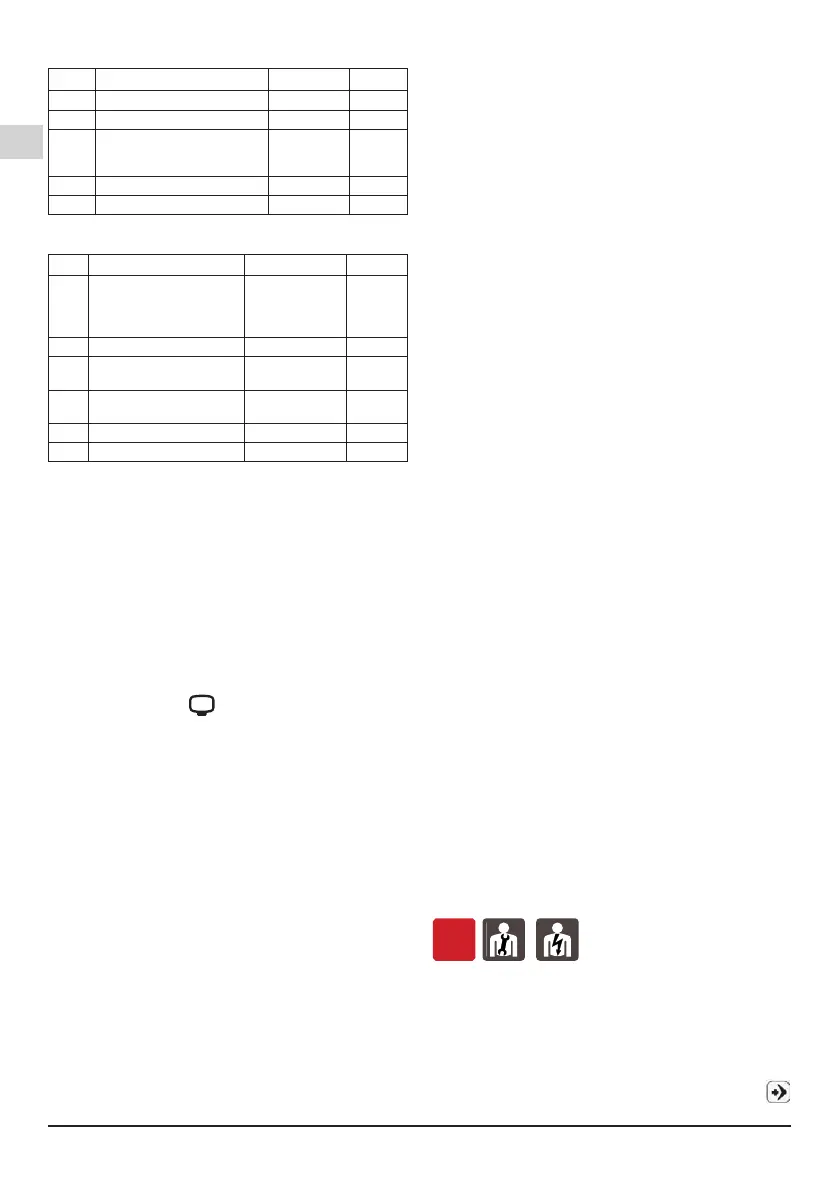
7.4.2. AP – Advanced settings
Par. Description Values Standard
AP01 Pump suction pressure (bar)
0
AP02 Reset to factory set-up nO, yES nO
AP03
Minimum run time of the pump
0 ÷ 15 s ECO
15 ÷ 30 s
COMFORT
30
AP04
Stop delay time
0 ÷ 30 s 30
AP05 Geodetic level
0 ÷ 23 0
7.4.3. GP – Booster sets settings
Par. Description Values Standard
GP01 Mode 0 = single pump
1 = booster set
rand = booster set
with random starts
0
GP02 Number of pumps FFFF FFFF
GP03 Booster set stop pressure
(bar)
FFFF FFFF
GP04 Booster set restart pressure
(bar)
FFFF FFFF
GP05 ID pumps FFFF FFFF
GP06 Threshold time changeover FFFF FFFF
7.5. Operating modes
It is possible to set-up two different operating modes:
COMFORT (default) in this operating mode the system
is set to minimize pressure uctuations and minimize
the number of starts.
ECO in this operating mode the system is set to
maximize the energy savings by reducing the operating
times of the pump.
ATTENTION In COMFORT mode operations we
always advise the installation of a small accumulator
(8 ltrs minimum) on the pump delivery side, delivery
side, while in ECO mode the installation in mandatory.
7.5.1. Warning for high number of starts/hour
The TANK symbol will light on, due to a warning
for high number of starts and stops, if the pump
achieves at least 15 starts in a short time (cycle time
less than 30 seconds).
If TANK symbol appear a higher capacity tank is
required.
Press (enter) button to reset the warning.
If the pump starts more than 240 times within 2 hours,
Er05 will be displayed.
7.5.2. Dry-run settings operation and manage-
ment
UP04=0 (default)
In normal operation conditions, i.e. after the rst
starting (30s), the warning Er01 is displayed so the
pump will try to start again every 10 minutes for 10
seconds for maximum 6 times.
In the case that all these attempts fail, Er01 is kept
displayed and a manual reset or turn off and back on
the pump is required.
UP04=1
Alternative operation mode, i.e. after the rst attempt
(30s), Er01 is displayed and the pump will try to start
again every 10 minutes for 10 seconds, after that the
pump will try to start again every 24h for 15s (there’s
no limit of attempts in this case). However, it is still
possible to manually reset or restart the pump.
Obviously, manual reset is possible even by switching
the pump off and back on.
7.5.3. Forced start
To avoid any mechanical blocks, if the pump is in
stand-by state for more than 24 hours, the pump starts
running for a minimum time dened by parameter
AP03, and then until the stop pressure UP01 has been
reached. A forced starting does not take place if the
pump has been manually turned OFF.
7.6. PASSWORD insertion
To enter on a menu with password, four numbers
appear on the display, the number to insert is blinking.
By pushing buttons (plus) or (minus) you can change
the blinking value. If you conrm with (enter) the next
number start blinking.
If the password is correct you can enter on the MENU, if
the password is wrong the rst number restart blinking.
To exit the program, push (menu) until you arrive on
the basic display, when you are out from the set-up
mode the icon disappear.
password 1959
8. STARTUP AND OPERATION
8.1. Preliminary checks before start-up of the
pump
Do not start-up the device in case of damaged parts.
8.2. Parameters to be set at the start-up
The electric pump is already set with all the operating
parameters, therefore it is not necessary to modify any
parameters for operation.
ATTENTION: at the rst starting check that with all the
taps closed the system stops. If the pump do not stop
change the stop pressure (UP01) according with the
system needs.
8.3. Suction pressure set-up
The system allows the set of pumps suction pressure.
To set the pumps suction pressure, parameter AP01
must be changed.
ATTENTION: once the parameter AP01 has been
modied it is necessary to modify the parameters
UP01 and UP02 so that they are suitable for the
application and guarantee the correct start and stop
of the system (during programming the product will
suggest the values of the rst attempt).
ATTENTION: the maximum values that can be set in
parameter AP01 are limited in order to never exceed
the maximum allowable pressure of the product.
8.4. First starting
OFF
Never start the pump before it has been immersed to
a depth of at least 100 mm.
Pump is equipped with a vent plug.
At rst starting ll the system, stop the pump, open
the taps and set AP05 parameter as the pressure
difference among the value measured by the pump
and the value measured at the pressure gauge near
the storage tank.
To visualize the pressure measured by the pump use
button and scroll through quick menù.


 To Next Page
 Loading...