3
English
Operation
Base Operation
Emergency operation and test operation
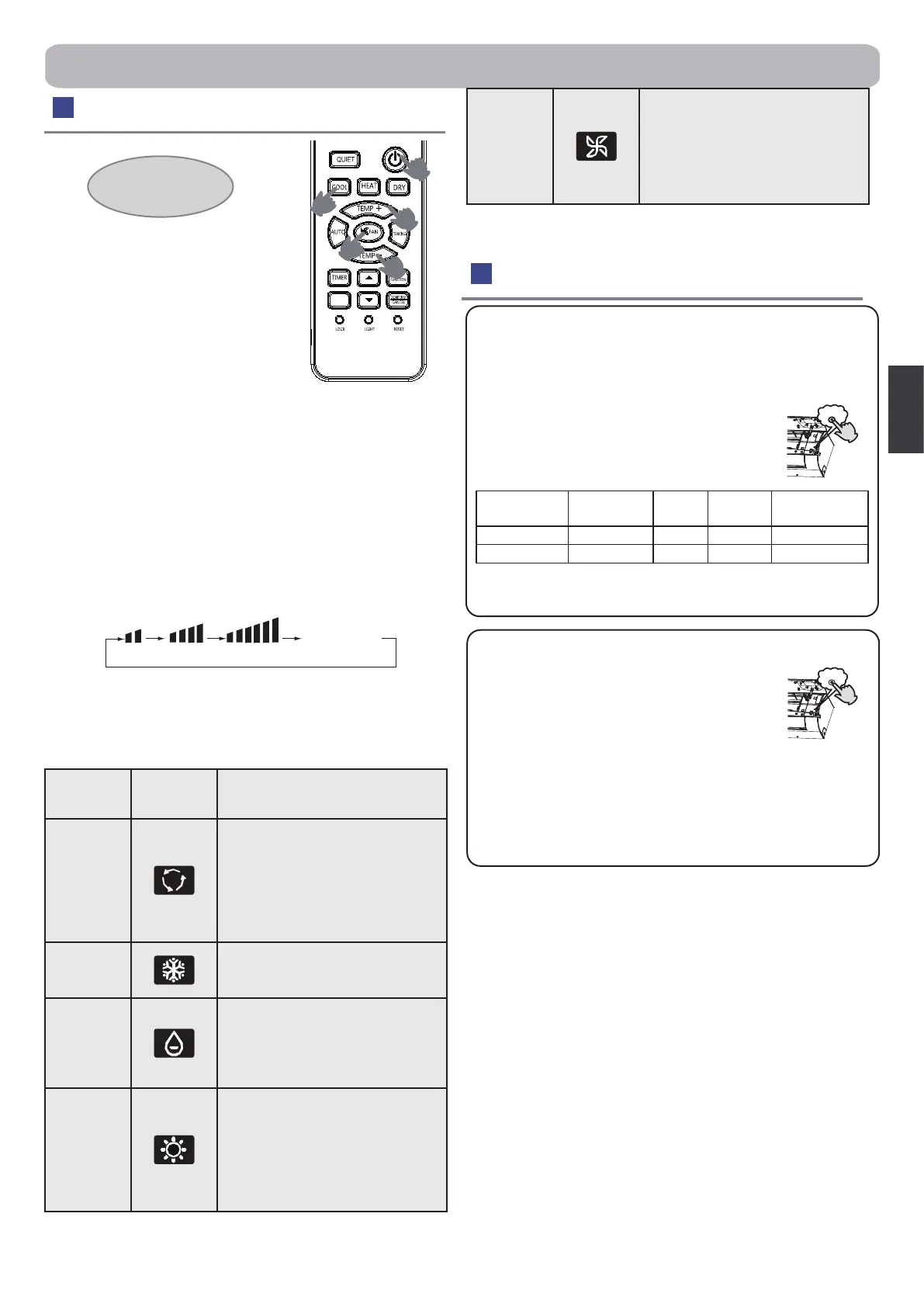
1. Unit start
Press ON/OFF on the remote controller,
unit starts.
2.Select operation mode
COOL button:Cooling mode
HEAT button: Heating mode
DRY button: Dehumidify mode
3.Select temp. setting
Press TEMP+ / TEMP- button
TEMP+ Every time the button is pressed, temp. setting increases
1°C, if kept depressed, it will increase rapidly
TEMP- Every time the button is pressed, temp. setting decreases
1°C, if kept depressed, it will decrease rapidly
Select a desired temperature.
4.Fan speed selection
Press FAN button. For each press, fan speed changes as follows:
Remote controller:
Air conditioner is running under displayed fan speed.
When FAN is set to AUTO, the air conditioner automatically adjusts
the fan speed according to room temperature.
Mode
Remote
controller
Note
AUTO
Under the mode of auto operation,
air conditioner will automatically se-
lect Cool or Heat operation accord-
ing to room temperature. When FAN
is set to AUTO the air conditioner
automatically adjusts the fan speed
according to room temperature.
COOL
Cooling only unit do not have dis-
plays and functions related with
heating
DRY
In DRY mode, when room tempera-
ture becomes lower than temp. set-
ting+2 °C, unit will run intermittently
at LOW speed regardless of FAN
setting.
HEAT
In HEAT mode, warm air will blow
out after a short period of the time
due to cold - draft prevention func-
tion. When FAN is set to AUTO, the
air conditioner automatically adjusts
the fan speed according to room
temperature.
2
3
3
1
4
SELF
CLEAN
Remote controller
Emergency Operation:
●Use this operation only when the remote controller is defective
or lost, and with function of emergency running, air conditioner
can run automatically for a while.
●When the emergency operation switch is pressed, the "Pi"
sound is heard once, which means the start of
this operation.
●When power switch is turning on for the rst time
and emergency operation starts, the unit will run
automatically in the following modes:
Room
temperature
Designated
temperature
Timer
mode
Fan
speed
Operation
mode
Above 24 ºC 24 ºC No AUTO COOL
Below 24 ºC 24 ºC No AUTO HEAT
●It is impossible to change the settings of temp. and fan speed.
It is also not possible to operate in TIMER or DRY mode.
Test operation:
Test operation switch is the same as emergency
switch.
●Use this switch in the test operation when the
room temperature is below 16 °C , do not use it
in the normal operation.
●Continue to press the test operation switch for more than 5
seconds. After you hear the "Pi" sound twice,release your
nger from the switch: the cooling operation starts with the air
ow speed "Hi".
Pi
Pi
AUTO
LO MED HI
Display
circulated
FAN
In FAN operation mode, the
unit will not operate in COOL
or HEAT mode but only in FAN
mode, AUTO is not available in
FAN mode. And temp. setting is
disabled. In FAN mode, sleep
operation is not available.


 To Next Page
 Loading...