4
EN
English
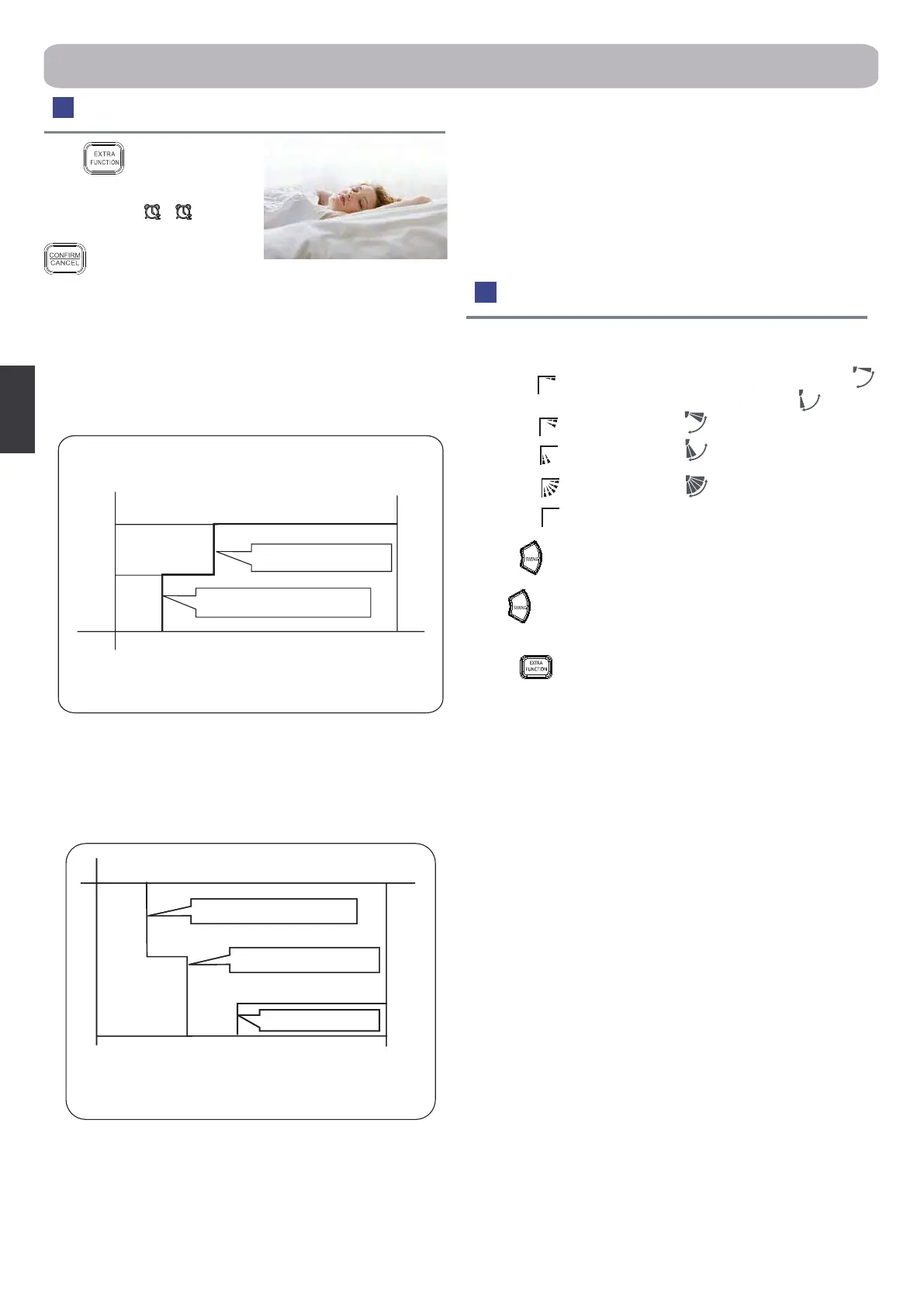
Air Flow Direction Adjustment
1. Vertical ap
COOL/DRY/AUTO(Initial state)
(Autoswing)
HEAT (Initial state)
2.Press button. changes as follows: Pos.4
Press button again ,vertical ap will stop over present
position, the swing function will be cancelled.
3.Press
button to choose the Pos.2 and Pos.3.
4.Left and right air ow adjustment(manual)
Move the vertical blade by a knob on airconditioner
to adjust left and right direction referring to Fig.
Cautions:
●
When adjusting the ap by hand,turn o the unit.
●
When humidity is high,condensate water might occur at air outlet
if all vertical louvers are adjusted to left or right.
●
It is advisable not to keep horizontal ap at downward position for
a long time in COOL or DRY mode ,otherwise, condensate water
might occur.
●
When system is restarted by the remote controller it will
automatically memorise the previous set swing position.
(no)
Pos.1
Pos.2
Pos.3
Pos.4
Pos.5
Operation
Sleep Operation
Press button to enter
additional options, when
cycle display to
,
will ash. And then press
enter to sleep function.
Operation Mode
1. In COOL, DRY mode
1 hour after SLEEP mode starts, temp. will become 1°C higher
than temp. setting. After another 1 hour, temp. rises by 1°C further.
The unit will run for further 6 hours then stops Temp. is higher than
temp. setting so that room temperature won’t be too low for your
sleep.
2.In HEAT mode
1 hour after SLEEP mode starts, temp will become 2°C lower than
temp. setting. After another 1 hour, temp decrease by 2°C further.
After more another 3 hours, temp. rises by 1°C further. The unit will
run for further 3 hours then stops.Temp.is lower than temp. setting
so that room temperature won’t be too high for your sleep.
3.In AUTO mode
The unit operators in corresponding sleep mode witch adapted to
the automatically selected operation mode.
4.In FAN mode
It has no SLEEP function.
5.Set the wind speed change when sleeping
Set the wind speed to low if the unit will be on during sleep times.
Note
:
When TIMER function is set, the sleeping function can’t be set up
.After the sleeping function is set up, if user resets TIMER function,
the sleeping function will be cancelled; the machine will be in the
state of timing-on.
SLEEP operation starts SLEEP operation stops
Approx.6hrs
Rises 1°C
Rises 1°C
1 hr
1 hr
Temp.setting
Unit stop
In COOL, DRY mode
SLEEP operation starts SLEEP operation stops
Rises 1°C
1 hr
1 hr
3 hrs
3 hrs
Temp.setting
Unit stop
In HEAT mode
Decreases 2°C
Decreases 2°C


 To Next Page
 Loading...