5
English
TURBO/QUIET Operation
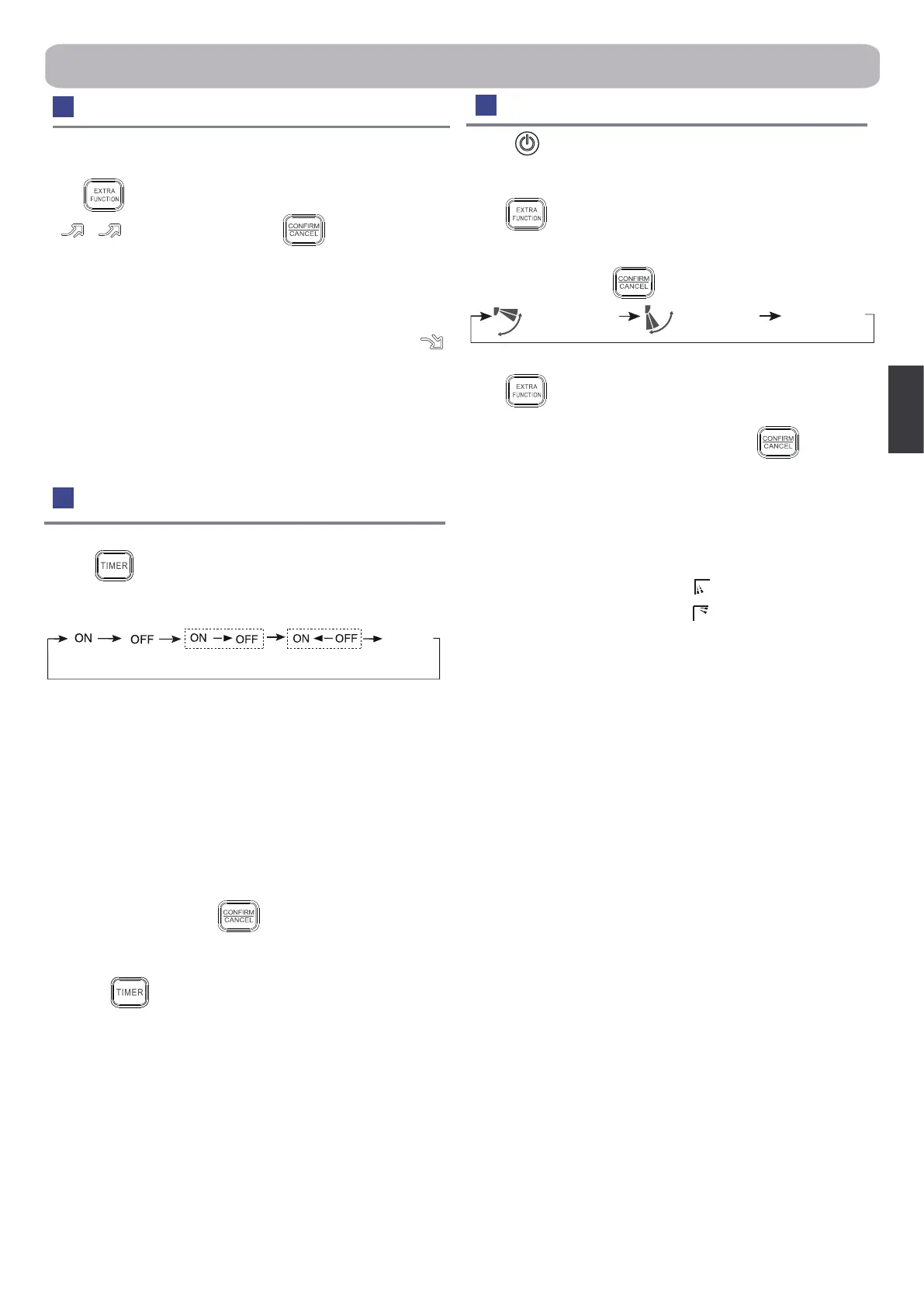
1.TURBO Operation
When you need rapid heating or cooling, you can use this function.
Press button to enter additional options, when cycle display
to
,
will ash, and then press , enter to turbo
function . When cancel the function, please enter additional options
again and to cancel turbo function.
2.QUIET Operation
You can use this function when silence is needed for rest or
reading. Press QUIET button, the remote controller will show
, and then achieve to the quiet function. Press again this QUIET
button , the quiet function will be cancelled.
Note
During TURBO operation, in rapid HEAT or COOL mode , the room
will show inhomogeneous temperature distribution. Long period
QUIET operation will cause eect of not too cool or not too warm.
1.After unit starts, select your desired operation mode.
2.Press button to change TIMER mode. Every time the
button is pressed, display changes as follows:
Remote controller:
BLANK
TIMER ON TIMER OFF TIMER ON-OFF
TIMER OFF-ON
0.5h
0.5h 0.5h
0.5h
Then select your desired TIMER mode (TIMER ON or TIMER OFF
or TIMER ON-OFF). "ON"or "OFF"will ash.
3.Press▲
/▼
button to set time.
▲Press the button for each time, setting time in the rst 12 hours
increased by 0.5 hour every time, after 12 hours, increased by 1
hour every time.
▼
Press the button for each time, setting time in the rst 12 hours
decreased by 0.5 hour every time, after 12 hours, decreased by
1 hour every time.
It can be adjusted within 24 hours.
4.Conrm timer setting
After adjust the time, press button and conrm the time ON
or OFF button will not ash any more.
5.Cancel timer setting
Press the button by times until the time display eliminated.
Hints:
After replacing batteries or a power failure happens, time setting
should be reset.
According to the Time setting sequence of TIMER ON or
TIMER OFF, either Start-Stop or Stop-Start can be achieved.
Timer On/O On-O Operation
Operation
Healthy airow Operation
1.Press to starting
Setting the comfort work conditions.
2.The setting of healthy airow function
Press button to enter additional options,Press this button
continuously, the louvers location will cycle between in the
following three locations, to choose the swing location what you
needed,and then press button to conrm.
3.The cancel of the healthy airow function
Press button to enter additional options, press this button
continuously, the louvers location will cycle between in the
following three locations again, and then press button to
cancel.
Notice: Do not direct the ap by hand. Otherwise, the grille will run
incorrectly. If the grille is not run correctly, stop for a minute and
then start, adjusting by remote controller.
Note:
1.After setting the healthy airow function, the position grill is xed.
2.In heating, it is better to select the mode.
3.In cooling, it is better to select the mode.
4.In cooling and dry, using the air conditioner for a long time under
the high air humidity, condensate water may occur at the grille .
Healthy airow
upwarder
Healthy airow
downwarde
Present
position


 To Next Page
 Loading...