4
English
Operation
Sleep Operation
Press button, the remote
controller will show and then
achieve to the sleep function. Press
again this button , the sleep
function will be cancelled.
Operation Mode
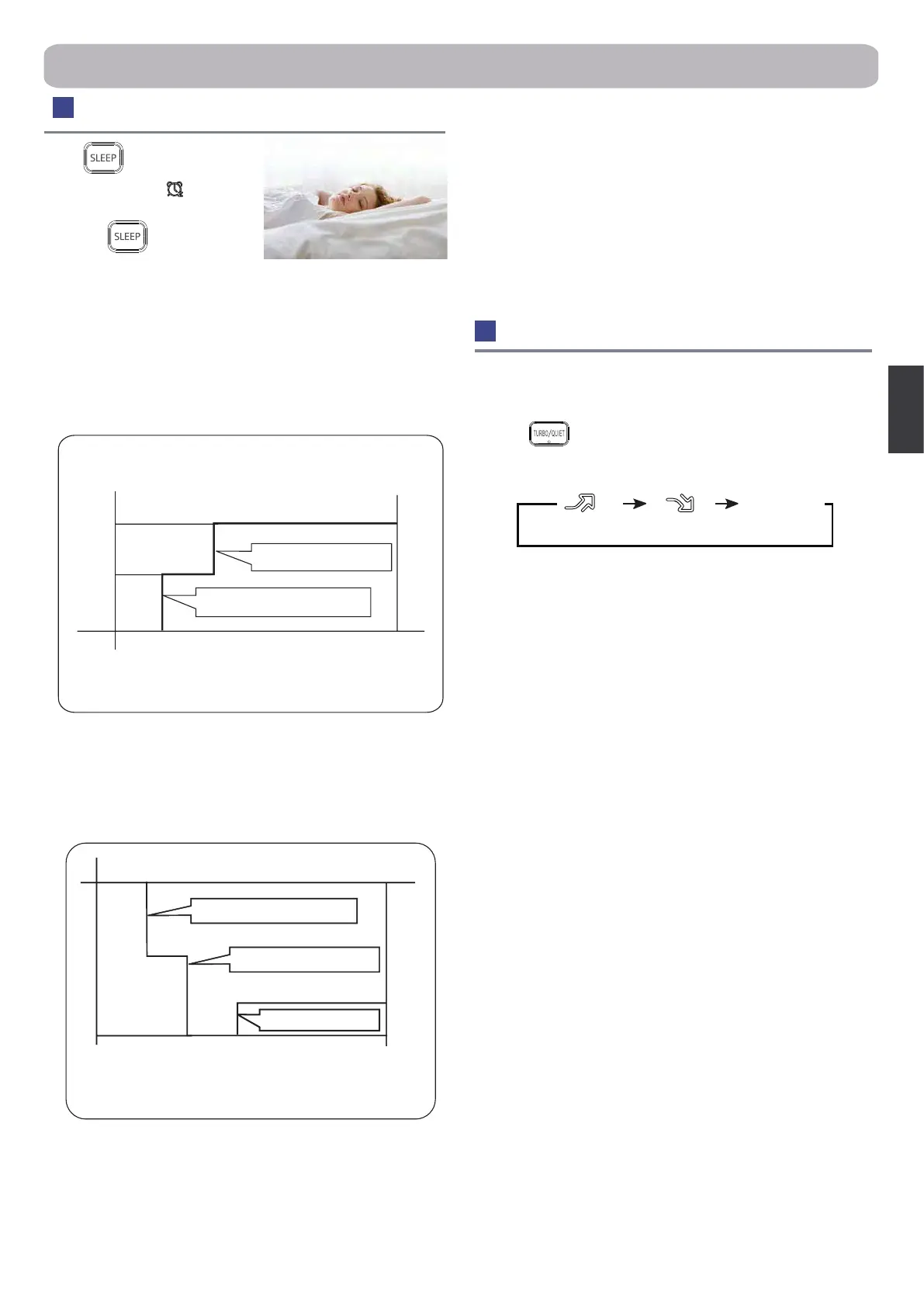
1. In COOL, DRY mode
1 hour after SLEEP mode starts, temp. will become 1°C higher
than temp. setting. After another 1 hour, temp. rises by 1°C further.
The unit will run for further 6 hours then stops Temp. is higher than
temp. setting so that room temperature won’t be too low for your
sleep.
2.In HEAT mode
1 hour after SLEEP mode starts, temp will become 2°C lower than
temp. setting. After another 1 hour, temp decrease by 2°C further.
After more another 3 hours, temp. rises by 1°C further. The unit will
run for further 3 hours then stops.Temp.is lower than temp. setting
so that room temperature won’t be too high for your sleep.
3.In AUTO mode
The unit operators in corresponding sleep mode witch adapted to
the automatically selected operation mode.
4.In FAN mode
It has no SLEEP function.
5.Set the wind speed change when sleeping
Set the wind speed to low if the unit will be on during sleep times.
Note
:
When the TIMER ON mode is set already, the SLEEP mode
can not be set at the same time. If setting the TIMER ON mode
while the SLEEP mode is already set, the SLEEP mode will be
cancelled; TIMER OFF mode and SLEEP mode can be set at the
same time. The unit remains power on before the set o time.
SLEEP operation starts
SLEEP operation starts
SLEEP operation stops
SLEEP operation stops
Approx.6hrs
Rises 1°C
Rises 1°C
Rises 1°C
1 hr
1 hr
1 hr
3 hrs
3 hrs
1 hr
Temp.setting
Temp.setting
Unit stop
Unit stop
In COOL, DRY mode
In HEAT mode
Decreases 2°C
Decreases 2°C
TURBO/QUIET Operation
When you need rapid heating or cooling, you can choose the
Turbo function .You can use Quiet function when silence is needed
for rest or reading.
Press the button, you can switch the "Turbo" and“Quiet”
function easily. Every press,the remote controller will switch as
below
:
Note
When running in Turbo, the fan speed is the highest,when running
in Quiet,the fan speed is super slow.
TURBO QUIET
cancel


 To Next Page
 Loading...