2323
CONNECTION OF THE POWER SUPPLY CABLE
WARNING: If the power supply cable is damaged, it must be replaced only by an
authorised service agent in order to avoid a hazard.
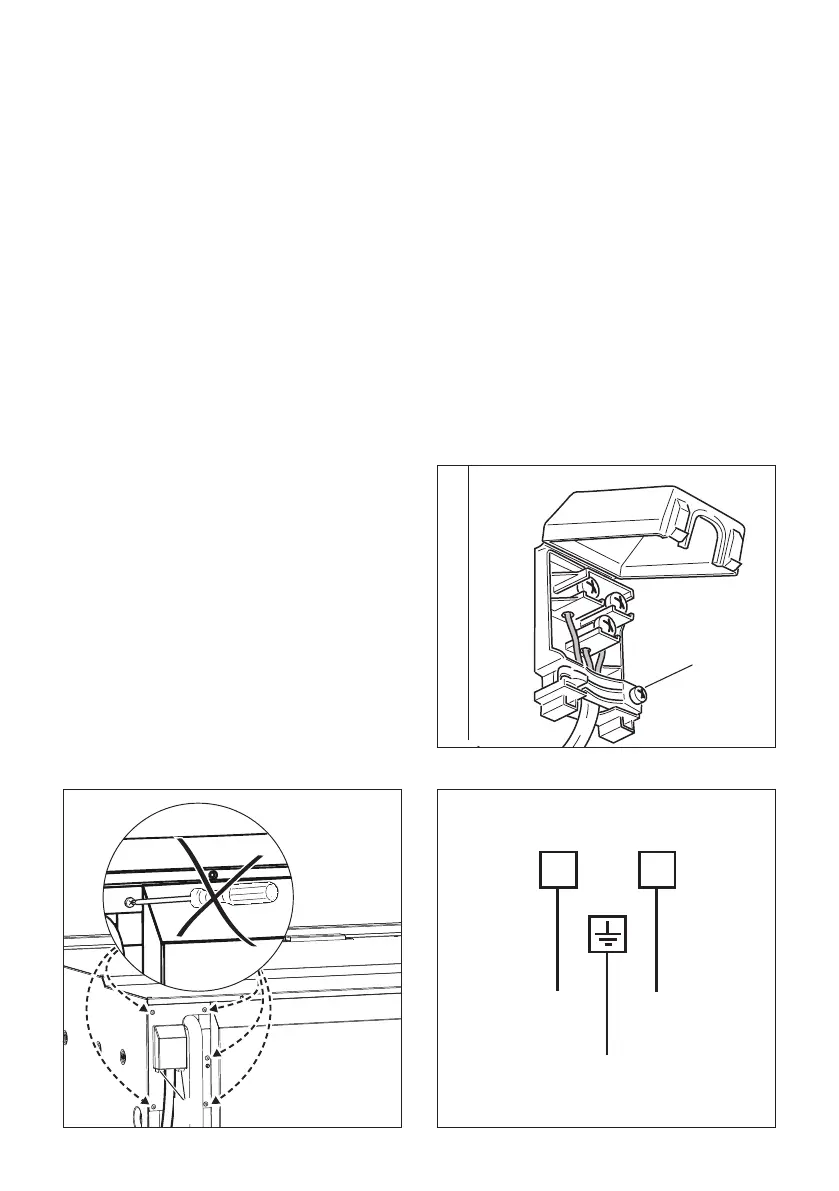
• Unhook the terminal board cover by inserting a screwdriver into the two hooks “A” (g.
3.1).
• Open the cable gland by unscrewing screw “F” (g. 3.2), unscrew the terminal screws
and remove the cable.
• The new supply cable, of suitable type and section, is connected to the terminal board
following the diagram of g. 3.3.
N.B. The earth conductor must be left about 3 cm longer than the others.
IMPORTANT: To connect the power supply cable DO NOT unscrew the screws xing
the cover plate behind the terminal block.
The operations must be executed by a qualied technician.
FEEDER CABLE SECTION
TYPE “H05RR-F” or “H05V2V2-F”
(resistance to temperatures of 90°C).
220-240 V ac 3 x 0,75 mm
2
(*) (**)
(*) Connection possible with plug and outlet
(**) Connection with wall box connection.
Fig. 3.1
Fig. 3.2
Fig. 3.3
F
L1 N (L2)
PE
220 - 240 V ac


 To Next Page