3939
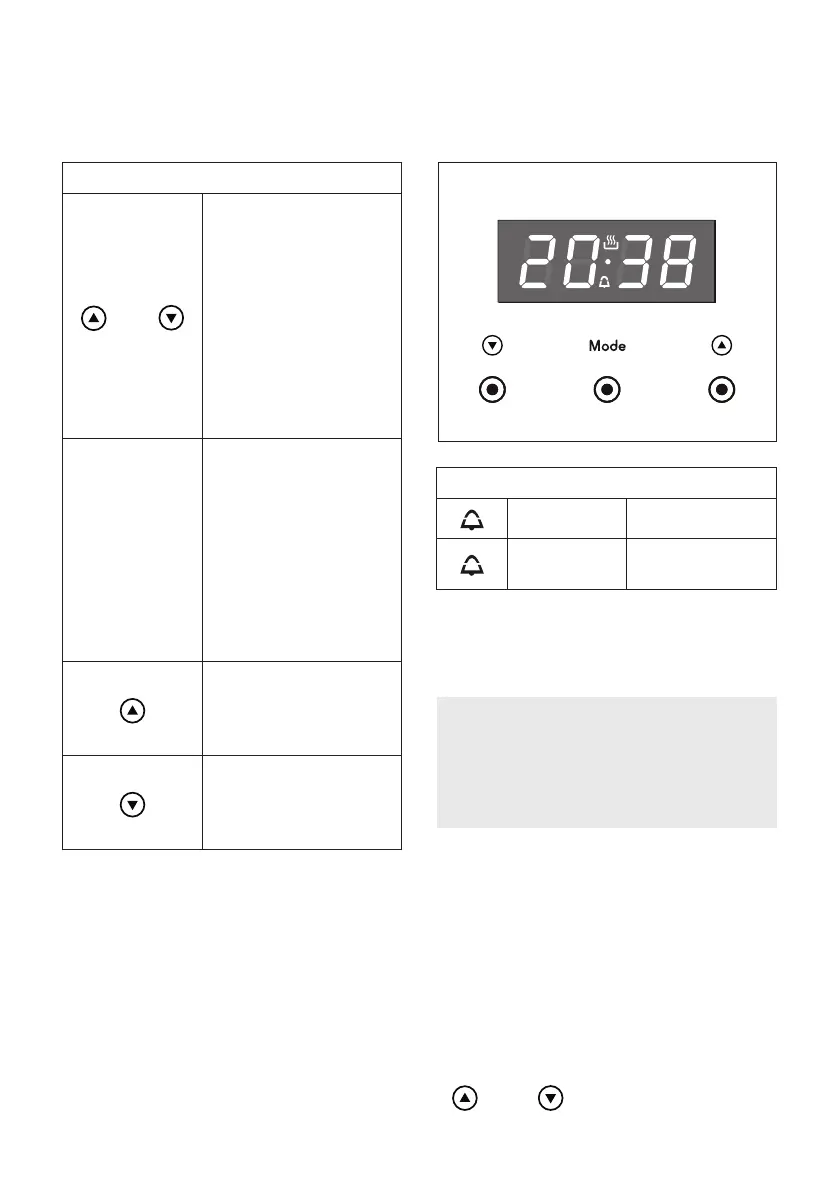
Illuminated symbols:
ashing Timer being set
steady
illumination
Timer in
operation
Keys:
“ ” and “ ”
Touched
simultaneously (for
more than 2 seconds):
• setting the clock;
• setting the timer
volume (by
touching once,
along with the
“MODE” key).
“ MODE ”
Function selection
(touched for more than
2 seconds):
• setting the clock
(only after rst
connection or after
a power failure);
• timer.
“ ”
Increases the number
shown on the display
“ ”
Decreases the number
shown on the display
CLOCK and TIMER with “ TOUCH CONTROL” KEYS
Fig. 3.5
“TOUCH-CONTROL” KEYS
The “touch-control” keys shall be operated by the ngers (just by touching the key).
When using touch controls it is best to use the ball of your nger rather than the tip.
The keys are automatically deactivated:
• 8 seconds after the last selection; the deactivation is indicated by an acoustic signal
(“beep”).
To reactivate just touch the “ MODE ” key or the “ ” and “ ” keys (simultaneously) for
more than 2 seconds.
ATTENTION - MOST IMPORTANT:
This is only an alarm that DOES NOT
switch o the oven or grill.
REMEMBER TO TURN OFF THE OVEN
OR GRILL MANUALLY.
NOTES: The symbols may vary.
DIGITAL ELECTRONIC CLOCK WITH TIMER (g. 3.5)


 To Next Page