13
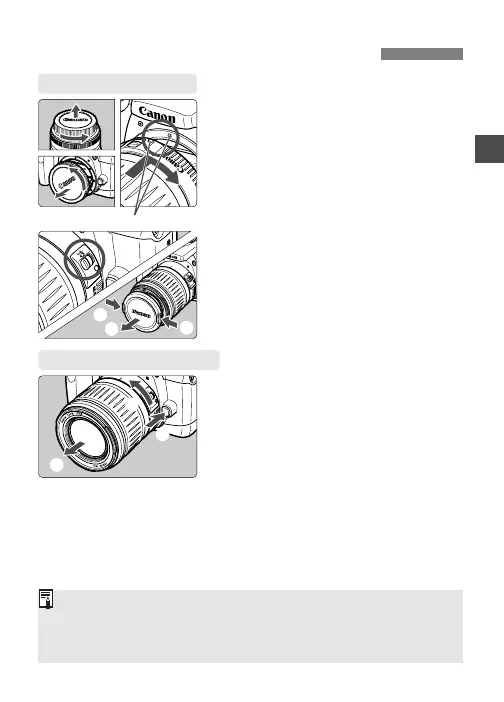
Mounting and Detaching a Lens
1
Remove the caps.
•
Remove the rear lens cap and the
camera body cap.
2
Mount the lens.
•
Align the red dots on the lens and
camera and turn the lens as shown
by the arrow until it snaps in place.
Red dots
3
On the lens, set the focus mode
switch to <
AF
>.
•
If the focus mode switch is set to
<
MF
>, autofocus will not operate.
4
Remove the front lens cap.
Mounting a Lens
• Keep the removed caps where you will not lose them.
•<AF> stands for “Auto Focus,” and <MF> stands for “Manual
Focus.”
• An EF-S lens cannot be attached to the camera.
Detaching the Lens
While pressing the lens release
button, turn the lens as shown
by the arrow.
•
Turn the lens until it stops, then
detach it.
1
1
2
1
2
3











 To Next Page