46
Using the Built-in Flash
FE (Flash Exposure) lock is for setting the correct flash exposure
for any part of the subject. First pop-up the built-in flash.
jFE Lock
★
1
Focus the subject.
•
Keep pressing the shutter button
until step
3.
2
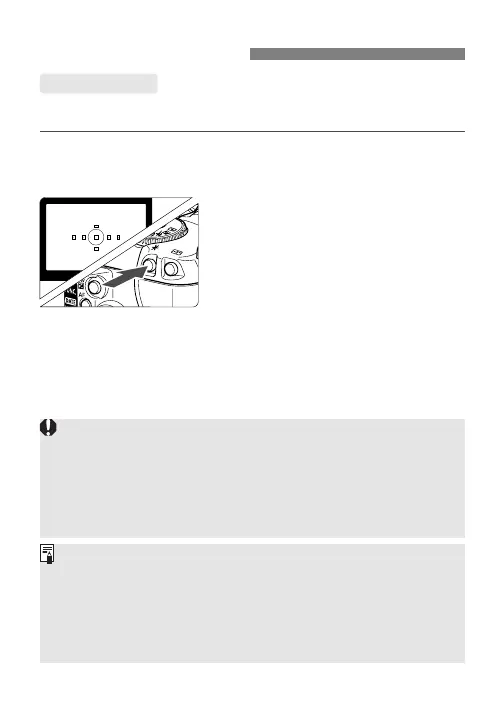
Aim the viewfinder center over
the target subject, then press
the <j> button.
s A preflash is fired and the <j>
icon will be displayed in the
viewfinder.
3
Compose the shot and take the
picture.
• If the subject is beyond the effective flash range resulting in
underexposure, the <M> icon will blink. Get closer to the subject
and repeat steps
1 and 2.
• For the external Speedlite, use an EX-series Speedlite. If the
camera is used with an EZ-, E-, EG-, ML-, or TL-series Speedlite,
the flash will not fire in the TTL and A-TTL autoflash modes. Use
the manual flash mode if the Speedlite has one.
About E-TTL II Autoflash
E-TTL II is a new autoflash exposure system incorporating
improved flash exposure control and lens focusing distance
information, making it more precise than the previous E-TTL
(evaluative flash metering with preflash) system.
The camera can execute E-TTL II autoflash with any EX-series
Speedlite.











 To Next Page