38
Q Automatic Depth-of-Field AE
This mode is for obtaining a wide depth of field automatically
between a near subject and far subject. It is effective for group
photos and landscapes.
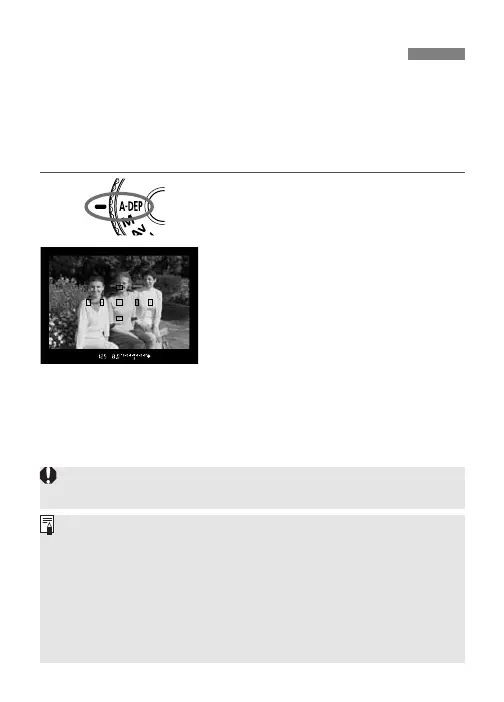
The camera uses the 7 AF points to detect the nearest and farthest
subjects to be in focus.
∗ <Q> stands for Auto-depth of field.
1
Turn the Mode Dial to <Q>.
2
Focus the subject.
•
Move the AF point over the subject
and press the shutter button
halfway.
•
Focus is achieved at all the AF
point marks that light.
3
Take the picture.
• If the aperture value blinks, it indicates that the exposure level is
correct but the desired depth of field cannot be achieved. Either
use a wide-angle lens or move further away from the subjects.
• In this shooting mode, you cannot freely change the shutter speed
and aperture value. If the camera sets a slow shutter speed, hold
the camera steady or use a tripod.
• Regardless of the AF mode setting, ONE-SHOT AF will take effect.
• If flash is used, the result will be the same as using flash in the
<T> mode.
The <Q> mode cannot be used if the lens’ focus mode switch is
set to <
MF>. The result will be the same as using the <T> mode.











 To Next Page