22
F
Using Red-eye Reduction
(with the built-in flash)
When flash is used in a low-light environment, the subject’s eyes
may come out red in the photograph. To reduce this “Red eye” the
red-eye reduction lamp shines a light into the subject’s eyes before
the flash is fired. Red-eye reduction works in all shooting modes
except <I> <P> <S>.
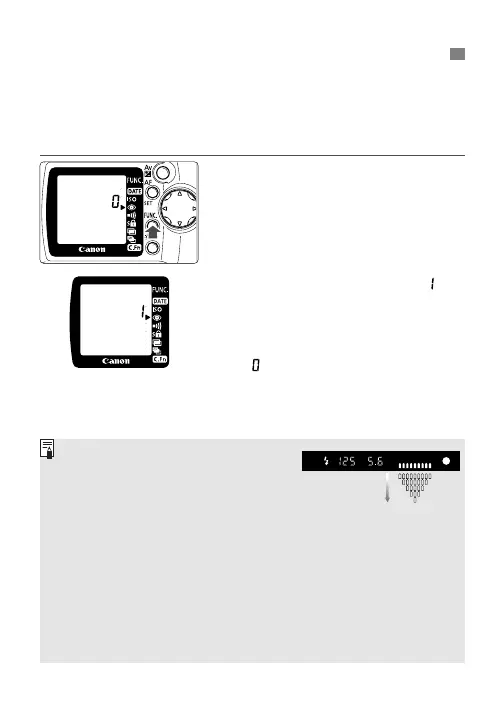
1
Move the
<
>
>
arrow to the
<
F
>
icon on the LCD panel.
•
Look at the LCD panel and press
the <\> button to move the
arrow. (∫)
2
Turn the <l> dial to set “ ”
on the LCD panel.
•
Press the shutter button halfway to
return to normal camera operation.
•
To cancel red-eye reduction, set
“” on the LCD panel.
• When you press the shutter button
halfway, the red-eye reduction lamp-on
indicator will appear in viewfinder and
on the LCD panel.
• Red-eye reduction will not work unless
the subject looks at the red-eye reduction
lamp. Tell the subject to look at the lamp.
• For maximum effectiveness, press the shutter button fully after the
red-eye reduction lamp turns off (after 1.5 sec.).
•You can take a picture even while the red-eye reduction lamp is lit.
• The effectiveness of red-eye reduction varies depending on the
subject.
•To further increase the effectiveness of red-eye reduction, go to a
brighter environment or move closer to the subject.
Red-eye reduction
lamp-on indicator











 To Next Page