49
Reference
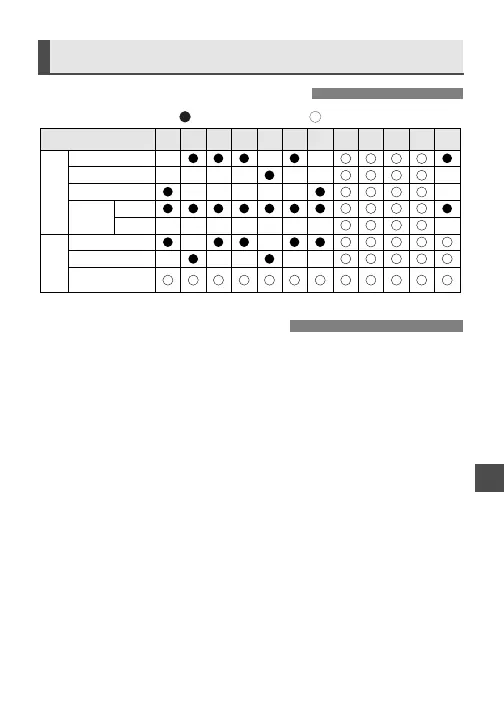
Feature Availability Table
Y U I OPASTREWQ
Mode Dial Mode
One Shot
AI Servo
AI Focus
Auto
Manual
Single frame
Continuous
Self-timer/
Remote control
AF
Film
Advance
AF Point
Selection
: Set automatically. : User-selectable/settable.
Troubleshooting Guide
If there is a problem, first refer to this Troubleshooting Guide.
•
Nothing is displayed on the LCD panel.
The batteries are exhausted. / The batteries have been installed incorrectly.
s
Replace the batteries with new ones. / Install the batteries correctly. (p.11)
•
The picture looks blurred.
The lens focus mode switch is set to <MF>.
s
Set the lens focus mode switch to <AF>. (p.13)
There was camera shake when the picture was taken.
s
Hold the camera steady or use a faster shutter speed. (p.14)
•
The shutter does not work.
On the LCD panel, the frame count is not displayed and the <
=
> icon blinks.
s
Take out the film and load it correctly. (p.15)
The focus confirmation light <n> in the viewfinder blinks and focus
cannot be achieved.
s
Select another AF point. (p.29) If focus still cannot be achieved, focus manually. (p.31)
•
The <π> icon blinks on the LCD panel.
The battery level is very low.
s
Replace the batteries with new ones. (p.11)
A misoperation has occurred.
s
Press the shutter button halfway. (p.14) / Remove the batteries and reload it. (p.11)
If the
<π>
icon does not stop blinking, consult your nearest service center.











 To Next Page