46
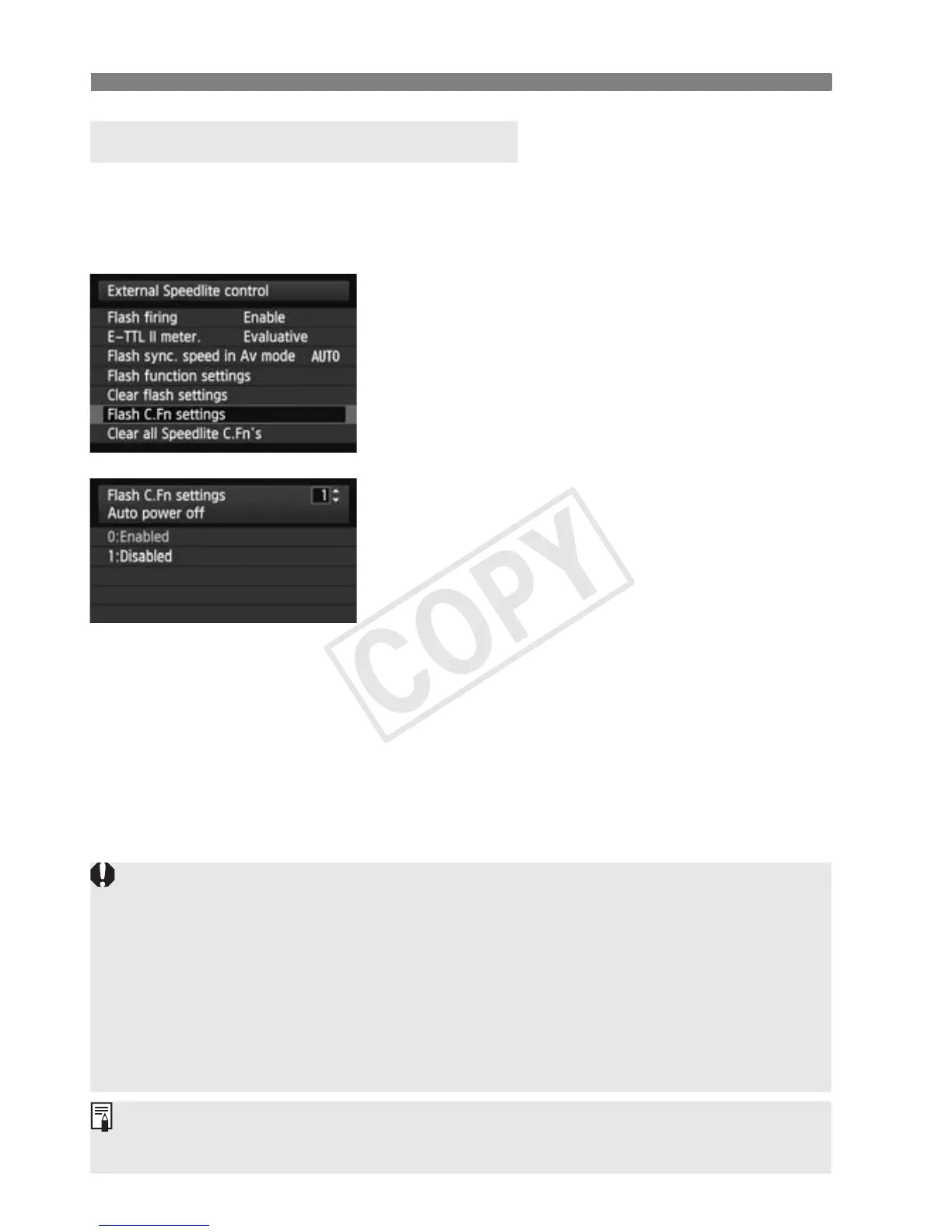
Flash Control from Camera’s Menu Screen
The displayed contents vary depending on the camera. When C.Fn-20
to 23 are not displayed, set them by operating the flash unit. For the
Custom Functions, see pages 95 to 100.
1
Select [Flash C.Fn settings].
Select [Flash C.Fn settings] or
[External flash C.Fn setting].
X The screen changes to the (external)
flash Custom Function settings
screen.
2
Set the Custom Function.
Select the Custom Function number
and set the function.
To c l ea r al l t h e C u sto m Fu n ct i o n
settings, select [Clear all Speedlite
C.Fn’s] or [Clear ext. flash C.Fn
set.] in step 1.
Flash Custom Function Settings
When using a camera released up to 2011, the C.Fn-20 to 23 settings are
not cleared even if [Clear all Speedlite C.Fn’s] is selected. When
following the “Clearing All the Custom Functions” operation on page 94,
all the Custom Functions (except C.Fn-00) are cleared.
When using the flash with EOS digital cameras released since 2012, as
auto external metering and manual external metering can be
automatically selected with the flash’s <E> button, C.Fn-05-2, 3 are
not displayed.
You cannot set or clear all Personal Functions (P.Fn/p.101) from the
camera’s menu screen. Set them by operating the flash unit.














 To Next Page