16
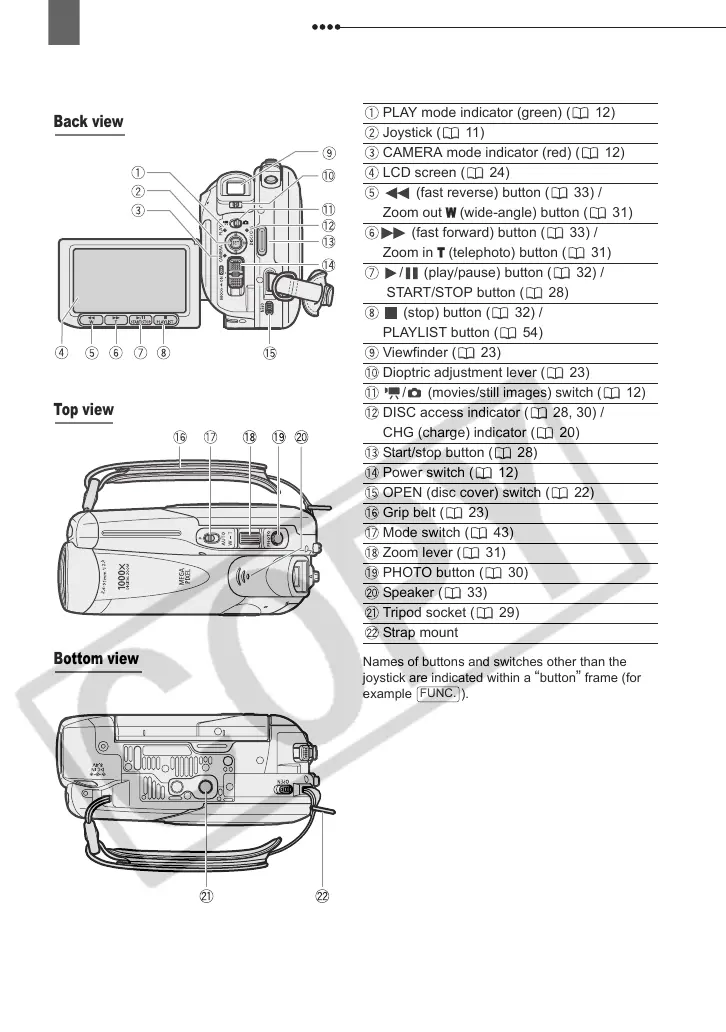
Getting to Know the Camcorder
Names of buttons and switches other than the
joystick are indicated within a
“button” frame (for
example ).
Back view
Top view
Bottom view
PLAY mode indicator (green) ( 12)
Joystick ( 11)
CAMERA mode indicator (red) ( 12)
LCD screen ( 24)
(fast reverse) button ( 33) /
Zoom out
W
(wide-angle) button ( 31)
(fast forward) button ( 33) /
Zoom in
T
(telephoto) button ( 31)
/ (play/pause) button ( 32) /
START/STOP button ( 28)
(stop) button ( 32) /
PLAYLIST button ( 54)
Viewfinder ( 23)
Dioptric adjustment lever ( 23)
/ (movies/still images) switch ( 12)
DISC access indicator ( 28, 30) /
CHG (charge) indicator ( 20)
Start/stop button ( 28)
Power switch ( 12)
OPEN (disc cover) switch ( 22)
Grip belt ( 23)
Mode switch ( 43)
Zoom lever ( 31)
PHOTO button ( 30)
Speaker ( 33)
Tripod socket ( 29)
Strap mount
FUNC.
D121C_E_Chap01-3.fm Page 16 Wednesday, January 17, 2007 10:03 AM



 To Next Page