Managing Photos
60
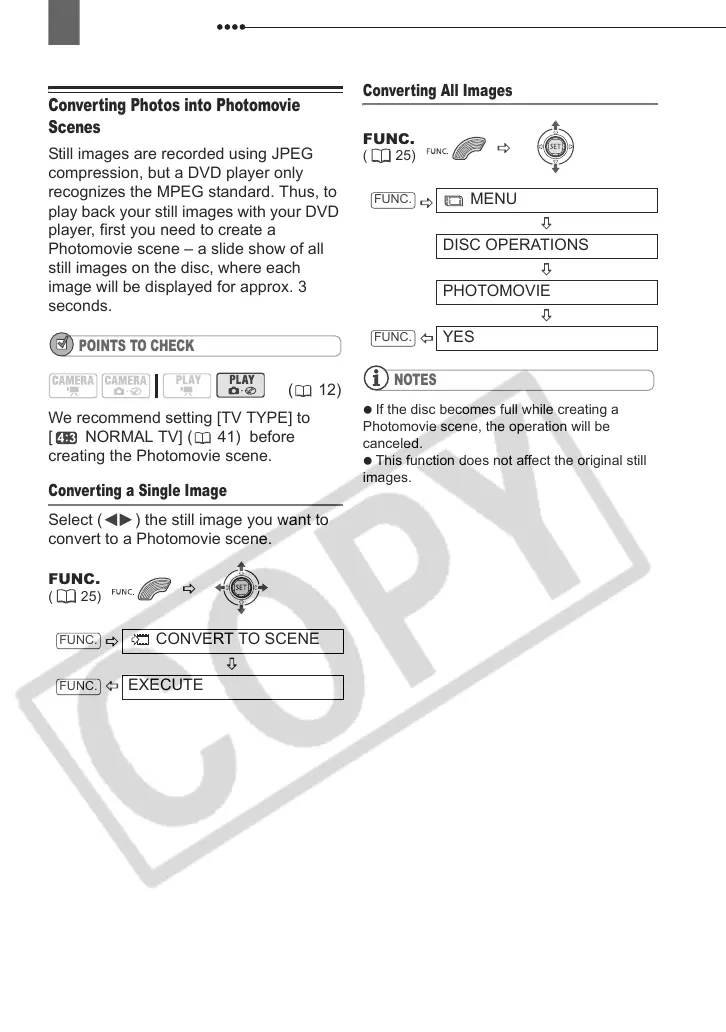
Converting Photos into Photomovie
Scenes
Still images are recorded using JPEG
compression, but a DVD player only
recognizes the MPEG standard. Thus, to
play back your still images with your DVD
player, first you need to create a
Photomovie scene – a slide show of all
still images on the disc, where each
image will be displayed for approx. 3
seconds.
POINTS TO CHECK
We recommend setting [TV TYPE] to
[ NORMAL TV] ( 41) before
creating the Photomovie scene.
Converting a Single Image
Select ( ) the still image you want to
convert to a Photomovie scene.
Converting All Images
NOTES
If the disc becomes full while creating a
Photomovie scene, the operation will be
canceled.
This function does not affect the original still
images.
(12)
FUNC.
( 25)
CONVERT TO SCENE
EXECUTE
FUNC.
FUNC.
FUNC.
( 25)
MENU
DISC OPERATIONS
PHOTOMOVIE
YES
FUNC.
FUNC.
D121C_NTSC-E.book Page 60 Thursday, January 11, 2007 2:46 PM



 To Next Page