Getting to Know the Camcorder
17
Introduction
Screen Displays
Recording Movies
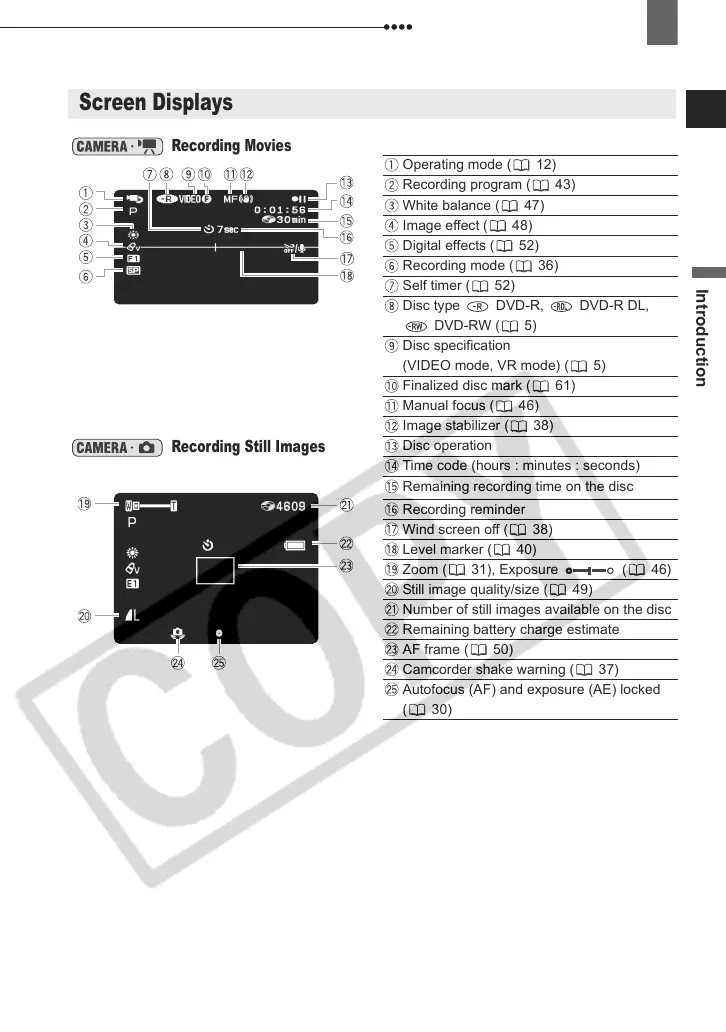
Operating mode ( 12)
Recording program ( 43)
White balance ( 47)
Image effect ( 48)
Digital effects ( 52)
Recording mode ( 36)
Self timer ( 52)
Disc type DVD-R, DVD-R DL,
DVD-RW ( 5)
Disc specification
(VIDEO mode, VR mode) ( 5)
Finalized disc mark ( 61)
Manual focus ( 46)
Image stabilizer ( 38)
Recording Still Images
Disc operation
Time code (hours : minutes : seconds)
Remaining recording time on the disc
Recording reminder
Wind screen off ( 38)
Level marker ( 40)
Zoom ( 31), Exposure ( 46)
Still image quality/size ( 49)
Number of still images available on the disc
Remaining battery charge estimate
AF frame ( 50)
Camcorder shake warning ( 37)
Autofocus (AF) and exposure (AE) locked
( 30)
D121C_E_Chap01-3.fm Page 17 Wednesday, January 17, 2007 10:03 AM



 To Next Page