Getting to Know the Camcorder
15
Introduction
Names of buttons and switches other than the
joystick are indicated within a
“button” frame (for
example ).
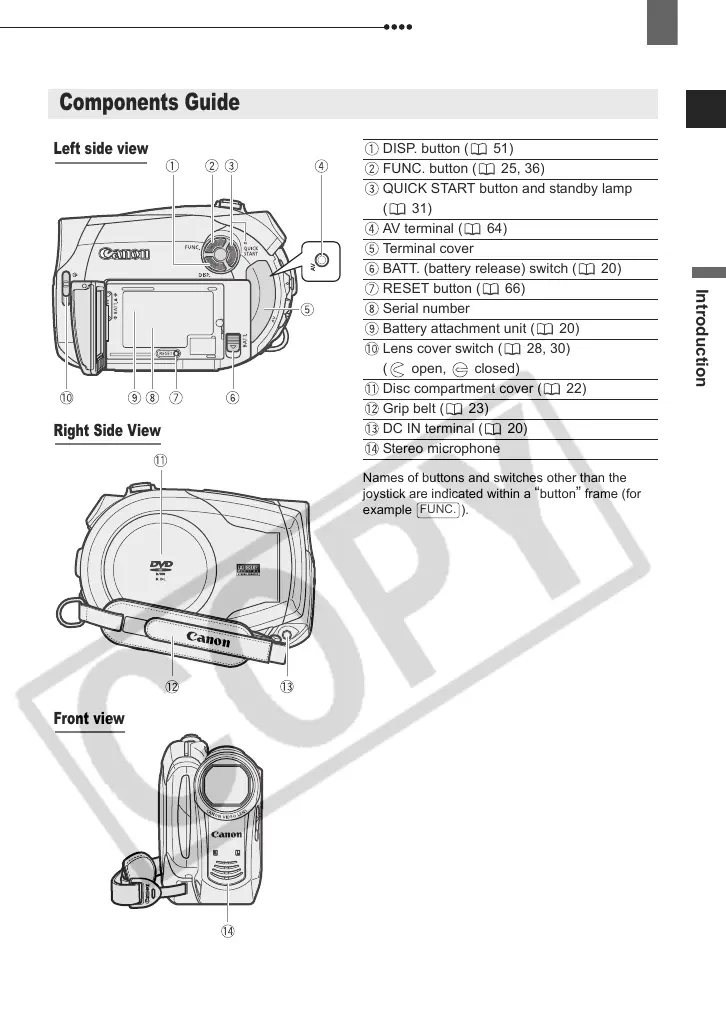
Components Guide
Left side view
Front view
Right Side View
DISP. button ( 51)
FUNC. button ( 25, 36)
QUICK START button and standby lamp
(31)
AV terminal ( 64)
Terminal cover
BATT. (battery release) switch ( 20)
RESET button ( 66)
Serial number
Battery attachment unit ( 20)
Lens cover switch ( 28, 30)
( open, closed)
Disc compartment cover ( 22)
Grip belt ( 23)
DC IN terminal ( 20)
Stereo microphone
FUNC.
D121C_NTSC-E.book Page 15 Thursday, January 11, 2007 2:46 PM



 To Next Page