7
Introduction
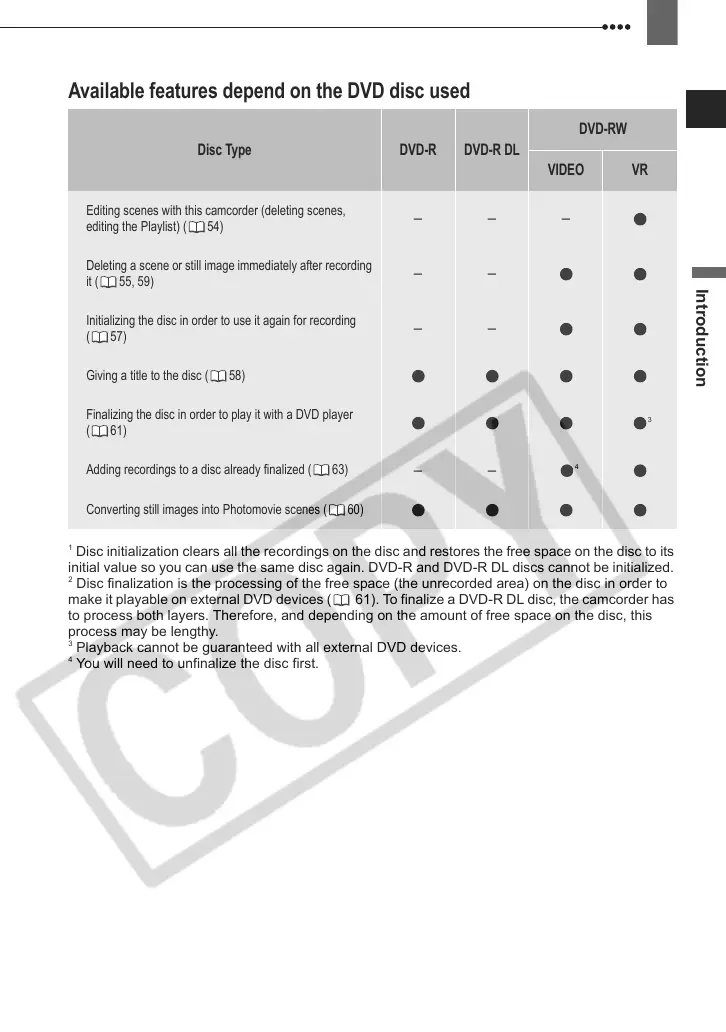
Available features depend on the DVD disc used
1
Disc initialization clears all the recordings on the disc and restores the free space on the disc to its
initial value so you can use the same disc again. DVD-R and DVD-R DL discs cannot be initialized.
2
Disc finalization is the processing of the free space (the unrecorded area) on the disc in order to
make it playable on external DVD devices ( 61). To finalize a DVD-R DL disc, the camcorder has
to process both layers. Therefore, and depending on the amount of free space on the disc, this
process may be lengthy.
3
Playback cannot be guaranteed with all external DVD devices.
4
You will need to unfinalize the disc first.
Disc Type DVD-R DVD-R DL
DVD-RW
VIDEO VR
Editing scenes with this camcorder (deleting scenes,
editing the Playlist) ( 54)
– – –
Deleting a scene or still image immediately after recording
it ( 55, 59)
– –
Initializing the disc in order to use it again for recording
(57)
– –
Giving a title to the disc ( 58)
Finalizing the disc in order to play it with a DVD player
(61)
3
Adding recordings to a disc already finalized ( 63)
– –
4
Converting still images into Photomovie scenes ( 60)
D121C_NTSC-E.book Page 7 Thursday, January 11, 2007 2:46 PM



 To Next Page