23
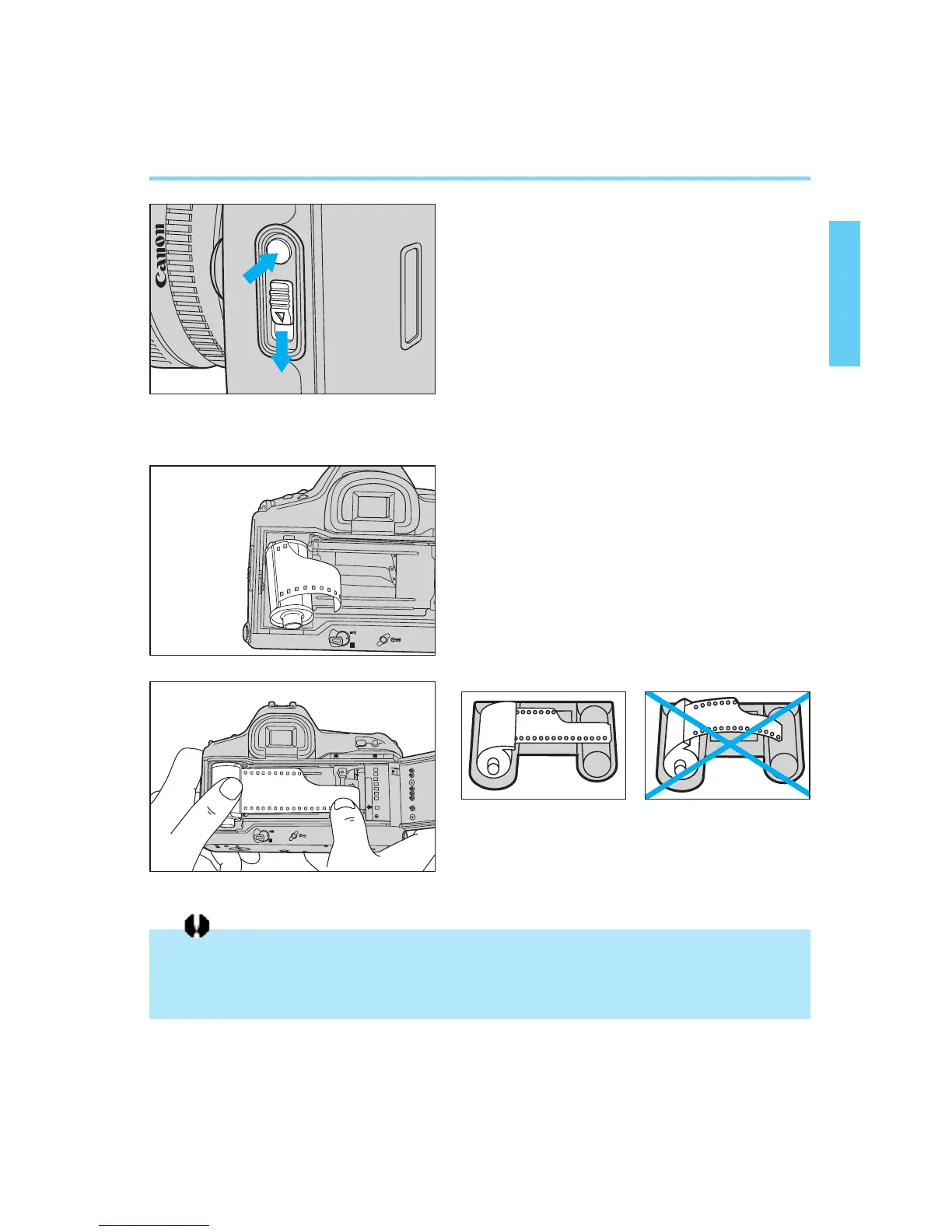
Film Loading
1
Set the main switch to “A”.
2
Open the back cover by using your
thumb to press the back cover lock
release button while sliding the
latch down.
• If you find it difficult to perform both
operations with one finger, use one fin-
ger to press the back cover release
button and another finger to operate
the latch.
3
Insert the film cartridge at a slant
with the flat end facing up and the
bottom end entering the camera
first.
4
Carefully pull the film tip across until
it reaches the orange mark.
• Hold down the film cartridge while
aligning the film to prevent slack.
The shutter curtain operates with extremely high precision and can be easily damaged if
touched. When loading or unloading film, BE CAREFUL not to touch the shutter curtain
accidentally with your finger or the tip of the film.
• If you pull out too much film, wind the
excess back into the cartridge.
CORRECT WRONG
1
2
00. Part.1 RS (E) (P.13~27) 27-01-2003 11:54 Page 23


 To Next Page