41
AE Lock
3
Refocus the subject, change the
composition as desired, and take
the picture.
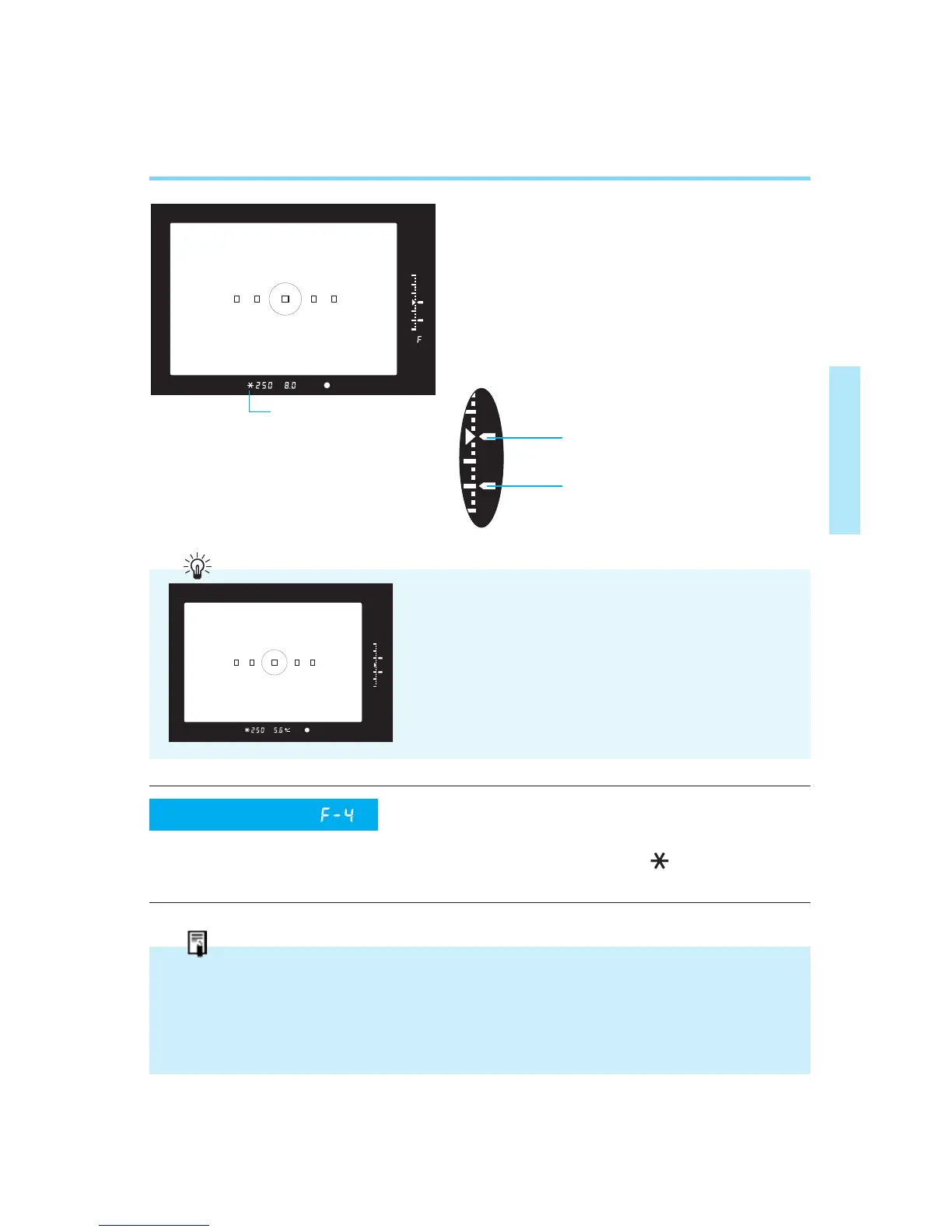
• When you change the scene composi-
tion, the difference between the locked
exposure value and the continuously
metered exposure value is displayed
in the viewfinder in real-time.
This custom function lets you lock the
exposure with the shutter button instead
of the AE lock button ( ). Pressing the
AE lock button activates autofocusing.
• When using One-shot AF together with Evaluative metering, the exposure reading is
automatically locked when autofocusing is completed after pressing the shutter button
halfway.
• When using One-shot AF together with Fine Spot or Partial metering, exposure setting
is locked only during continuous shooting.
AE lock indicator
Current metered exposure value
AE lock exposure value
Custom Function
(Refer to pages 84–85)
If you use AE lock to register a shadow read-
ing of your subject and then change the
scene composition to read a highlight area (or
vice versa), you can then use exposure com-
pensation (refer to page 42) to adjust the
exposure level based on the brightness range
of the scene.
00. Part.2 RS (E) (P.28~47) 27-01-2003 11:56 Page 41


 To Next Page