95
Using the Built-in Flash
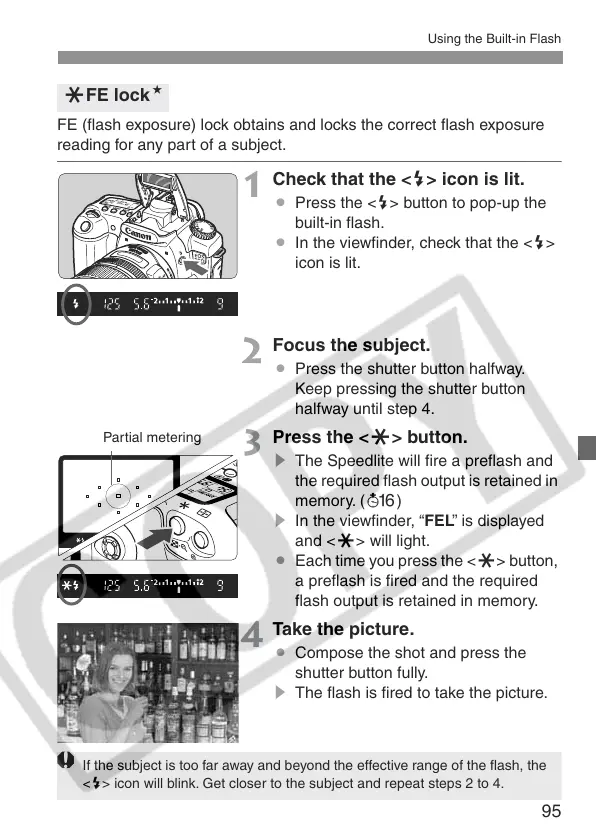
FE (flash exposure) lock obtains and locks the correct flash exposure
reading for any part of a subject.
1
Check that the <D> icon is lit.
¡ Press the <D> button to pop-up the
built-in flash.
¡ In the viewfinder, check that the <D>
icon is lit.
2
Focus the subject.
¡ Press the shutter button halfway.
Keep pressing the shutter button
halfway until step 4.
3
Press the <A> button.
s The Speedlite will fire a preflash and
the required flash output is retained in
memory. (8 )
s In the viewfinder, “FEL” is displayed
and <A> will light.
¡ Each time you press the <A> button,
a preflash is fired and the required
flash output is retained in memory.
4
Take the picture.
¡ Compose the shot and press the
shutter button fully.
s The flash is fired to take the picture.
AFE lockN
Partial metering
If the subject is too far away and beyond the effective range of the flash, the
<D> icon will blink. Get closer to the subject and repeat steps 2 to 4.















 To Next Page