_,,_ Transferring Images to a Personal Computer
Select the image to be
transferred.
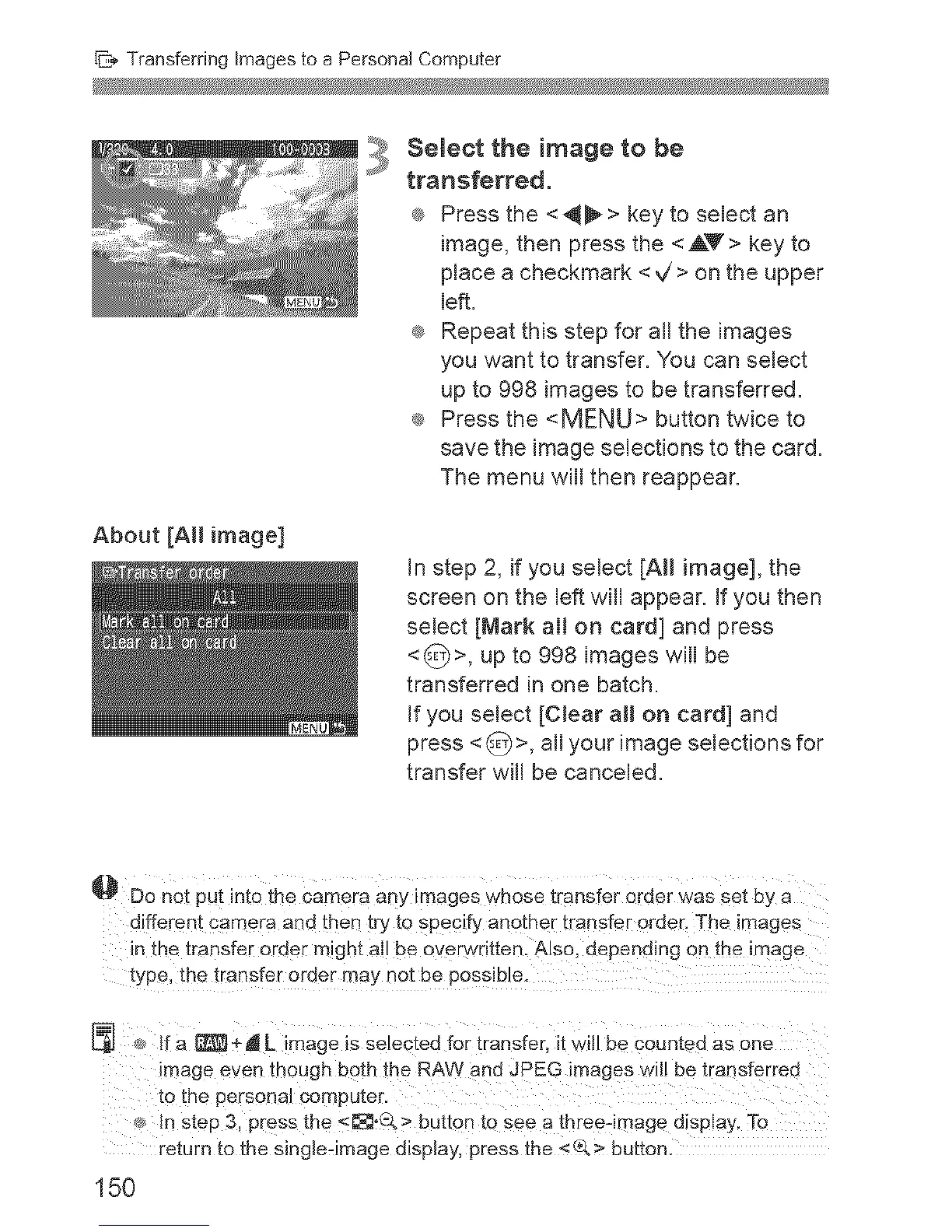
® Press the <_> key to select an
image, then press the <AY> key to
place a checkmark <V'> on the upper
left.
® Repeat this step for all the images
you want to transfer. You can select
up to 998 images to be transferred.
® Press the <MENU> button twice to
save the image selections to the card.
The menu will then reappear.
About [All image]
In step 2, if you select [AH image], the
screen on the left will appear. If you then
select [Mark ai[ on card] and press
<_)>, up to 998 images will be
transferred in one batch.
If you select [CJear aH on card] and
press < _>, all your image selections for
transfer wall be canceled.
Do no_ pu_ into the camera any images whose transfer order was set uy a
different camera and then try to specify another transfer order. The images
in the transfer order might ail be overs ntten. Also, depending on the image
type the transfer order may ne_ De possible.
If a [_+J L image _sselectedfor transfer, it will be counteaas one
mage even mough both the RAWand JPEG images will be transferred
_othe personal computer.
in step 3, pressthe <_;;_.Q> out[on to see a three-image display.To
return tothe single-image alspiay, press the <_> patton.
150


 To Next Page