Menu Settings
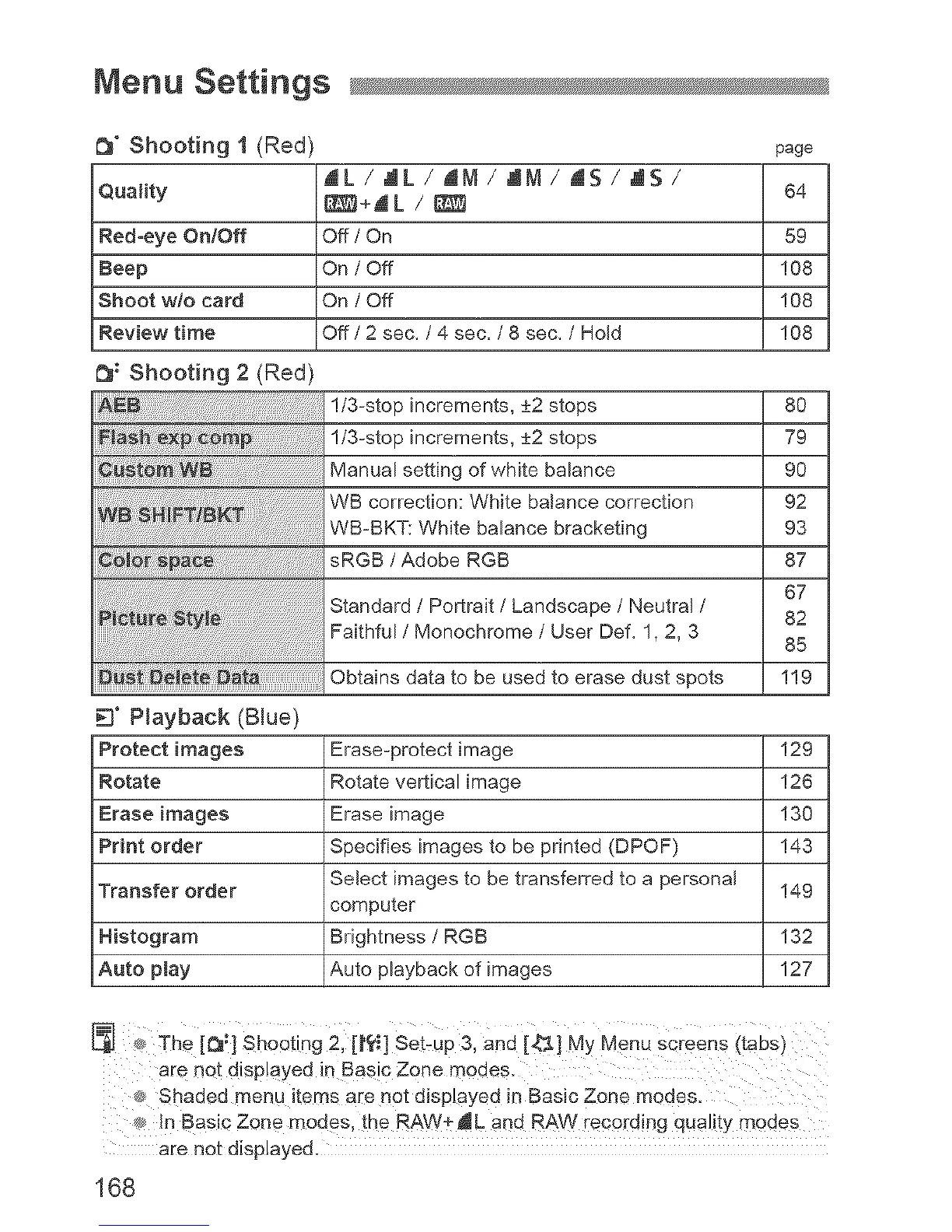
_" Shooting 1 (Red) page
JIL / .dL / AM / ,_M / AS / .dS /
Quality t_S_+AL / _ 64
Red-eye On/Off Off / On 59
Beep On / Off 108
Shoot w/o card On / Off 108
Review time Off / 2 sec. / 4 sec. / 8 sec. / Hold 108
_: Shooting 2 (Red)
!/3-stop increments, 4-_2stops
!/3-stop increments, 4-_2stops
Manual setting of white balance
WB correction: White balance correction
WB-BKT: White balance bracketing
sRGB / Adobe RGB
Standard / Portrait / Landscape / Neutral /
Faithful / Monochrome / User Def. 1, 2, 3
Obtains data to be used to erase dust spots
8O
79
90
92
93
87
67
82
85
119
3" Playback (Blue)
Protect images Erase-protect image 129
Rotate Rotate vertical image 126
Erase images Erase image 130
Print order Specifies images to be printed (DPOF) 143
Transfer order Select images to be transferred to a personal 149
computer
Histogram Brightness / RGB 132
Auto play Auto playback of images 127
The [_;] shOQtin9 2, [l'rti] Set:up& and [4_] My Menu screens (tabs)
® In Basic Zone modes, the RAW+JL and RAW recording quality modes
are not displayed.
168



 To Next Page