Menu Settings
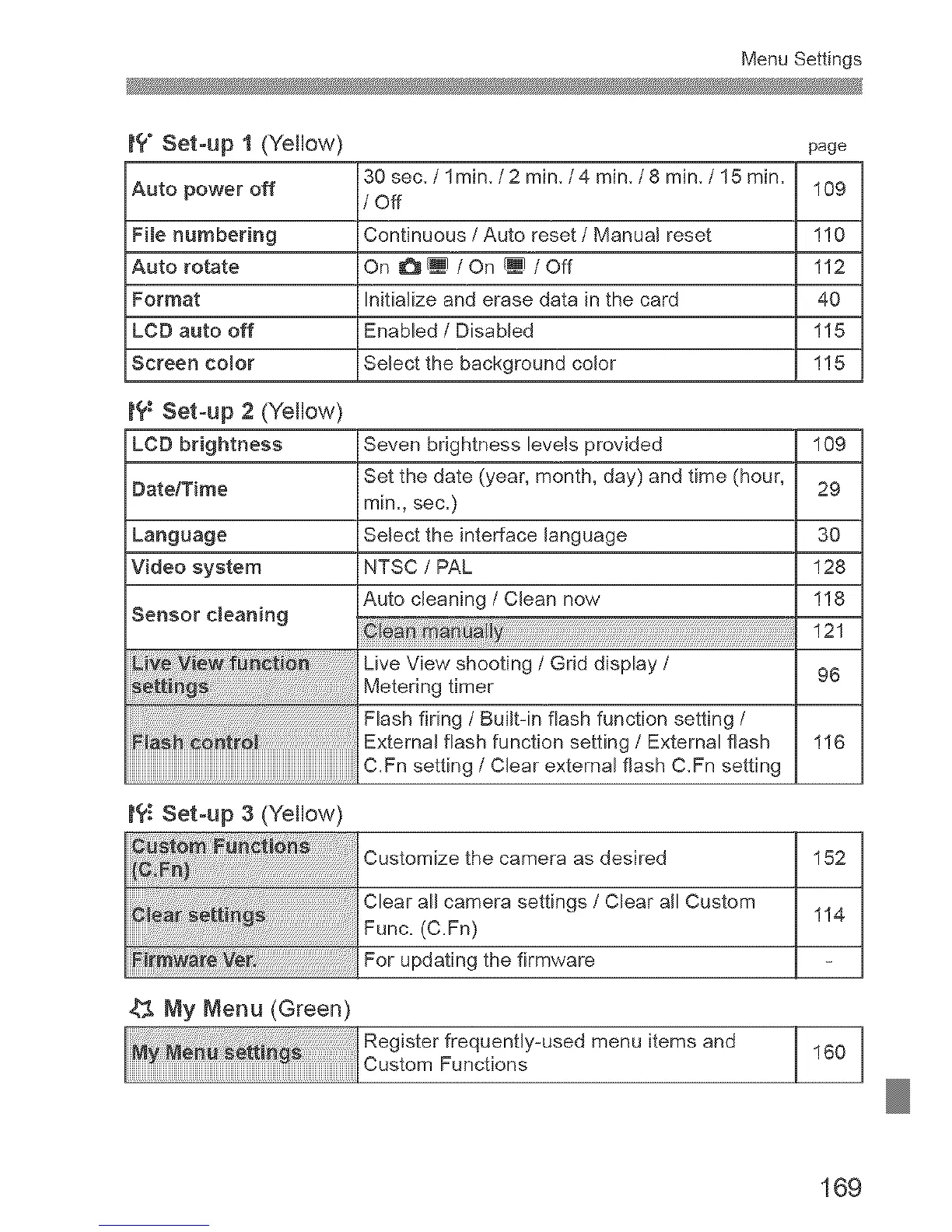
t?" Set-up 1 (Yellow)
Auto power off
File numbering
Auto rotate
Format
LCD auto off
Screen Color
t'£: Set-up 2 (Yellow)
LCD brightness
DateYrime
Language
Video system
Sensor cleaning
page
30 sec, / lmin, / 2 min,/4 min, / 8 min, / 15 min.
109
/ Off
Continuous / Auto reset / Manual reset 1!0
On _/On _/Off 112
Initialize and erase data in the card 40
Enabled / Disabled 115
Select the background color 1!5
Seven brightness levels provided 109
Set the date (year, month, day) and time (hour, 29
min., sec.)
Select the interface language 30
NTSC / PAL 128
Auto cleaning / Clean now 1!8
121
Live View shooting / Grid display /
Metering timer 96
Flash firing / Built-in flash function setting /
External flash function setting / External flash 1!6
C.Fn setting / Clear external flash C,Fn setting
t?_ Set-up 3 (Yellow)
Customize the camera as desired 152
Clear all camera settings / Clear all Custom
Func. (C.Fn) 1!4
_ _ _re Ve_'. For updating the firmware
My Menu (Green)
Reg ster frequent y-used menu items and 160
CuetomFunot_ons
169



 To Next Page