Connecting to a TV or VCR
External Connections
67
Standard Definition TV Sets
Terminal on the
Camcorder
Connecting Cable
Terminal on the
Connected Device
2
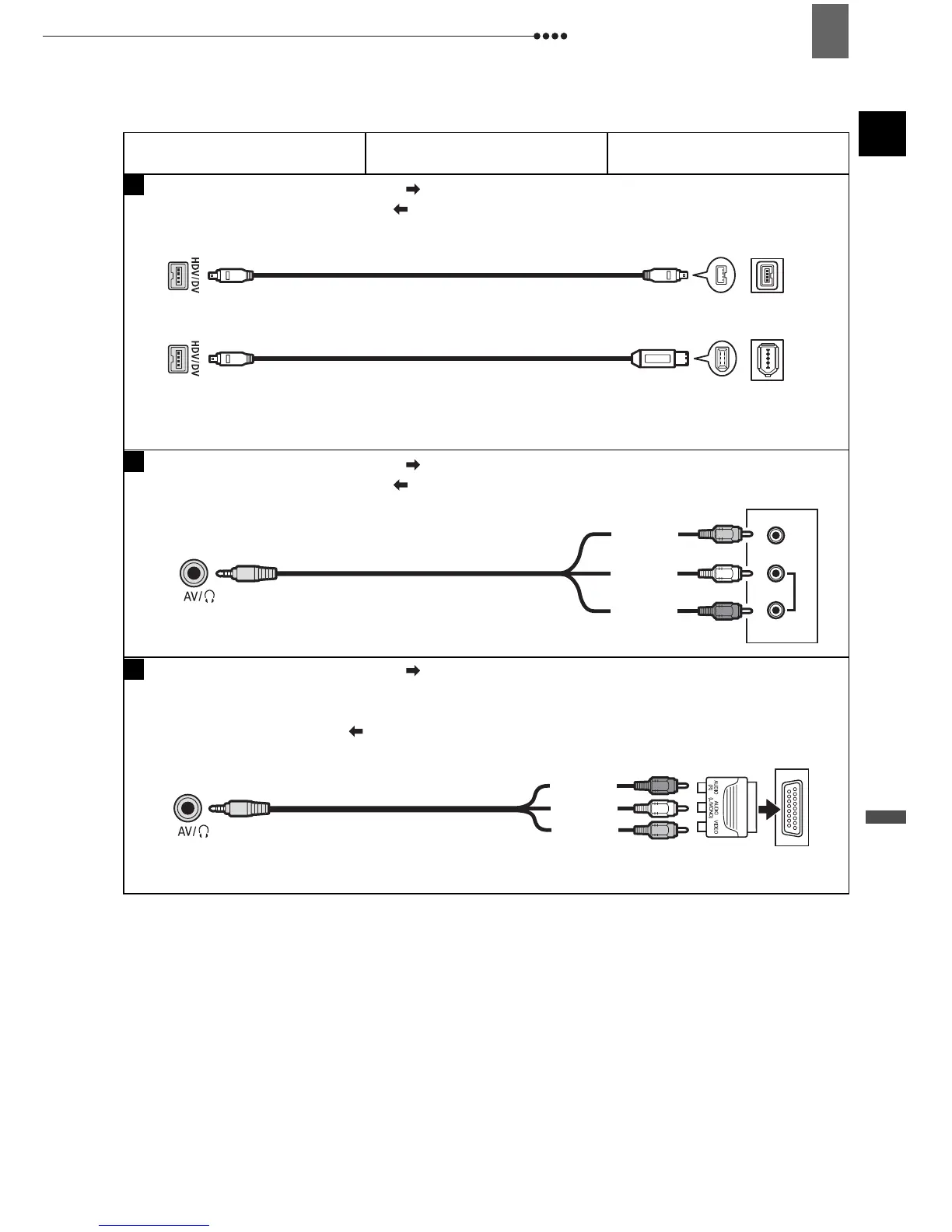
Output connection (Signal Flow ) to a TV with a DV (IEEE1394) terminal.
Input connection (Signal Flow ) from a TV or other digital video source with a DV
(IEEE1394) output.
CV-150F/CV-250F
DV Cable (Optional)
4-pin
6-pin*
* Be careful to correctly insert the 6-pin plug into the DV terminal. Inserting it in the wrong direction
can result in damage to the camcorder.
4
VIDEO
AUDIO
R
L
Output connection (Signal Flow ) to a TV or VCR with AV Terminals.
Input connection (Signal Flow ) from a TV, VCR or other analog video source with
AV terminals.
STV-250N Stereo Video Cable
(Supplied)
Yellow
White
Red
5
Output connection (Signal Flow ) to a TV or VCR with SCART terminal.
First, connect a SCART adapter to the SCART terminal on the TV or VCR and then
connect the STV-250N Stereo Video Cable to the adapter. To use this as an input
connection (Signal Flow ) from an analog video source, you will require a SCART
adapter with input capability.
STV-250N Stereo Video Cable
(Supplied)
Yellow
White
Red
SCART Adapter
(Commercially available)


 To Next Page