Setting Up a Computer as a File Server
5-43
5
Using a TCP/IP Network
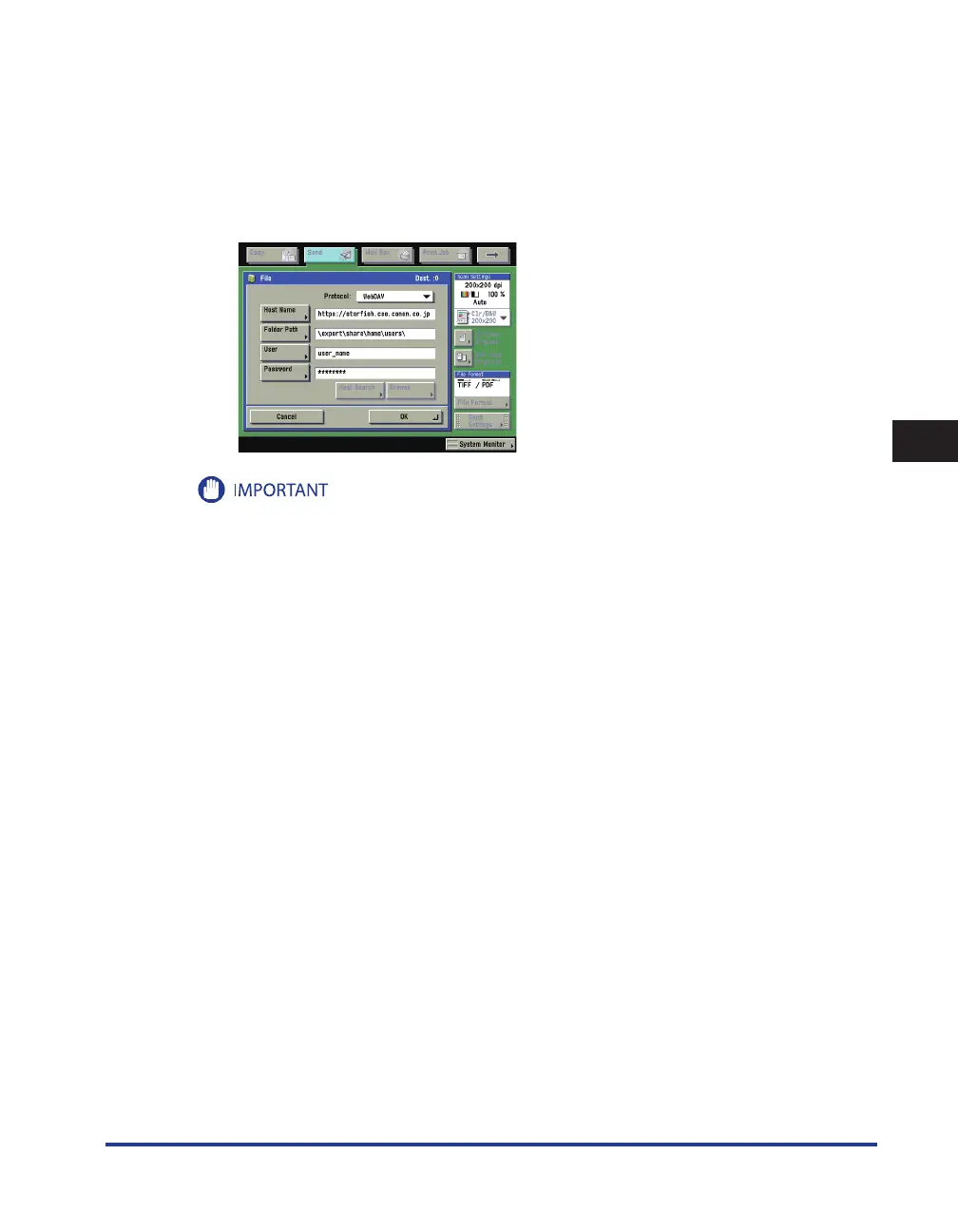
The machine's address settings:
<Protocol>: WebDAV
[Host Name]: https://starfish.cse.canon.co.jp/
[Folder Path]: \export\share\home\users\
[User]: User name for the Basic and Digest authentication methods of the WebDAV server
[Password]: Password for the Basic and Digest authentication method of the WebDAV server
Up to 128 alphanumeric characters can be entered for [Host Name] on the control panel. Also, up to 255
alphanumeric characters can be entered for [Folder Path].
If you switch the language of the touch panel display, [Host Name] and [Folder Path] may not be displayed
correctly.
If the language of the touch panel display differs from the computer used as a master browser, [Host name]
and [Folder path] may not be displayed correctly, or you may not be able to browse the directories.
To send to an IPv6 host, set [Host Name] using the following format:
<IPv6 address>:<Port number>
Example: [5aed:90a0:bc05:01d2:568a:2fc0:0001:12ee]:21000
If you set [Host Name] using DNS with both [IPv4 Settings] and [IPv6 Settings] set to 'On' on the TCP/IP
Settings screen, IPv4 communication is used when sending to WebDAV servers.
•
•
•
•
•
•





 To Next Page