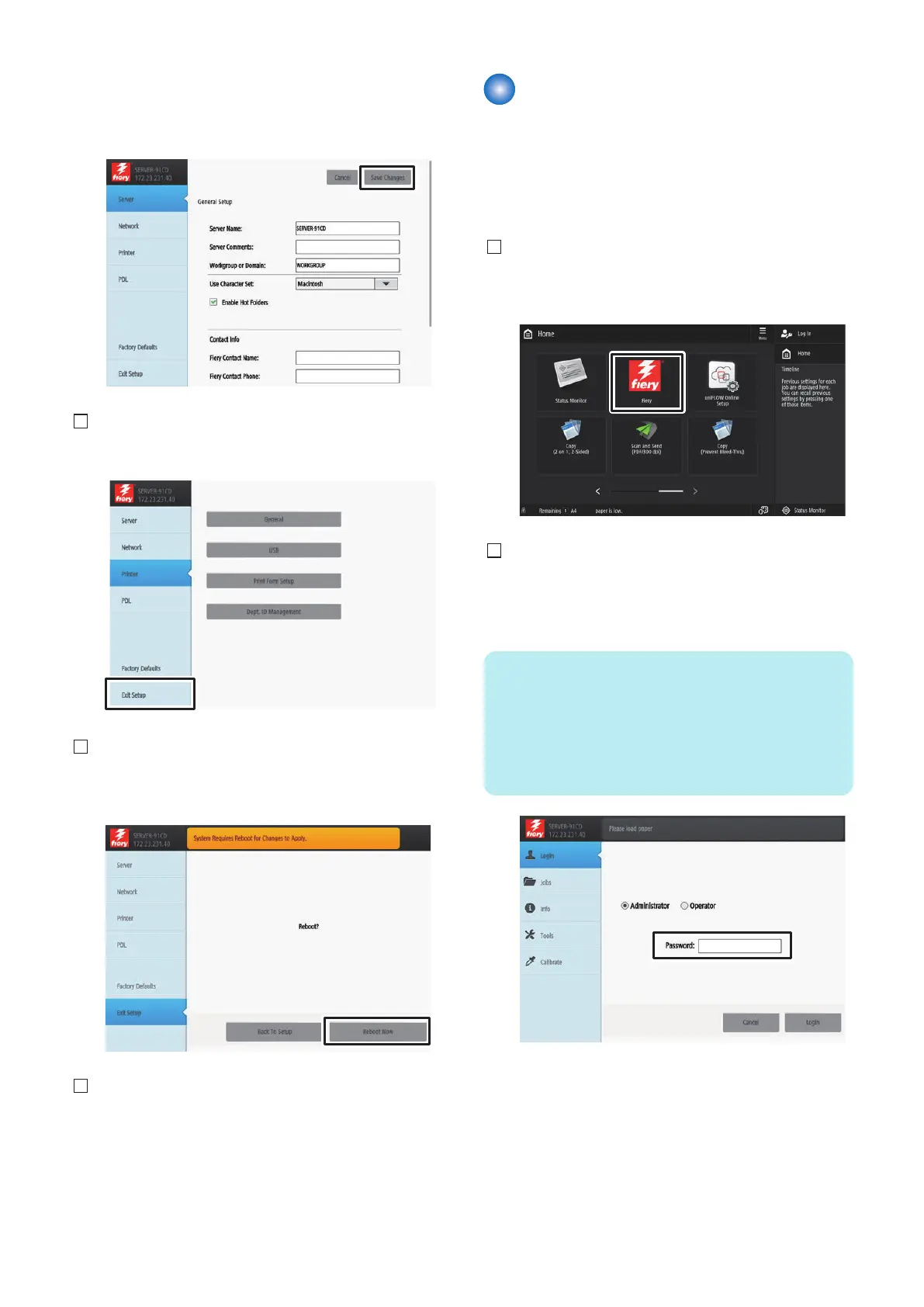
Check that the items in the General Setup are set, and
perform [Save Changes] even if there is no change. The
setting will not be completed unless [Save Changes] is
pressed.
5. Press [Exit Setup] after all settings are completed.
6. The confirmation screen will appear, and then press
[Reboot Now].
7. The imagePRESS Server will be restarted (approx.
10 min.).
Checking the Operation After
Making the Settings
Output Test Page and Configuration by the following
procedure, and check the connection between the host
machine and this equipment as well as the settings of
this equipment.
1. Select [Fiery] from the main menu on the host
machine's LCD.
2. Select [Login] to log in as a system administrator.
Entering "Fiery password" in the password field
displays the setting screen.
NOTE:
On the Fiery Server Configuration page, look
for ID in the BIOS Setup section. The
alphanumeric characters in the ID field is the
default password.(Print the Configuration
page: Press the Fiery logo, then press [Info]
> [Print Pages] > [Configuration].)
6. INSTALLATION PROCEDURE
91



 To Next Page