16
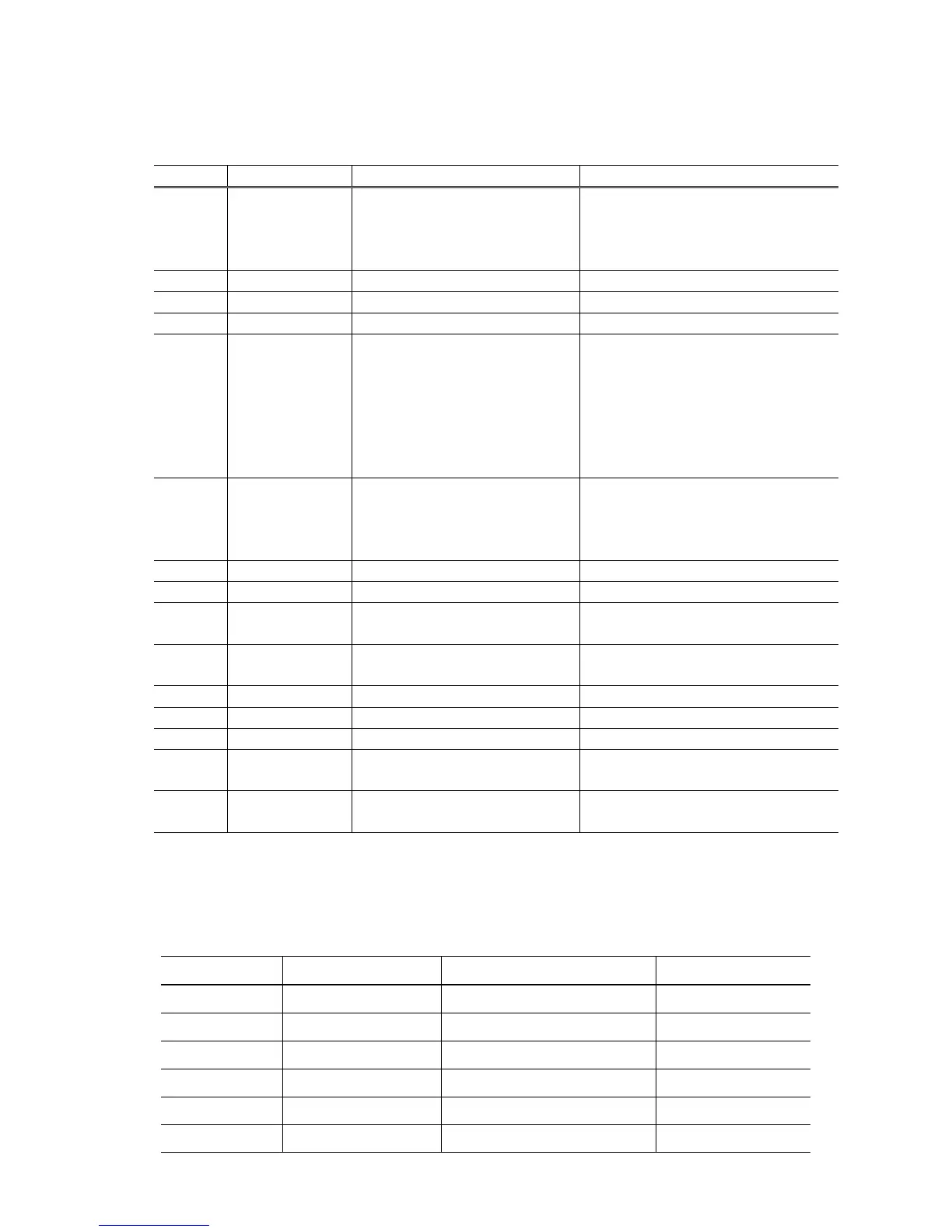
time(s) according to the function listed in the table below. (Each time the Resume/Cancel button is
pressed, the Alarm and Power LEDs light alternately, Alarm in orange and Power in green, starting
with Alarm LED.)
Time(s) LED indication Function Remarks
0 times Green (Power) Power off When the print head is not
installed, the carriage
returns and locks in the
home position capped.
1 time Orange (Alarm) Service test print
2 times Green (Power) EEPROM information print
3 times Orange (Alarm) EEPROM initialization
4 times Green (Power) Ink absorber counter resetting Set a sheet of A4 or Letter sized plain
paper in the rear tray or cassette, and
reset the ink absorber counter. After
the ink absorber counter is reset, the
counter value is printed automatically.
See "Ink absorber counter resetting"
below.
5 times Orange (Alarm) Destination settings Press the Resume/Cancel
button the specified number
of time(s) according to the
destination.
6 times Green (Power) Print head deep cleaning Cleaning of both Black and Color
7 times Orange (Alarm) CD / DVD check pattern print Not used in servicing.
8 times Green (Power) CD / DVD print position
correction (horizontal: X direction)
Not used in servicing.
9 times Orange (Alarm) CD / DVD print position
correction (vertical: Y direction)
Not used in servicing.
10 times Green (Power) LF / Eject correction
11 times Orange (Alarm) Left margin correction
12 times Green (Power) Return to the menu selection
13 times Orange (Alarm) Register the ink amount in the ink
absorber
14 to 16
times
Green (Power) /
Orange (Alarm)
Return to the menu selection
Note: If the Resume/Cancel button is pressed 16 or more times, the Alarm LED (orange) lights
steadily without any changes.
<Destination settings>
In the destination settings mode, press the Resume/Cancel button the specified number of time(s)
according to the destination listed in the table below, and press the Power button.
Time(s) LED indication Destination CD / DVD print
0 times Green (Power) No change of the destination
1 time Orange (Alarm) Japan Supported
2 times Green (Power) Korea Not supported
3 times Orange (Alarm) US Not supported
4 times Green (Power) Europe Supported
5 times Orange (Alarm) Australia Supported










 To Next Page