Chapter 2
2-35
2.3.3.2.2 Cassette Pick-up Sequence
0013-4172
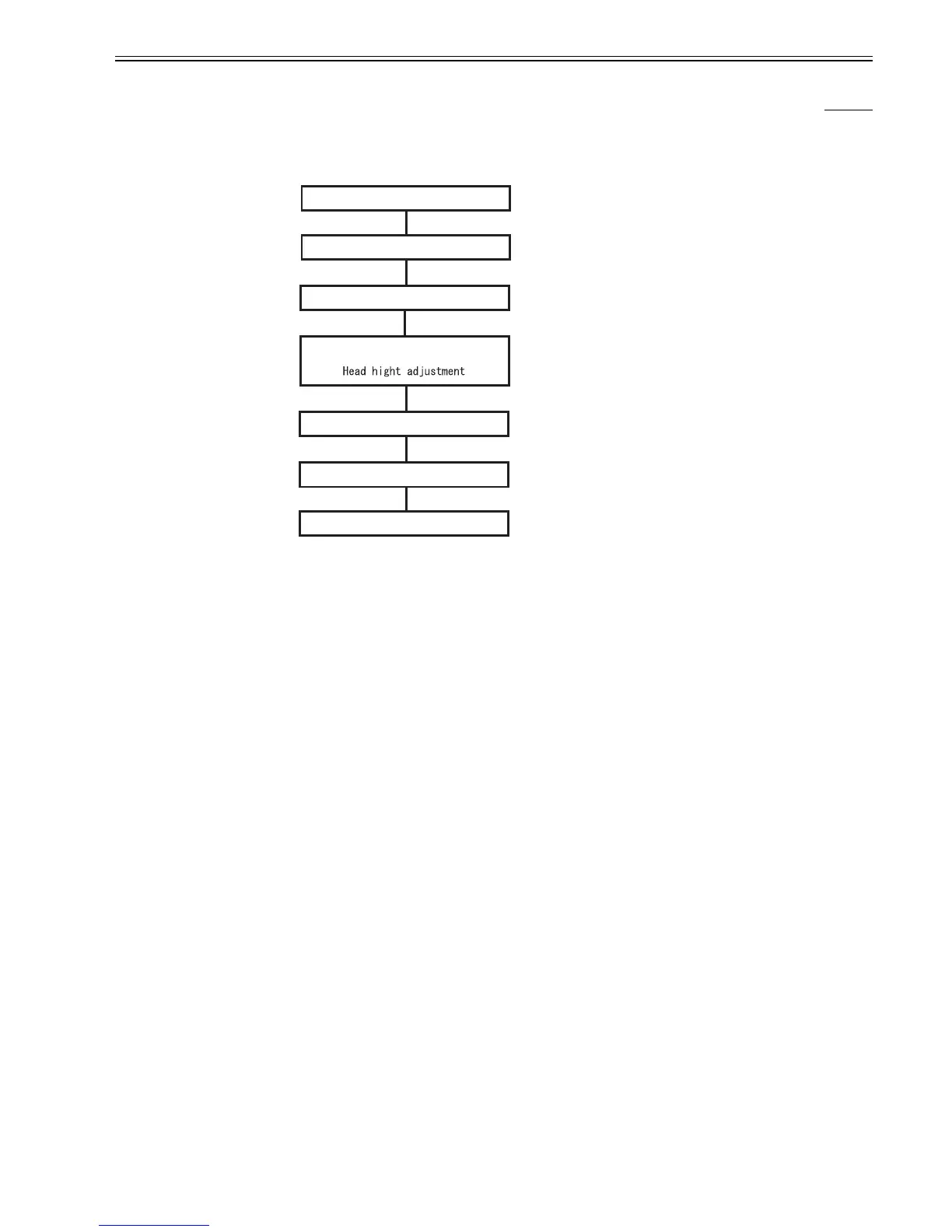
When a Print command is received with paper loaded in the cassette, cassette pick-up operation starts. The paper supplied from the cassette is checked for normal
feeding using the sensors provided along the paper feed path. When the paper is fed by the specified length, the multi sensor adjusts the light intensity and the head
hight, detects the paper width, and then starts printing.
During feeding, paper is fed by the cassette pick-up roller and cassette feed roller. During printing, paper is fed by the feed rollers.
In paper is fed from the cassette, the multi sensor does not detect the leading edge of paper and skewed feeding of paper.
F-2-29
Reception of Print command
Light intensity/
Paper width detection
Cassette pick-up end
Printing
Cassette pick-up start
Paper detection
- Cassette paper detection sensor
- Cassette pick-up sensor
- Paper detection sensor




 To Next Page