Things You Must Do Before Using This Machine
1-28
Before You Start Using This Machine
1
Registering Sender Names
For fax, you can register any name as the sender's name, such as the section or department's
name, or an individual's name.
The registered sender's name can be displayed on the touch panel display of the recipient's
machine and/or printed at the top of the documents that you send as the sender's information.
NOTE
•
You can set to display and print the sender's name instead of the name stored as the unit's name with
the Sender's Names setting from the Send Settings screen.
•
For this setting, the optional Super G3 FAX Board is required.
1
Press ➞ [Communications Settings] ➞ [TX Settings] under <Common
Settings> ➞ [Sender's Names (TTI)].
2
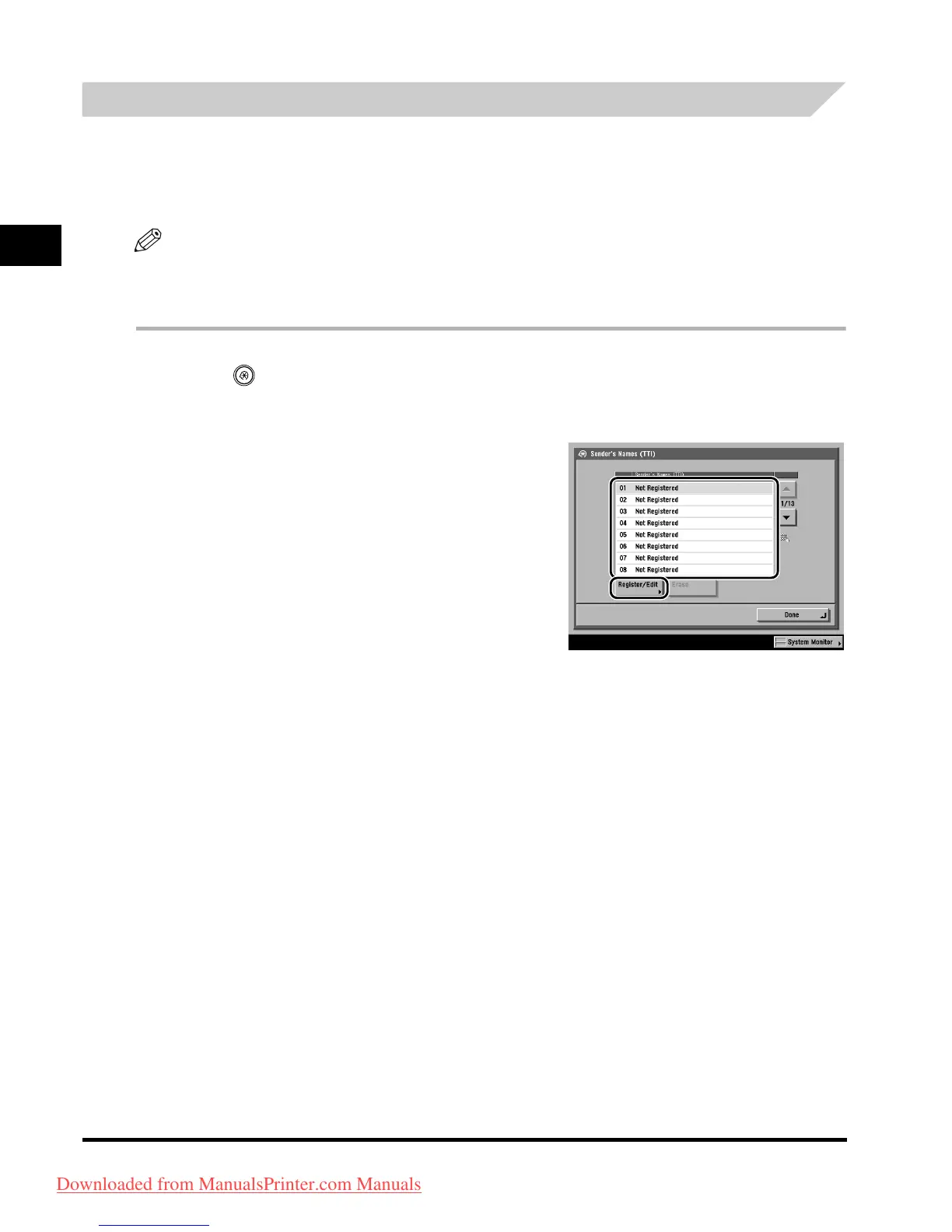
Select the number under which you want
to register the sender's name ➞ press
[Register/Edit].
You can store up to 99 sender names (01 to 99).
To delete a stored sender's name, select the number
under w
hich the name is registered ➞ press [Erase].
Only one sender name can be erased at a time.
3
Enter the sender's name ➞ press [OK].
Downloaded from ManualsPrinter.com Manuals


 To Next Page