Replacing the Toner Cartridge
2-7
Routine Maintenance
2
IMPORTANT
•
Use only the toner cartridges intended for use with this machine.
•
Do not replace toner cartridges until the message prompting you to do so appears.
•
Do not attempt to replace the toner cartridge while the machien is printing.
NOTE
•
When the message <Black toner is low. Replacement not yet needed.> appears, approximately 10% of
the toner is left. It is recommended that you get a new toner cartridge ready for replacement before the
toner runs out.
•
Complete instructions on how to replace the toner cartridge can be accessed by pressing [Previous] or
[Next] on the touch panel display.
•
If toner runs out during a print job, the remaining prints are made after you replace the toner cartridge.
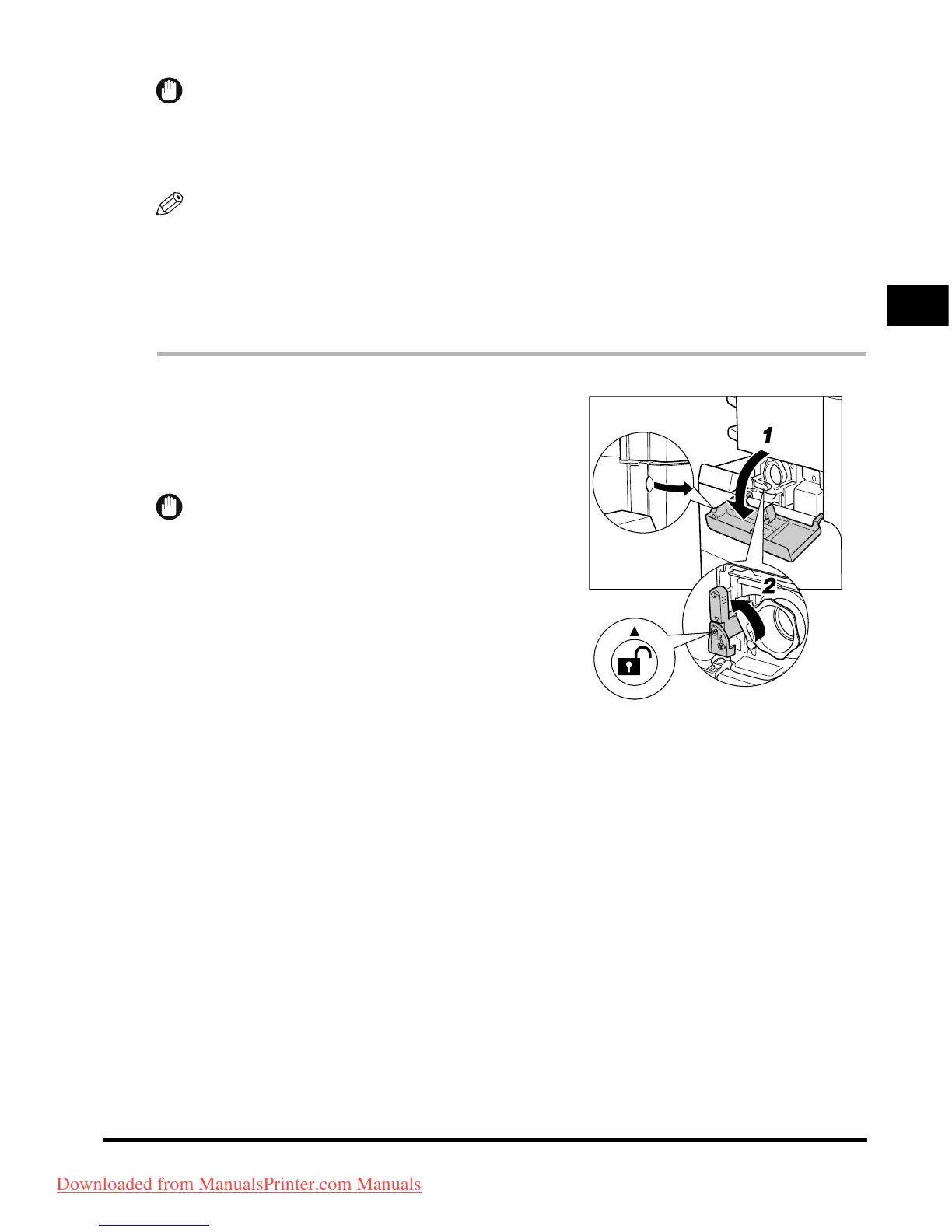
1
Open the toner supply port cover.
2
Lift up the locking lever until it becomes
vertical.
IMPORTANT
Make sure that the
▼
on the lever is aligned with the
▲
of
the
'
Unlock
'
position.
Downloaded from ManualsPrinter.com Manuals



 To Next Page