MVX250i E, MVX200i E, MVX200 E
DISASSEMBLING
8
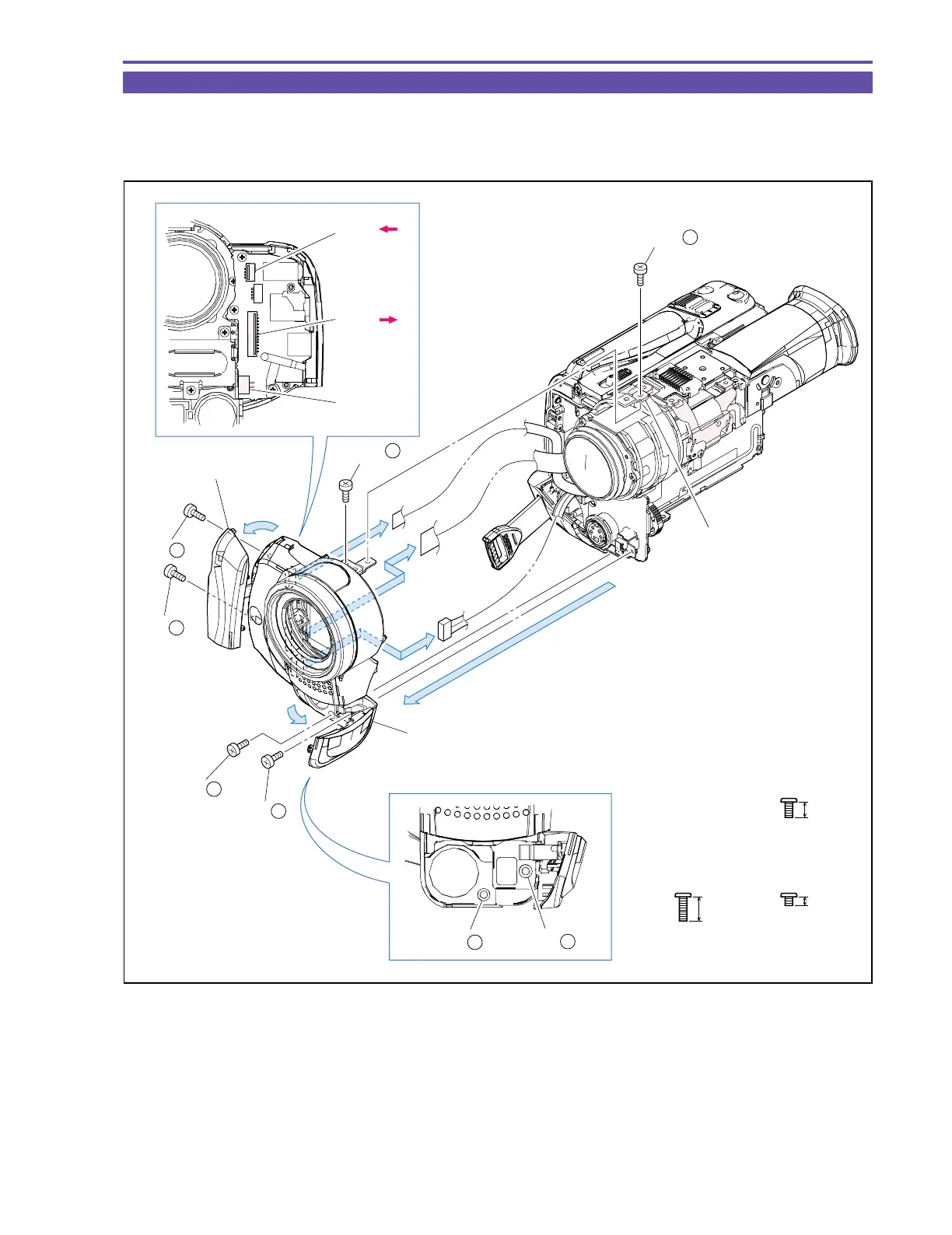
1-6 Separation of Front Cover Unit
(1) Open the Jack1 Cover and Jack2 Cover, and remove six screws (h × 4, i × 1, j × 1).
(2) Disconnect the CN3211, CN42, and CN51. Then, while being free from the Lens Shield, detach the Front Cover Unit.
(Refer to 1-8 : Separation of Shields.)
Fig. 5
3.5mm
Metal
M1.7
h
5.5mm
Metal
M1.7
i
Metal
M1.7
2mm
j
Jack1 Cover
Jack2 Cover
(2)
(2)
(2)
(2)
(1)
(1)
CN51
CN3211
CN42
(1) - h
(1) - h
Lens Shield
(1) - h
(1) - h
(1) - h
(1) - i
(1) - i
(1) - j



 To Next Page