59 ImageBrowser Software User Guide
Chapter 6
Using Supplementary Features
Adding Sounds to Images (2/2)
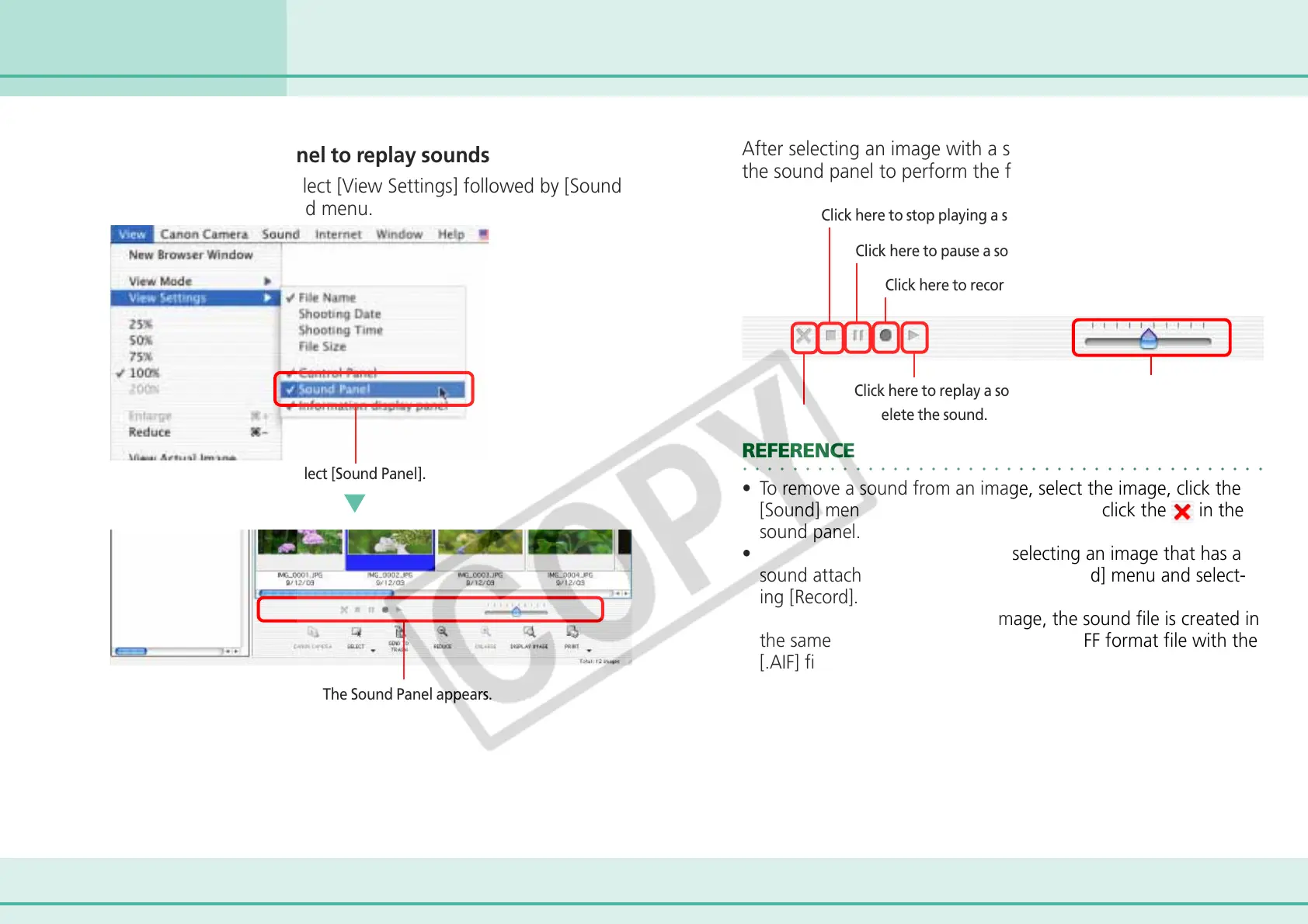
■ Using the Sound Panel to replay sounds
On the [View] menu, select [View Settings] followed by [Sound
Panel] from the displayed menu.
After selecting an image with a sound attached, you can use
the sound panel to perform the following.
Select [Sound Panel].
The Sound Panel appears.
Click here to stop playing a sound
Click here to pause a sound
Click here to record a sound
Click here to replay a sound.
Move the tab to adjust
the sound volume.
○○○○○○○○○○○○○○○○○○○○○○○○○○○○○○○○○○○○○○○○○○
REFERENCE
• To remove a sound from an image, select the image, click the
[Sound] menu and select [Send to Trash] or click the
in the
sound panel.
• You can record a new sound by selecting an image that has a
sound attached already, clicking the [Sound] menu and select-
ing [Record].
• When you add a sound to an image, the sound file is created in
the same folder as the image file as an AIFF format file with the
[.AIF] file name extension.
Click here to delete the sound.












 To Next Page