EasyManua.ls Logo

Canon PowerShot A310 - User Manual

Canon PowerShot A310
127 pages
Print Icon
To Next Page IconTo Next Page
Loading...
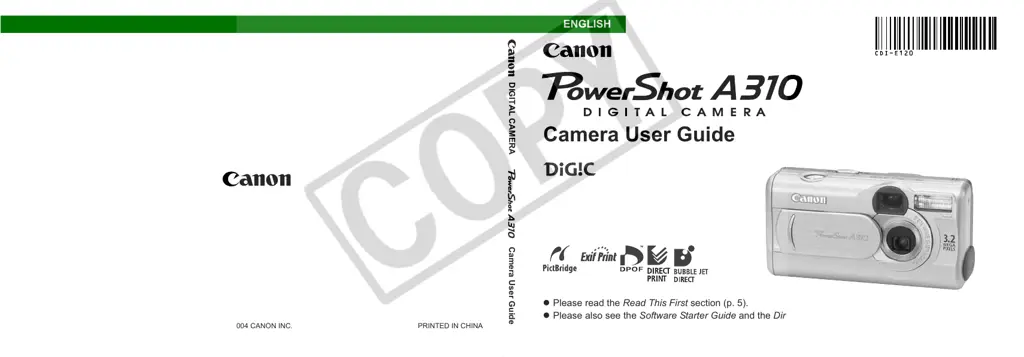
Camera User Guide
z Please read the Read This First section (p. 5).
z Please also see the Software Starter Guide and the Direct Print User Guide.
CDI-E120-010 © 2004 CANON INC. PRINTED IN CHINA
DIGITAL CAMERA
Camera User Guide
ENGLISH

Table of Contents

Other manuals for Canon PowerShot A310

Questions and Answers

  • J
    Jennifer SuttonAug 20, 2025
    Why my Canon Digital Camera will not turn on?
    • M
      Mark KingAug 20, 2025
      There are several reasons why your Canon Digital Camera might not be operating. First, ensure that the camera is turned on. Check that the CF card slot/battery cover is securely closed. Make sure the batteries are loaded in the correct direction and are not depleted; if they are, replace them with unused alkaline or fully recharged Canon AA-size NiMH batteries. Also, verify that you are using the correct type of batteries and that the battery terminals are clean.
  • T
    Tina OwensAug 22, 2025
    What to do if my Canon Digital Camera won't take pictures?
    • K
      Karen CordovaAug 22, 2025
      If your Canon Digital Camera won't shoot, make sure it is not in Playback mode; switch to a Shooting mode. If the flash is charging, wait until it's ready (the indicator light will turn orange). Also, check if the CF card is full; if it is, insert a new one or free up space by downloading and erasing images.
  • A
    amybarryAug 25, 2025
    Why won't my Canon PowerShot A310 Digital Camera batteries charge in the charger?
    • B
      Briana BaileyAug 25, 2025
      If your batteries aren't charging in the charger, ensure they are placed in the correct direction. Make sure there's good electrical contact between the batteries and the charger, and that the power cable is firmly connected to both the charger and the power outlet. Also, wipe the battery terminals with a dry cloth. If the batteries have lost their effectiveness, replace them with new ones.
  • D
    Daniel MartinAug 26, 2025
    What to do if my Canon Digital Camera will not shoot?
    • A
      Andre AlvarezAug 26, 2025
      If your Canon Digital Camera isn't taking pictures, here are a few things to check: * Ensure the camera is in a shooting mode, not Playback mode. * Wait for the flash to fully charge; the indicator light should be steadily lit. * If the CF card is full, insert a new one or download images to your computer and erase them from the card to free up space.
  • M
    Mrs. Mary WebsterAug 27, 2025
    Why do the batteries drain so fast on my Canon Digital Camera?
    • J
      jilllewisAug 27, 2025
      Several factors can cause batteries to drain quickly in your Canon Digital Camera. Ensure you are using new AA-size alkaline or Canon AA-size NiMH batteries. If shooting in cold conditions, keep the batteries warm until use. Clean the battery terminals with a dry cloth. If the batteries haven't been used for over a year, performance should normalize after a few charging cycles. Otherwise, replace them with new ones if they've lost their effectiveness.
  • M
    Michael ChristensenAug 29, 2025
    How to fix blurry photos on Canon Digital Camera?
    • L
      lauraporterAug 29, 2025
      If your shots are blurry or unfocused, it could be due to several reasons. Ensure you hold the camera steady while shooting. Check that nothing is obstructing the AF-assist beam. Also, confirm that the AF-assist beam setting is turned on. Make sure the subject is within the camera's focusing range (at least 20 cm or 7.9 inches away, or use macro mode for closer shots). If the subject is difficult to focus on, use the Focus Lock feature.
  • R
    Raymond McleanAug 31, 2025
    What to do if my Canon PowerShot A310 says it can't shoot because of the CF card?
    • A
      Alan FernandezAug 31, 2025
      If your Canon Digital Camera won't shoot due to a CF card issue, format the CF card. If the problem persists, the card may be defective. In this case, contact Canon Customer Help Desk.
  • A
    Ana GoodSep 2, 2025
    Why does the flash not work on my Canon Digital Camera?
    • K
      Karen TerrySep 2, 2025
      If the flash on your Canon Digital Camera isn't firing, check if the flash mode is set to off. If so, set the flash mode to any other mode except Off.
  • B
    baldwinallisonSep 4, 2025
    Why are my photos too dark with my Canon PowerShot A310 Digital Camera?
    • M
      michaelperezSep 4, 2025
      If your Canon Digital Camera photos are too dark, consider the following: * Turn the flash on. * If the subject is darker than its surroundings, increase the exposure compensation or use spot metering. * If the subject is too far for the flash, ensure the subject is within 2 meters (6.7 feet) of the lens or raise the ISO speed.
  • R
    Richard BraunSep 6, 2025
    Why are my photos too bright with my Canon PowerShot A310?
    • S
      Sharon GrimesSep 6, 2025
      If your Canon Digital Camera photos are too bright, consider these solutions: * Ensure the subject is not too close to the flash (at least 20 cm or 7.9 inches away). * If the subject is brighter than the surroundings, decrease the exposure compensation or use spot metering. * Adjust the camera angle to avoid direct light or reflections. * Change the flash mode to something other than always on.

Summary

Read This First

Safety Precautions and Warnings

Essential safety guidelines, warnings, and precautions for camera operation.

Preparing the Camera

Setup: Battery, Card, and Settings

Installing power, memory card, and configuring initial settings like date and language.

Basic Functions

Core Operations: Power, Modes, and LCD

Turning the camera on/off, switching modes, and using the LCD monitor effectively.

Shooting - The Basics

Basic Shooting Modes and Features

Using Auto Mode, viewfinder, flash, and basic shooting modes like Movie.

Image Settings and Advanced Shooting

Adjusting resolution, compression, and exploring advanced modes like Panorama.

Playback - The Basics

Image and Movie Playback

Viewing photos and videos, including magnification and index playback.

Erasing Images

Shooting - Advanced Functions

Menu Navigation and Settings Control

Accessing and modifying camera settings via FUNC. and MENU buttons.

Exposure, White Balance, and ISO Adjustments

Controlling exposure, color balance, and light sensitivity for optimal shots.

Autofocus, Metering, and Photo Effects

Optimizing focus, selecting metering modes, and applying creative visual effects.

Troubleshooting

Camera Operation and Shooting Issues

Solutions for common problems like camera not operating or shooting.

Image and Card-Related Problems

Addressing issues with image playback, CF card errors, and file compatibility.

Appendix

Maintenance, Power, and Accessories

Information on battery replacement, power kits, AC adapters, and camera care.

Specifications

Photo Tips and Information

Photography Techniques and Tips

Guidance on improving photo quality, self-timer use, and exposure adjustment.

Functions Available in Each Shooting Mode

FCC Notice

Regulatory Compliance

Official information regarding FCC rules and radio frequency interference.

Canon PowerShot A310 Specifications

General IconGeneral
TypeCompact
Megapixels3.2 MP
Optical Zoom5.4x
FlashBuilt-in
Battery2 x AA batteries
Effective Pixels3.2 MP
Sensor TypeCCD
LCD Screen1.5-inch
ISO Range50, 100, 200, 400
Video RecordingYes, 320 x 240 at 15 fps
Supported Flash MemorySD, MMC
Storage MediaSD card

Related product manuals