5-19
Chapter 5 Operating Procedures
❏ Scanning
This section describes the procedure for scanning.
If you want to save the image file to USB memory, specify
the folder in the USB memory to save the image file in
Steps 2 to 4. (See “USB Memory Screen” on p. 5-17.)
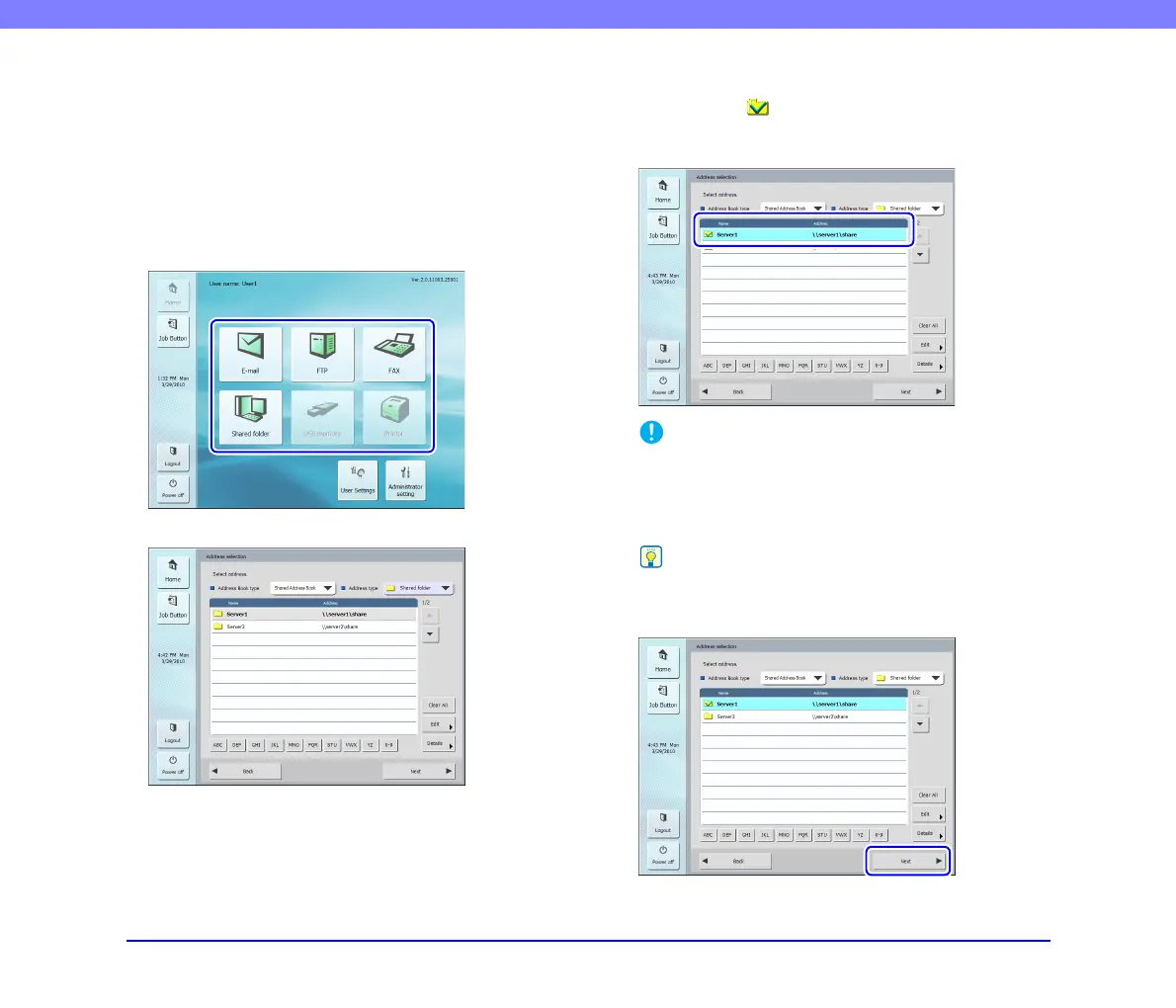
1. Select a destination.
Press a destination button to select a destination.
The address selection screen appears.
2. Use [Address Book type] and [Address type] to
display the address to send the image file.
3. Press a displayed address to select it.
A checkmark ( ) is added to the icon for the selected
address. Pressing a selected address again clears the
selection.
IMPORTANT
An address is not selected as an address to send data to if there
is no checkmark, even if the background is shaded.
4. Make sure the selected address has a checkmark
and then press [Next].
Hint
When a different type of address is selected, you can confirm
the selected address by pressing [Selected address] in the
Address type drop-down list.
The Scan/Delivery Options screen appears.








 To Next Page