Replace the Staple Cartridge of the Saddle Stitch Unit
Introduction
If a staple cartridge of the saddle stitch unit of the optional Saddle Finisher-AF2 is almost empty,
the control panel will display a message indicating which staple cartridge must be replaced. The
procedure below describes how to replace the staple cartridge.
NOTE
This procedure is only necessary when the Saddle Finisher-AF2 is attached.
Required tools
Staple P1
Procedure
Replace the staple cartridge of the saddle stitch unit
Step Action Illustration
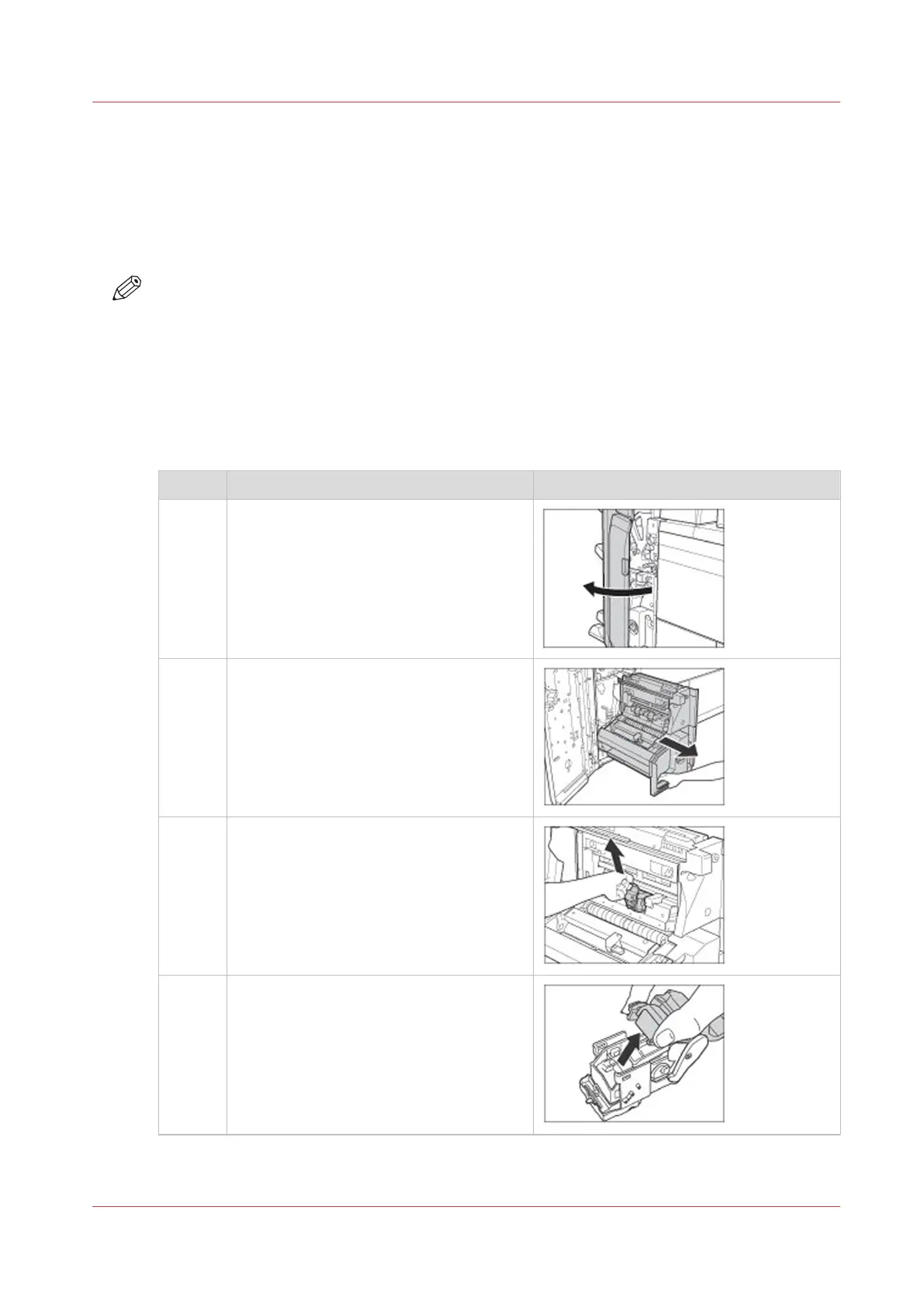
1 Open the front door of the stacker/stapler.
2 Pull out the saddle stitch unit.
3 Grab the tab of the staple case and pull
the staple case out of the staple unit.
4 Hold the cover of the staple case by its
left and right sides
Lift the cover and slide the cover off.
4
Replace the Staple Cartridge of the Saddle Stitch Unit
Chapter 14 - Maintain the print system
429
Canon varioPRINT DP line










 To Next Page