36
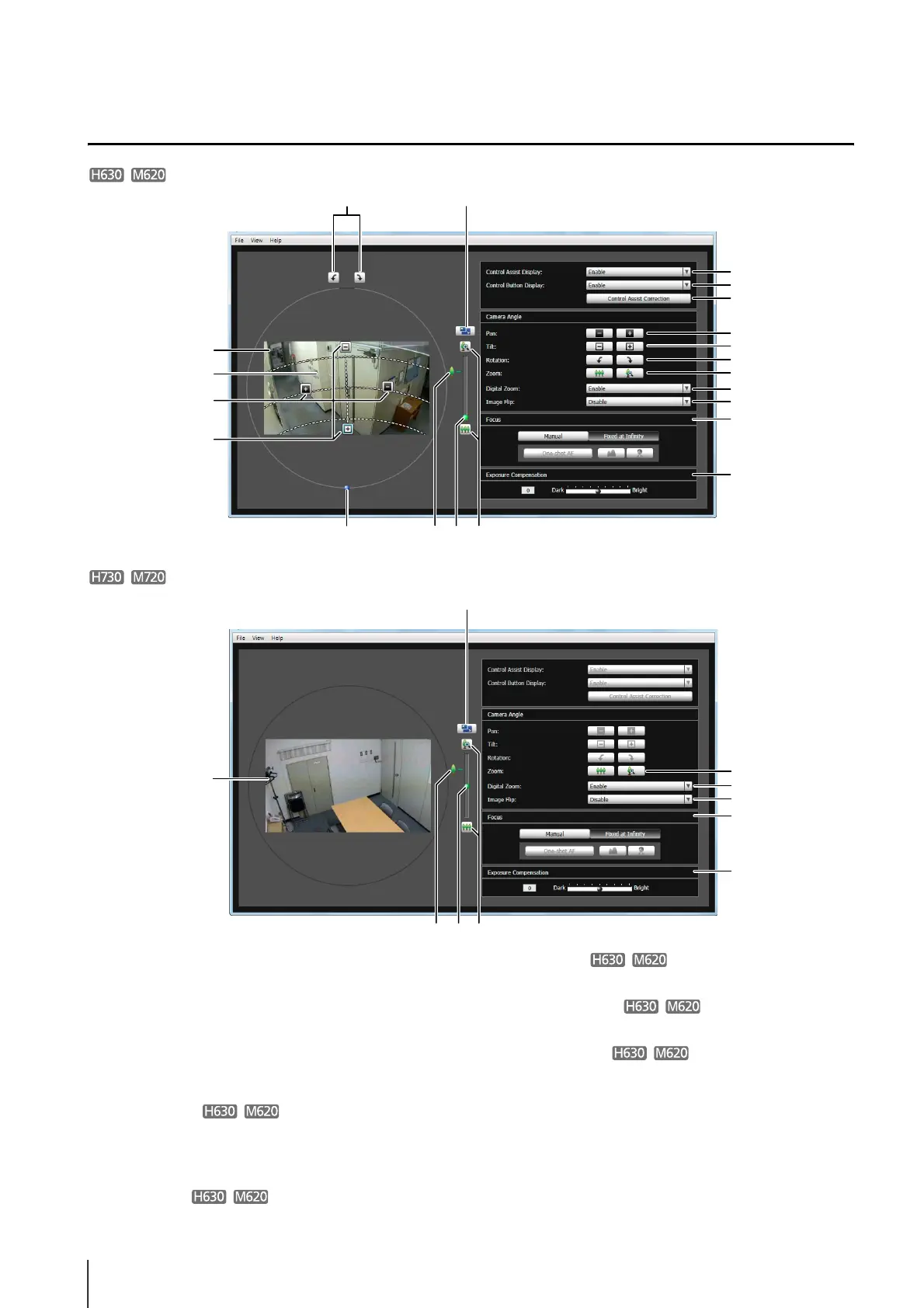
Display Screen of Camera Angle Setting Tool
(1) Image Display Area
The image captured by the camera is shown.
(2) [Switch Screen Size] button
Switches the display screen size between large
display and small display. The display screen size
can also be selected from [Display Screen Size] from
the [View] menu.
(3) Control Assist
Displays dotted lines showing the range of pan
operation and tilt operation. The camera angle cannot
be changed to positions with no dotted lines.
(4) [Pan] button
Control the camera’s pan operation.
(5) [Tilt] button
Control the camera's tilt operation.
(6) [Rotation] button
Control the camera’s rotation operation.
(7)
[Rotation] slider
You can click on the slider or drag the knob to control
the camera's rotation operation.
(8) Optical telephoto end icon
This is displayed when [Enable] is selected for [Digital
Zoom]. Dragging the slider upward above this icon
switches to the digital zoom.
(4)
(1)
(3)
(5)
(6) (2)
(7) (9) (10)
(11)
(12)
(13)
(14)
(15)
(16)
(17)
(4)
(5)
(6)
(10)
(8)
(1)
(2)
(9)(8) (10)
(14)
(10)
(15)
(16)
(17)



 To Next Page