Appendix: Onscreen Icons and Displays
115
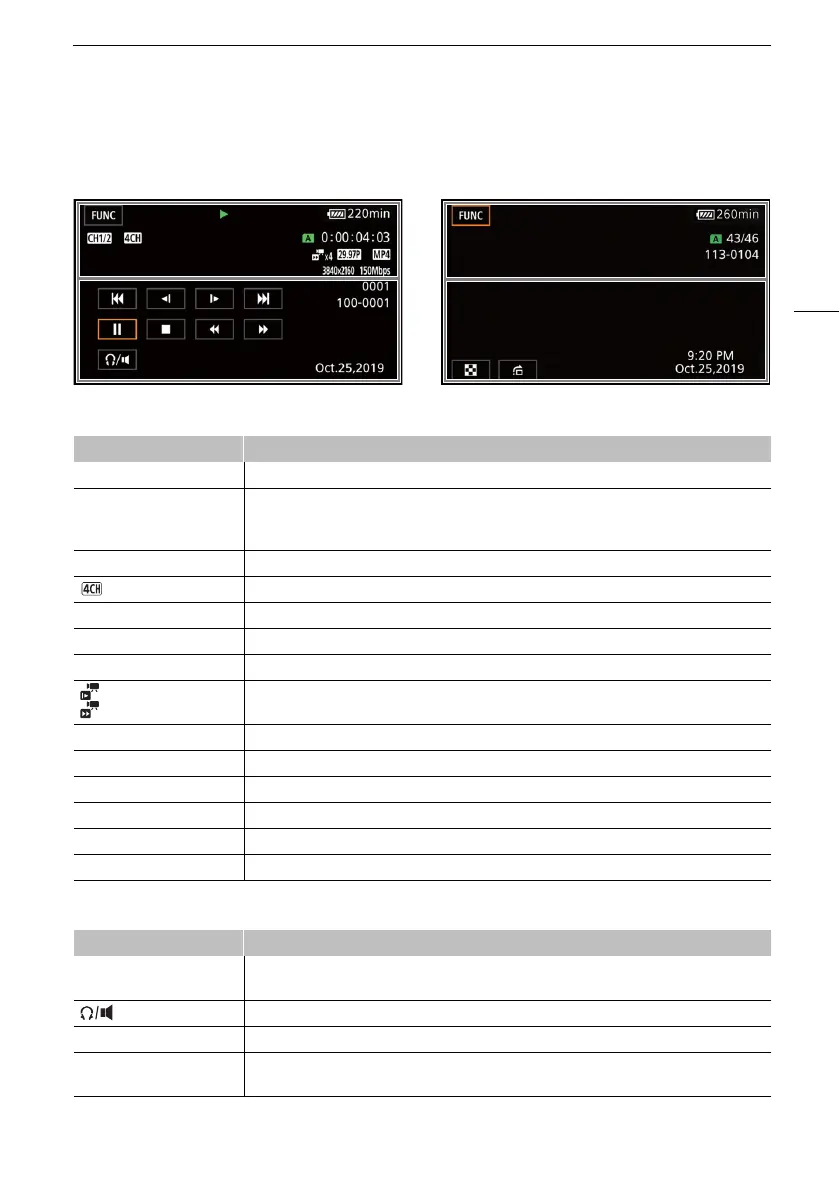
Playback
Top of the scre e n
Bottom of the screen
Clips Photos
Icon/Display Description
[FUNC] Opens the FUNC menu (A 28).
Ð, Ý, Ø, ×, Ö,
Õ, Ô, Ó
Playback operation (A 90)
Ð: Playback, Ý: Playback pause, Ø/×: Fast playback,
Ö/Õ: Slow playback, Ô/Ó: Frame reverse/advance
CH0/0, CH0+0/0+0 Audio output channel (A 99)
Audio format (A 68)
6 /7 SD card in use.
00:00:00.00, 00:00:00:00 Time code (A 64)
000000/000000 Current photo / Total number of photos
x0.0,
x0000
Slow & fast motion recording mode and slow/fast motion rate (A 38)
¼, », º Frame rate (A 37)
¸ Movie format
0000x0000 Resolution (A 37)
000Mbps Bit rate (A 37)
000000 Clip number
000-0000 File number (A 107)
Icon/Display Description
Ú, Ù, Ý, Ð, Ñ,
Ø, Ö, ×, Õ
Playback controls for clips (A 90)
Headphone/Speaker volume (A 76, 91)
f, h Playback controls for photos (A 90)
Time and date
F00 1/00000
Data code (A 105)


 To Next Page