Basic Playback
91
Adjusting the Volume
During playback, audio will be output from the monaural built-in speaker. You can connect a pair of
headphones to the × (headphone) terminal to listen to the audio in stereo.
1 During playback, touch the screen to display the playback controls.
2 Select [Ó/].
3 Select [Ø]/[Ô] or [Ù]/[Õ] to adjust the volume and then select [K].
• You can also drag your finger along the respective volume bar.
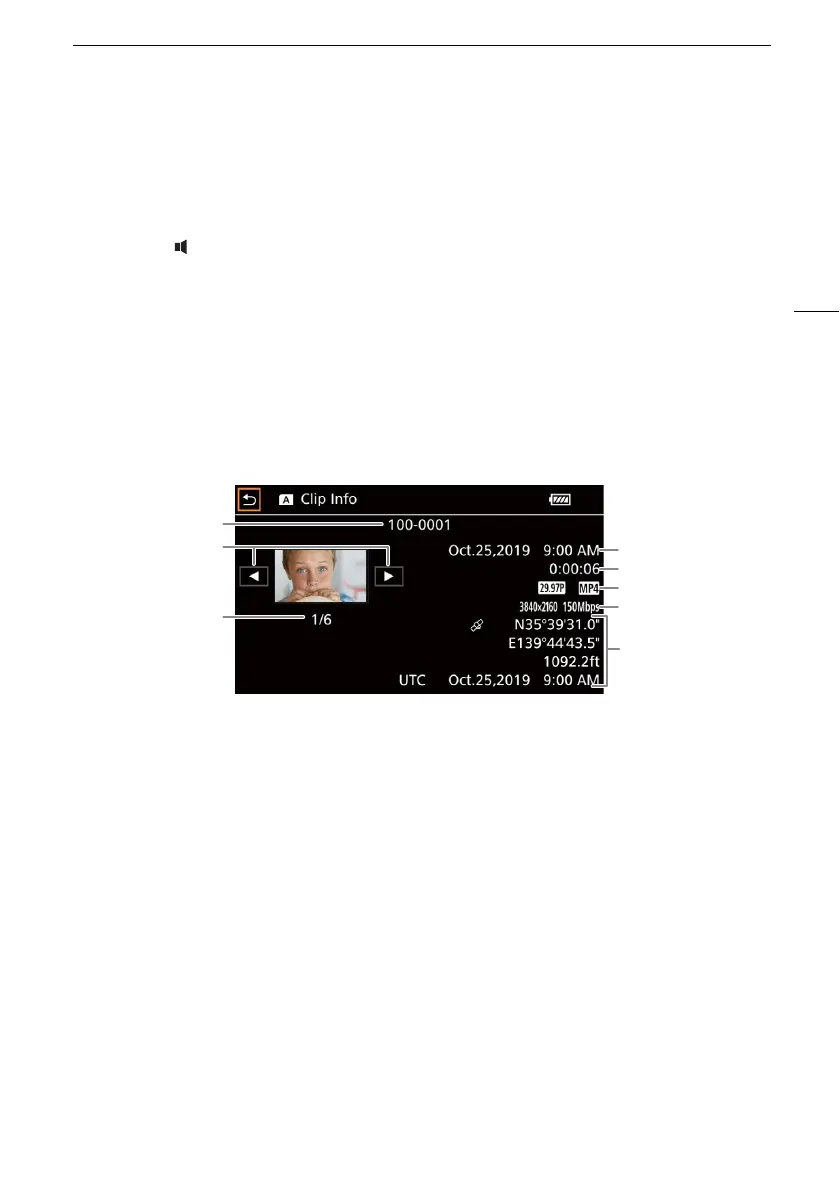
Displaying Clip Information
1 In the clip index screen select [I] and then select the desired clip.
• The [Clip Info] screen will be displayed.
•Select [Ï] / [Ð] to view the information for the previous/next clip.
2 Select [L] twice to return to the index screen.
* Only when the optional GP-E2 GPS Receiver was used when recording the clip.
1
3
2
4
5
6
7
8
1 File number (A 107)
2 Display the information for the previous/next
clip
3Clip number / Total number of clips
4 Date and time at the start of recording
5Clip duration
6 Frame rate (A 37) and movie format
7Resolution and bit rate (A 37)
8 GPS information* (A 82)
(location at the start of recording)



 To Next Page