Working
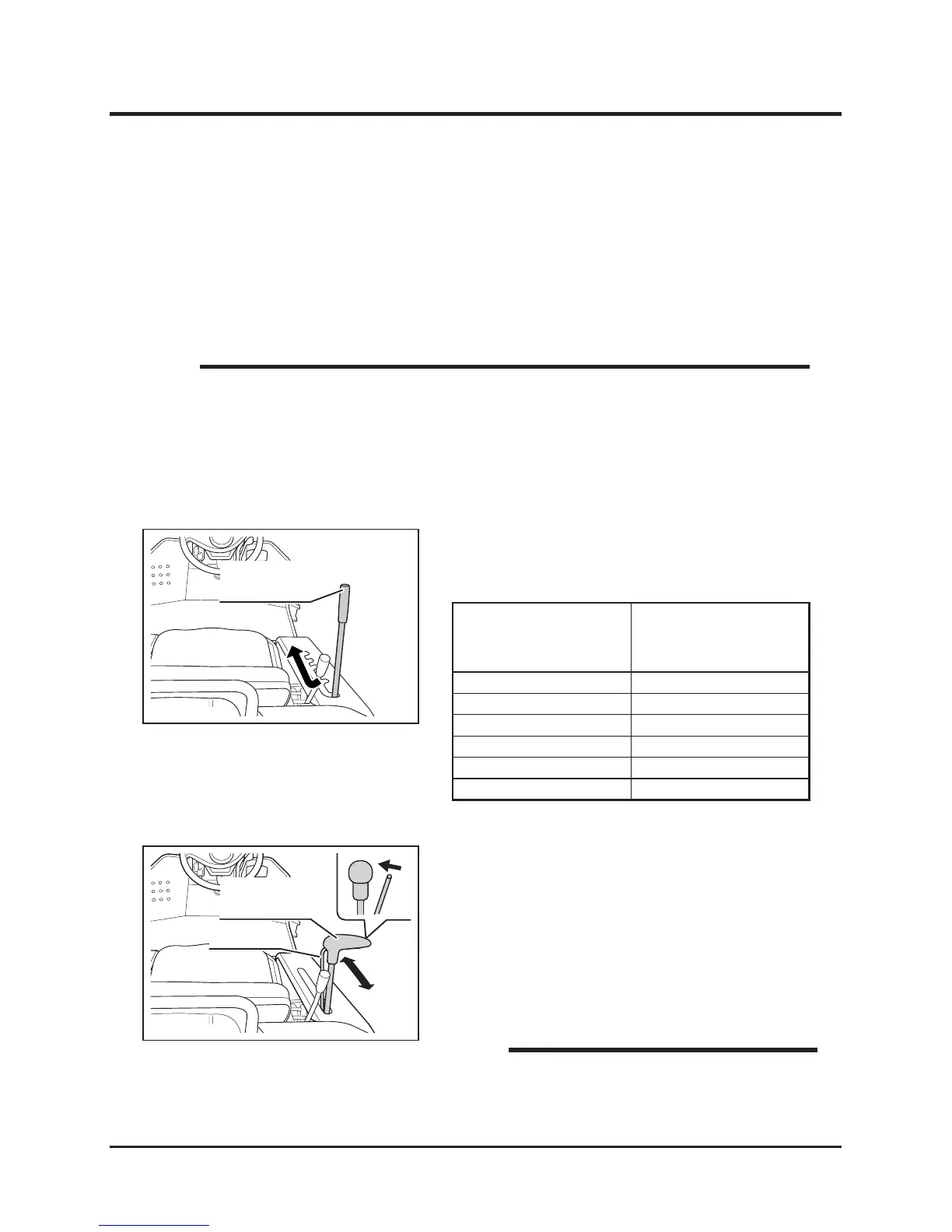
1. Move cutting height adjust lever to a desired
position.
Inspecting Cutting Blade
Inspect cutting blade before work. Refer to Cutting Blades (page 49) for inspection
procedure.
Adjusting Cutting Height
• Cutting rotary clutch cannot be engaged when cutting height adjust lever is in
transport position.
• Cutting Height indicated on the side of the adjust lever is for reference purpose
only; actual cutting height may vary due to the condition of ground or brush, and
other factors.
NOTE
Cutting Height
Adjust Lever
Position
Indication of
Cutting Height
Transport For Transport
5 65 mm
4 50 mm
3 35 mm
2 20 mm
1 0 mm
5331M-0403-010E
Cutting Height
Adjust Lever
Adjusting Cutting Height (CM141)
5343M-0403-010E
Cutting Height
Adjust Lever
Lock Lever
Adjusting Cutting Height (CM142)
1. Pull lock lever to unlock cutting height adjust
lever.
2. With lock lever pulled, move cutting height
adjust lever to a desired height.
3. Release lock lever to lock cutting height
adjust lever.
• Cutting height: 0-80mm.
NOTE


 To Next Page