The following section describes aspects of using the S/L console in live sound reinforcement. Because live sound reinforce-
ment is so diverse in set-up requirements and connections, this section will only discuss aspects of a live system setup and
focus on the features of the S/L series console. The features covered in the following are:
Auxiliary sends
Recording a live show to 2 track
Sub mixing with groups
A Live sound system
The Sound Check
AUXILIARY SENDS
The S/L consoles feature 8 auxiliary sends with several switchable routing possibilities. For live sound, the main tasks for the
auxiliary sends are stage monitor sends, effects sends and specialty sub mixes.
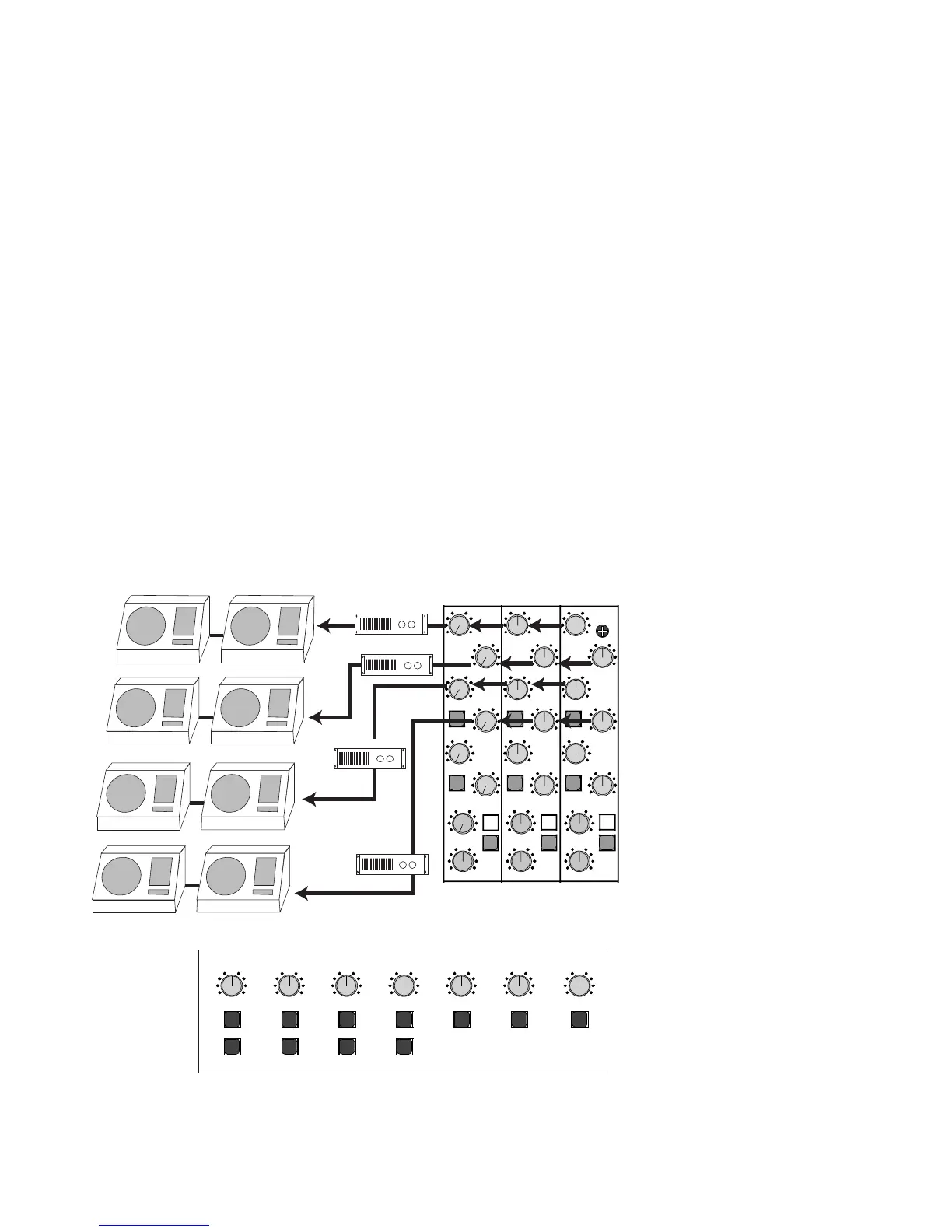
For stage monitor sends, the S/L console is capable of having 6 pre-fader sends. This is made up of the pre-fader AUX 1 and
2 sends, the AUX 3 and 4 sends in pre fader mode (via the PRE switch down) and the AUX 7/8 sends in the pre-fader / post EQ
mode (via the PRE w/EQ switch down). In many cases, the AUX 1-2 sends and AUX 3-4 sends in the pre fader mode will pro-
vide the typical 4 monitor sends. Here the 4 monitors would break down as 3 individual front-of-stage monitors (center, left and
right) and a monitor mix for the drummer (rear stage). The Auxiliary 1-4 sends are especially designed for this setup with the
PRE switches on the channel and the FLIP switches on the AUX SEND 1-4 masters. The FLIP switches, on the AUX SEND 1-4
masters make the 1-4 Group’s XLR balanced outputs available to these sends. The XLR balanced outputs provide better noise
rejection and better Signal level when
using long cable runs, like with XLR
“snakes” going from the mixer to the
stage. In turn for using these XLR’s for
the SENDs, the Group 1-4 outputs are
now available at the 1-4 send 1/4” out-
puts.
For effects sends, S/L consoles can pro-
vide 6 post fader effects sends. These
are made up of the AUX 3 and 4 sends
in post fader mode (via the PRE switch
up), AUX 5 and 6 post fader sends and
AUX 7/8 send in the post fader mode (via
the PRE w/EQ switch up). In most sys-
tems with 4 monitor mixes, AUX 5 and
6 will provide the typical 2 effects sends
with AUX 7/8 open for two more effects
sends.
For specialty sub mixes, the TAPE
inputs can provide additional inputs for
live shows when channeled through the
AUX 7/8 send (via the AUX 7/8 TAPE
switch in the down position) and in the
master section by the AUX 7/8 L-R
switch. These inputs, in this configu-
ration have no EQ, so it is best these
input signals are used with the stereo
returns
.
6. Standard live mixer setups
17



 To Next Page