8 8305557-R2
INSTALLATION
7
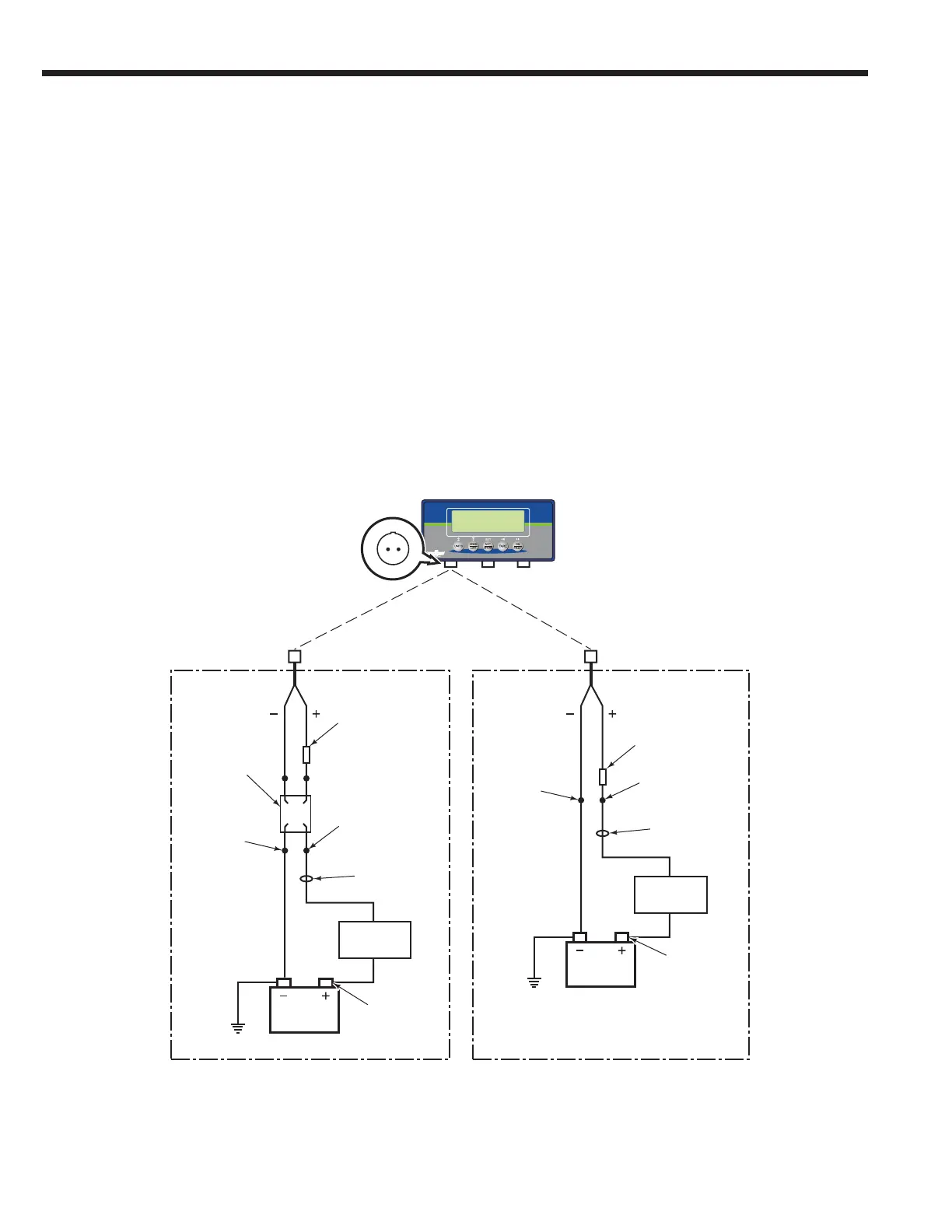
If equipped with a truck power option
indicator, connect indicator to truck
power.
A Disconnect the cable from the negative battery
terminal or as directed by OEM truck manual.
B Connect cable ends to the components, as shown.
12V Systems – Connect the fused positive wire to
a 12V switched power source. Connect the ground
wire.
24V-80V Systems – Mount the voltage converter
to truck. Connect the fused positive wire from the
converter to a 24V-80V switched power source.
Connect the ground wire. Check the cable routing
for pinch points and clearance.
Use wire ties as needed.
C Connect the power cable to the indicator.
D Connect battery cable(s) to their proper terminal(s).
Fuse, 3.15A,
Cascade Part No.
6167147
Fuse, 3.15A,
Cascade
Part No. 6167147
Dedicated
(Unswitched)
Connect
Positive
Connect
Positive
Connect
Negative
Connect
Negative
Dedicated
(Unswitched)
Truck
Fuse Block
Truck
Fuse Block
Truck
Battery
Truck
Battery
Ground
Ground
D
CC
B
B
B
B
D
Indicator
Connector
Port
24V-80V 12V
Voltage
Converter



 To Next Page