16 8305557-R2
USING THE WEIGH SYSTEM
Pre-set Tare Weight Method
Obtaining Net/Tare/Gross Weight
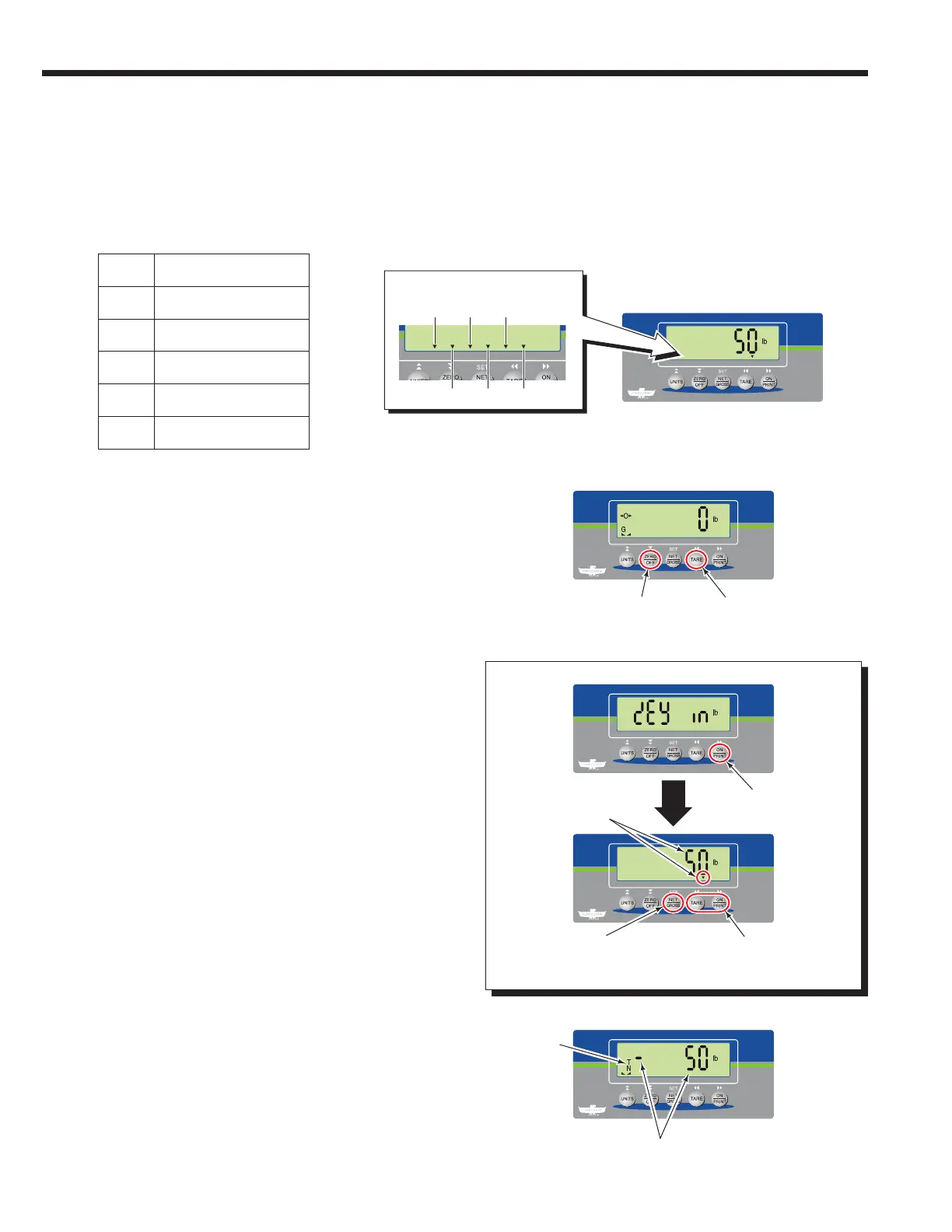
4 The indicator will show the preset tare value as a
negative value and the N and T icons will appear. N
indicates only net weight is shown and T indicates Tare
Mode.
2 Press and hold the "TARE" button for 5 seconds.
1 If required, zero the indicator.
3 The indicator will show "key in". Press the "ON/PRINT"
button to continue and view each preset tare value
(up to 6 preset values). An arrow at the bottom of
the screen and its position, shows which preset tare
value. Use the "ON/PRINT" (next) and "TARE" (previous)
buttons to view each preset tare. To select a preset tare
value, press the "NET/GROSS" button.
Procedure continued on next page
PT values:
PT1
PT2
PT3
PT4
PT5
PT6
PT6
PT5
PT4
PT3
PT2
PT1
Preset Tare Designation
1 2
3
4
Current Preset Value
and arrow position
(PT1 shown)
Select preset
tare value
Preset tare value
View preset
tare values
Toggle to the next ("ON/PRINT"
button) or previous ("TARE" button)
preset tare
"T" icon
and "N"
icon
appears
NOTE: To program tare presets (up to six), refer to the
Appendix section, "Programming Preset Tare Values".



 To Next Page