SECTION 2 - CONTROLS, INSTRUMENTS AND OPERATION
2ï68
150
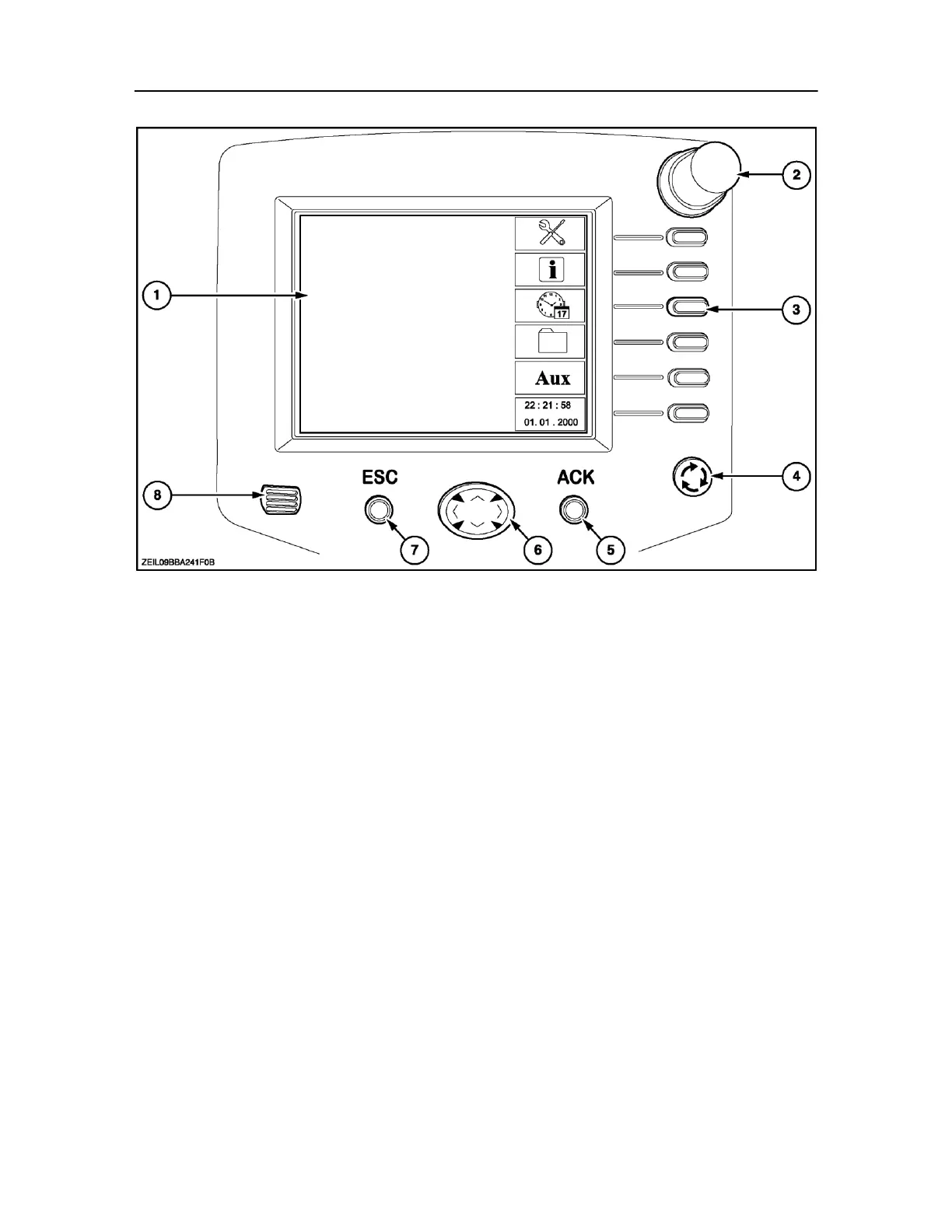
BALER PERFORMANCE MONITOR (BLACK AND WHITE DISPLAY) OPTIONAL EQUIPMENT
CONTROLS SELECTION
1. Status area: Displays the status of operations.
2. Rotary Encoder: Is used to navigate around the
different screen selections, and then by pressing
makes a selection.
Depending upon the displayed screen, the
encoder can increase and decrease alpha,
numeric values.
NOTE: In some screens a double push on the encoder
knob will give access to a quick function display for faster
input.
3. Soft keys: These keys are used for screen,
implement, or data selection depending upon the
displayed screen at the time.
4. Screen change key: Can be used to switch between
monitor screen and baler screen.
5. Acknowledge key: Used to execute a command
6. Arrow navigation keys: Are used for selection of any
desired input screen. Once selected, the
background of the selected screen will be highlighted
and the data shown in the screen can be changed
by turning the rotary encoder knob
(2).
7. Escape key: Used when an error is made during an
input, to remove that input, or move to next screen.
8. Speaker: Emits audible warnings



 To Next Page